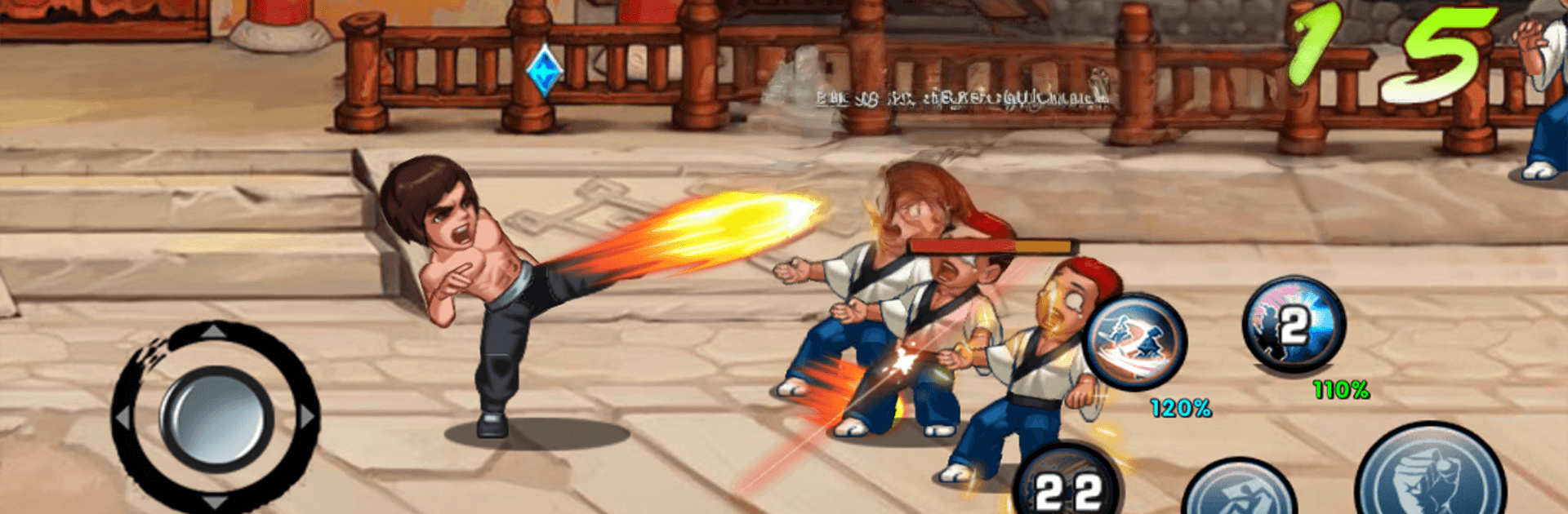
Kung Fu Attack: Final Fight

Kung Fu Attack: Final Fight

Action

| Hs Soft

Play on PC with BlueStacks or from our cloud

  • Overview
  • Game Features
  • How to Play

Page Modified On: August 24, 2026

Play Kung Fu Attack: Final Fight on PC or Mac

Explore a whole new adventure with Kung Fu Attack: Final Fight, a Action game created by Hs Soft. Experience great gameplay with BlueStacks, the most popular gaming platform to play Android games on your PC or Mac.

About the Game

Kung Fu Attack: Final Fight drops you into fast, crunchy brawls where timing, spacing, and good reads matter. This Action title leans hard into stylish hand-to-hand combat, letting you chain slick combos, counter at the last second, and crush thugs on a mission to pull off a daring rescue. Prefer a bigger screen and precise controls? It plays smoothly on PC with BlueStacks, too.

Game Features

  • Snap-Responsive Combat: Your inputs flow into clean chains, from jabs and sweeps to launchers and air juggles—perfect for pushing enemies to the brink.
  • Signature Moves & Finishers: Unlock new strings, unleash crowd-pleasing finishers, and land that decisive hit when the window opens.
  • Weapons and Chi Skills: Grab improvised weapons and unleash mystical bursts to turn messy brawls into your highlight reel.
  • Story and Arcade Paths: Push through a gritty rescue storyline or test your mettle in classic ladder-style matchups.
  • Training Dojo: Practice freely to learn cancels, parries, and timing tricks, then bring them to real fights.
  • Diverse Fighter Roster: Swap between distinct styles—nimble ninja blades, a disciplined kung fu master, or a hard-hitting stick fighter—each with unique moves.
  • Bosses and Arenas: Face off against specialty bosses across rings, alleys, and temple courtyards, each with patterns you can crack.
  • Guard, Dodge, Counter: Defense isn’t passive—bait swings, absorb with a guard, and send the pain back with well-timed counters.
  • Upgrades and Power-Ups: Enhance stats, unlock special abilities, and push your favorite fighter into true hero territory.

Ready to top the leaderboard? We bet you do. Let precise controls and sharp visuals optimized on BlueStacks lead you to victory.


Game Features

Enhancements

  • Macros
  • Multi Instance
  • Multi Instance Sync
  • Eco Mode
  • Enhancements
Macros

Macros

Skip the boring parts of a game. Play Kung Fu Attack: Final Fight with Macros and get the edge. Simply record a sequence of commands and execute them at any moment.
Multi Instance

Multi Instance

Why limit to one game on your phone when you can play many on your PC? Open multiple instances of Kung Fu Attack: Final Fight at once with Multi-Instance. Leverage the power of different accounts by doing more.
Multi Instance Sync

Multi Instance Sync

Get the best out of Kung Fu Attack: Final Fight with Multi-Instance Sync. Play the game from different accounts and build your own empire. Use Multi-instance sync to repeat the action in the main BlueStacks instance on all other instances.
Eco Mode

Eco Mode

Find the rarest heroes by making multiple summons in Kung Fu Attack: Final Fight. And while you are at it, reduce your PC’s resource consumption with the Eco Mode. Farm efficiently. Get the best results.
Read More

How to Download and Play Kung Fu Attack: Final Fight on PC or Mac

  • Download and install BlueStacks on your PC or Mac

  • Complete Google sign-in to access the Play Store, or do it later

  • Look for Kung Fu Attack: Final Fight in the search bar at the top right corner

  • Click to install Kung Fu Attack: Final Fight from the search results

  • Complete Google sign-in (if you skipped step 2) to install Kung Fu Attack: Final Fight

  • Click the Kung Fu Attack: Final Fight icon on the home screen to start playing

video
Watch Video

Minimum System Requirements

With BlueStacks 5, you can get started on a PC that fulfills the following requirements.

  • Operating System

    Microsoft Windows 7 or above, macOS 11 (Big Sur) or above

  • Processor

    Intel, AMD or Apple Silicon Processor

  • RAM

    at least 4GB

  • HDD

    10GB Free Disk Space

Note:

* You must be an Administrator on your PC. Up to date graphics drivers from Microsoft or the chipset vendor.

Kung Fu Attack: Final Fight - FAQs

  • How to play Kung Fu Attack: Final Fight on Windows PC & Mac?

    Play Kung Fu Attack: Final Fight on your PC or Mac by following these simple steps.

    • Click on 'Play Kung Fu Attack: Final Fight on PC’ to download BlueStacks
    • Install it and log-in to Google Play Store
    • Launch and play the game.
  • Why is BlueStacks the fastest and safest platform to play games on PC?

    BlueStacks respects your privacy and is always safe and secure to use. It does not carry any malware, spyware, or any sort of additional software that could harm your PC.

    It is engineered to optimize speed and performance for a seamless gaming experience.

  • What are Kung Fu Attack: Final Fight PC requirements?

    Minimum requirement to run Kung Fu Attack: Final Fight on your PC

    • OS: Microsoft Windows 7 or above MacOS 11 (Big Sur) or above
    • Processor: Intel, AMD or Apple Silicon Processor
    • RAM: Your PC must have at least 4GB of RAM. (Note that having 4GB or more disk space is not a substitute for RAM)
    • HDD: 10GB Free Disk Space.
    • You must be an Administrator on your PC.