Mage Battle Legends Arena

Mage Battle Legends Arena

Action

| Prism113

Play on PC with BlueStacks or from our cloud

  • Overview
  • Game Features
  • How to Play

Page Modified On: November 20, 2025

Play Mage Battle Legends Arena on PC or Mac

Mage Battle Legends Arena brings the Action genre to life, and throws up exciting challenges for gamers. Developed by Prism113, this Android game is best experienced on BlueStacks, the World’s #1 app player for PC and Mac users.

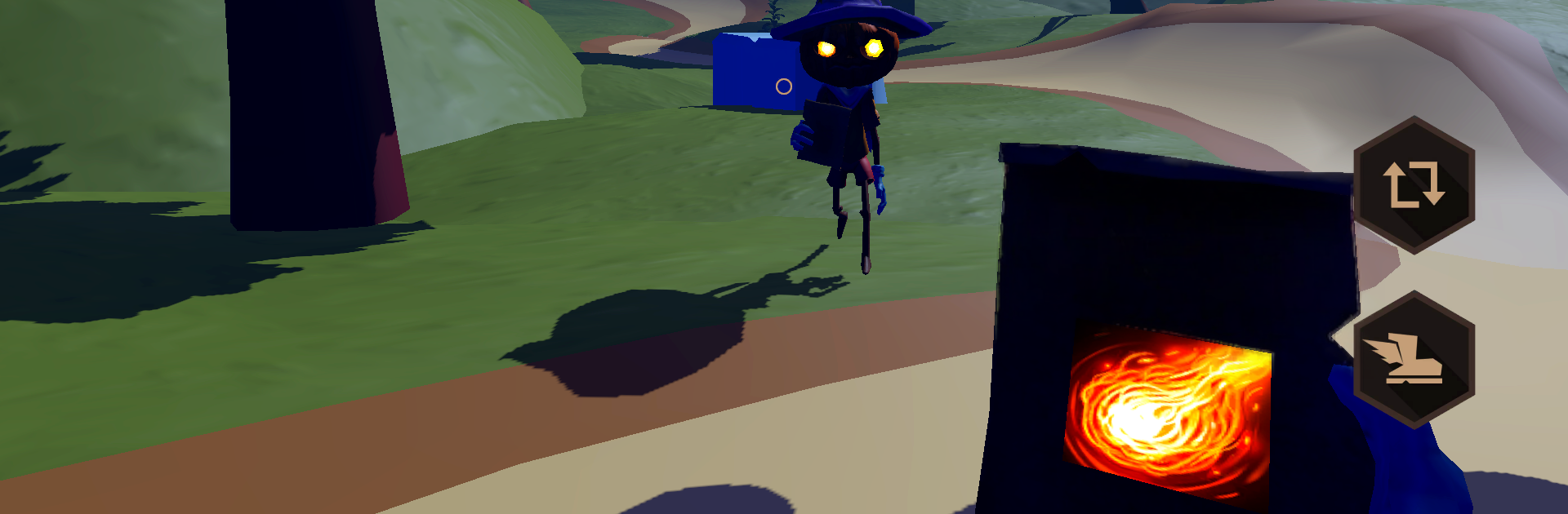
Mage Battle Legends Arena is a neat little wizard duel game where spells are spoken out loud, not tapped. The whole match is about timing a few keywords and reading the other mage. Say Fireball for a chunky hit that knocks back, Freeze to stop them in place, and Bolts to keep steady pressure since the projectiles track. There are cooldowns on everything, so a greedy Fireball at the wrong second gets punished. Rounds are short, usually one to three minutes, so it ends up feeling like small brainy skirmishes instead of long grinds. The interface stays out of the way and it is easy to see what is ready and what is still cooling down.

Opponents are not just target dummies either. The AI starts catching patterns, like if someone spams Bolts or always follows Freeze with Fireball, and it will try to counter that rhythm. That pushes players to swap spells and play with distance, using Freeze up close and saving Fireball for the window that actually matters. There are different arenas with small hazards, daily challenges, win streak rewards, and some outfits to show off. Leaderboards exist if chasing rank makes sense. Microphone permission is required, and speaking clearly matters a lot for recogniton. On PC with BlueStacks, a basic headset mic works and the game runs smooth, which makes calling spells fast without fumbling for buttons. It sounds simple with just three words, but juggling timing, spacing, and baiting casts ends up being the real game.

Make your gaming sessions memorable with precise controls that give you an edge in close combats and visuals that pop up, bringing every character to life.


Game Features

Enhancements

  • Macros
  • Multi Instance
  • Multi Instance Sync
  • Eco Mode
  • Enhancements
Macros

Macros

Skip the boring parts of a game. Play Mage Battle Legends Arena with Macros and get the edge. Simply record a sequence of commands and execute them at any moment.
Multi Instance

Multi Instance

Why limit to one game on your phone when you can play many on your PC? Open multiple instances of Mage Battle Legends Arena at once with Multi-Instance. Leverage the power of different accounts by doing more.
Multi Instance Sync

Multi Instance Sync

Get the best out of Mage Battle Legends Arena with Multi-Instance Sync. Play the game from different accounts and build your own empire. Use Multi-instance sync to repeat the action in the main BlueStacks instance on all other instances.
Eco Mode

Eco Mode

Find the rarest heroes by making multiple summons in Mage Battle Legends Arena. And while you are at it, reduce your PC’s resource consumption with the Eco Mode. Farm efficiently. Get the best results.
Read More

How to Download and Play Mage Battle Legends Arena on PC or Mac

  • Download and install BlueStacks on your PC or Mac

  • Complete Google sign-in to access the Play Store, or do it later

  • Look for Mage Battle Legends Arena in the search bar at the top right corner

  • Click to install Mage Battle Legends Arena from the search results

  • Complete Google sign-in (if you skipped step 2) to install Mage Battle Legends Arena

  • Click the Mage Battle Legends Arena icon on the home screen to start playing

video
Watch Video

Minimum System Requirements

With BlueStacks 5, you can get started on a PC that fulfills the following requirements.

  • Operating System

    Microsoft Windows 7 or above, macOS 11 (Big Sur) or above

  • Processor

    Intel, AMD or Apple Silicon Processor

  • RAM

    at least 4GB

  • HDD

    10GB Free Disk Space

Note:

* You must be an Administrator on your PC. Up to date graphics drivers from Microsoft or the chipset vendor.

Mage Battle Legends Arena - FAQs

  • How to play Mage Battle Legends Arena on Windows PC & Mac?

    Play Mage Battle Legends Arena on your PC or Mac by following these simple steps.

    • Click on 'Play Mage Battle Legends Arena on PC’ to download BlueStacks
    • Install it and log-in to Google Play Store
    • Launch and play the game.
  • Why is BlueStacks the fastest and safest platform to play games on PC?

    BlueStacks respects your privacy and is always safe and secure to use. It does not carry any malware, spyware, or any sort of additional software that could harm your PC.

    It is engineered to optimize speed and performance for a seamless gaming experience.

  • What are Mage Battle Legends Arena PC requirements?

    Minimum requirement to run Mage Battle Legends Arena on your PC

    • OS: Microsoft Windows 7 or above MacOS 11 (Big Sur) or above
    • Processor: Intel, AMD or Apple Silicon Processor
    • RAM: Your PC must have at least 4GB of RAM. (Note that having 4GB or more disk space is not a substitute for RAM)
    • HDD: 10GB Free Disk Space.
    • You must be an Administrator on your PC.