Merge Breakout: 2048 Arena

Merge Breakout: 2048 Arena

Action

| JadeHigh Games

Play on PC with BlueStacks or from our cloud

  • Overview
  • Game Features
  • How to Play

Page Modified On: October 21, 2026

Play Merge Breakout: 2048 Arena on PC or Mac

Merge Breakout: 2048 Arena brings the Action genre to life, and throws up exciting challenges for gamers. Developed by JadeHigh Games, this Android game is best experienced on BlueStacks, the World’s #1 app player for PC and Mac users.

About the Game

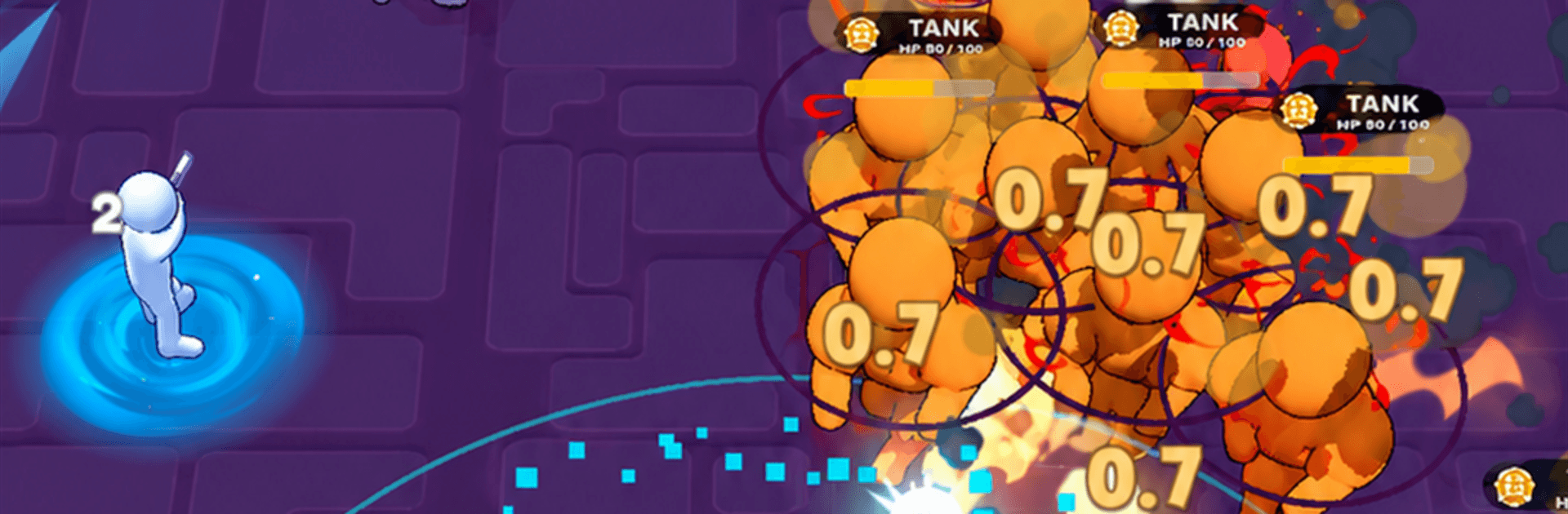
Merge Breakout: 2048 Arena is an Action twist on classic 2048 logic and arena survival mayhem. You’ll merge matching stickman fighters to build a tougher squad, then weave through a storm of bullets, beams, and brutal bosses. It also plays comfortably on BlueStacks if you want a smoother setup.

Game Features

  • Smart Merging: Pair identical fighters to bump their rank, stacking bigger damage and wider attack coverage.
  • Real-Time Arena Survival: Waves don’t wait—dodge through tight lanes while keeping your merge chain growing.
  • Elemental Mayhem: Burn with fire, freeze with ice, and slice with lasers, plus drones, mines, and screen-wipe skills.
  • Signature Bosses: Face heavy hitters with distinct patterns, punishing barrages, and small windows to counter.
  • Quick, Snackable Runs: Battles are brisk and replayable—great for short bursts or a longer grind if you’re in the zone.
  • Simple Controls, Big Chaos: Easy to learn and instantly responsive, then suddenly you’re managing pure on-screen madness.
  • On-the-Fly Decisions: Under pressure, choose what to merge, when to reposition, and which skills to trigger.
  • Bullet-Storm Payoff: Build a strong chain and watch the arena explode into glowing shots, effects, and satisfying clears.

Get ready for a buttery smooth, high-performance gaming action only on BlueStacks.

Game Features

Enhancements

  • Macros
  • Multi Instance
  • Multi Instance Sync
  • Eco Mode
  • Enhancements
Macros

Macros

Skip the boring parts of a game. Play Merge Breakout: 2048 Arena with Macros and get the edge. Simply record a sequence of commands and execute them at any moment.
Multi Instance

Multi Instance

Why limit to one game on your phone when you can play many on your PC? Open multiple instances of Merge Breakout: 2048 Arena at once with Multi-Instance. Leverage the power of different accounts by doing more.
Multi Instance Sync

Multi Instance Sync

Get the best out of Merge Breakout: 2048 Arena with Multi-Instance Sync. Play the game from different accounts and build your own empire. Use Multi-instance sync to repeat the action in the main BlueStacks instance on all other instances.
Eco Mode

Eco Mode

Find the rarest heroes by making multiple summons in Merge Breakout: 2048 Arena. And while you are at it, reduce your PC’s resource consumption with the Eco Mode. Farm efficiently. Get the best results.
Read More

How to Download and Play Merge Breakout: 2048 Arena on PC or Mac

  • Download and install BlueStacks on your PC or Mac

  • Complete Google sign-in to access the Play Store, or do it later

  • Look for Merge Breakout: 2048 Arena in the search bar at the top right corner

  • Click to install Merge Breakout: 2048 Arena from the search results

  • Complete Google sign-in (if you skipped step 2) to install Merge Breakout: 2048 Arena

  • Click the Merge Breakout: 2048 Arena icon on the home screen to start playing

video
Watch Video

Minimum System Requirements

With BlueStacks 5, you can get started on a PC that fulfills the following requirements.

  • Operating System

    Microsoft Windows 7 or above, macOS 11 (Big Sur) or above

  • Processor

    Intel, AMD or Apple Silicon Processor

  • RAM

    at least 4GB

  • HDD

    10GB Free Disk Space

Note:

* You must be an Administrator on your PC. Up to date graphics drivers from Microsoft or the chipset vendor.

Merge Breakout: 2048 Arena - FAQs

  • How to play Merge Breakout: 2048 Arena on Windows PC & Mac?

    Play Merge Breakout: 2048 Arena on your PC or Mac by following these simple steps.

    • Click on 'Play Merge Breakout: 2048 Arena on PC’ to download BlueStacks
    • Install it and log-in to Google Play Store
    • Launch and play the game.
  • Why is BlueStacks the fastest and safest platform to play games on PC?

    BlueStacks respects your privacy and is always safe and secure to use. It does not carry any malware, spyware, or any sort of additional software that could harm your PC.

    It is engineered to optimize speed and performance for a seamless gaming experience.

  • What are Merge Breakout: 2048 Arena PC requirements?

    Minimum requirement to run Merge Breakout: 2048 Arena on your PC

    • OS: Microsoft Windows 7 or above MacOS 11 (Big Sur) or above
    • Processor: Intel, AMD or Apple Silicon Processor
    • RAM: Your PC must have at least 4GB of RAM. (Note that having 4GB or more disk space is not a substitute for RAM)
    • HDD: 10GB Free Disk Space.
    • You must be an Administrator on your PC.