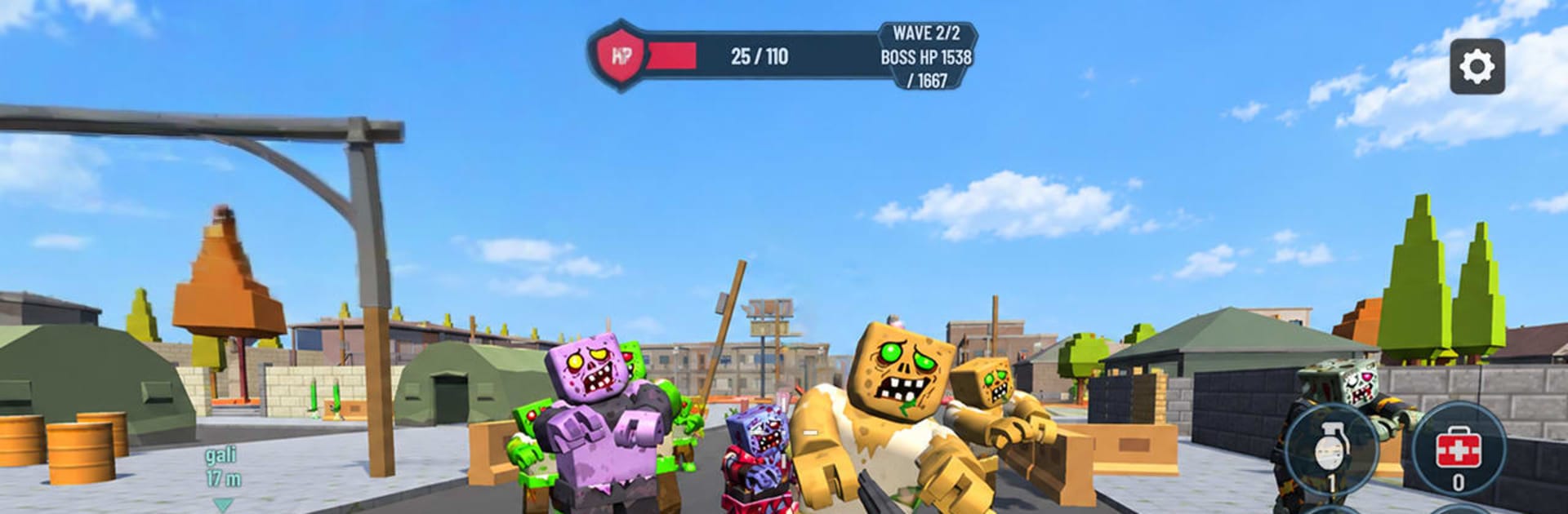
Noob Outbreak: Survival FPS

Noob Outbreak: Survival FPS

Action

| MEOW GLOBAL

Play on PC with BlueStacks or from our cloud

  • Overview
  • Game Features
  • How to Play

Page Modified On: November 02, 2026

Play Noob Outbreak: Survival FPS on PC or Mac

Noob Outbreak: Survival FPS brings the Action genre to life, and throws up exciting challenges for gamers. Developed by MEOW GLOBAL, this Android game is best experienced on BlueStacks, the World’s #1 app player for PC and Mac users.

About the Game

Getting swarmed is the whole point in Noob Outbreak: Survival FPS. This Action shooter drops you into tight arenas where snap aim, smart mid-run upgrades, and a growing arsenal decide whether you clear the next rush or get overrun. Prefer a desk setup? You can play it on PC with BlueStacks as well.

Game Features

  • Relentless encounters: Enemies pour in from every angle, pushing you to keep moving, use grenades wisely, and carve space before the next rush hits.
  • Mid-run buildcraft: Level up during a run and pick perks that reshape your loadout—damage boosts, special effects, and stronger options that stack into real power.
  • Swap-and-shoot arsenal: Start with the basics, unlock new firearms as you progress, and switch weapons on the fly to match whatever’s charging at you.
  • Two distinct modes: Push through curated stages in Campaign or see how long you can hold out in Survivor for endless, escalating pressure.
  • Responsive movement: Jump, crouch, and line up clean shots with simple, pick-up-and-play controls that keep the focus on awareness and timing.
  • Smart resource use: Manage ammo, time your reloads, and toss grenades at the right moment—waste a second and you’ll feel it.
  • Varied enemies: Speedy pests, tougher brutes, and other threats force you to adjust your targets and positioning every round.
  • Multiple arenas: Fight across spaces with different layouts, sightlines, and cover, rewarding good pathing and crowd control.
  • Rising challenge: The longer you survive, the harsher the modifiers and opponents get, turning small mistakes into big problems.
  • Quick sessions that stick: Runs are brisk yet tense—great for a short burst or a stretch session chasing a new personal best.

Start your journey now. Download the game on BlueStacks, invite your friends, and march on a new adventure.


Game Features

Enhancements

  • Macros
  • Multi Instance
  • Multi Instance Sync
  • Eco Mode
  • Enhancements
Macros

Macros

Skip the boring parts of a game. Play Noob Outbreak: Survival FPS with Macros and get the edge. Simply record a sequence of commands and execute them at any moment.
Multi Instance

Multi Instance

Why limit to one game on your phone when you can play many on your PC? Open multiple instances of Noob Outbreak: Survival FPS at once with Multi-Instance. Leverage the power of different accounts by doing more.
Multi Instance Sync

Multi Instance Sync

Get the best out of Noob Outbreak: Survival FPS with Multi-Instance Sync. Play the game from different accounts and build your own empire. Use Multi-instance sync to repeat the action in the main BlueStacks instance on all other instances.
Eco Mode

Eco Mode

Find the rarest heroes by making multiple summons in Noob Outbreak: Survival FPS. And while you are at it, reduce your PC’s resource consumption with the Eco Mode. Farm efficiently. Get the best results.
Read More

How to Download and Play Noob Outbreak: Survival FPS on PC or Mac

  • Download and install BlueStacks on your PC or Mac

  • Complete Google sign-in to access the Play Store, or do it later

  • Look for Noob Outbreak: Survival FPS in the search bar at the top right corner

  • Click to install Noob Outbreak: Survival FPS from the search results

  • Complete Google sign-in (if you skipped step 2) to install Noob Outbreak: Survival FPS

  • Click the Noob Outbreak: Survival FPS icon on the home screen to start playing

video
Watch Video

Minimum System Requirements

With BlueStacks 5, you can get started on a PC that fulfills the following requirements.

  • Operating System

    Microsoft Windows 7 or above, macOS 11 (Big Sur) or above

  • Processor

    Intel, AMD or Apple Silicon Processor

  • RAM

    at least 4GB

  • HDD

    10GB Free Disk Space

Note:

* You must be an Administrator on your PC. Up to date graphics drivers from Microsoft or the chipset vendor.

Noob Outbreak: Survival FPS - FAQs

  • How to play Noob Outbreak: Survival FPS on Windows PC & Mac?

    Play Noob Outbreak: Survival FPS on your PC or Mac by following these simple steps.

    • Click on 'Play Noob Outbreak: Survival FPS on PC’ to download BlueStacks
    • Install it and log-in to Google Play Store
    • Launch and play the game.
  • Why is BlueStacks the fastest and safest platform to play games on PC?

    BlueStacks respects your privacy and is always safe and secure to use. It does not carry any malware, spyware, or any sort of additional software that could harm your PC.

    It is engineered to optimize speed and performance for a seamless gaming experience.

  • What are Noob Outbreak: Survival FPS PC requirements?

    Minimum requirement to run Noob Outbreak: Survival FPS on your PC

    • OS: Microsoft Windows 7 or above MacOS 11 (Big Sur) or above
    • Processor: Intel, AMD or Apple Silicon Processor
    • RAM: Your PC must have at least 4GB of RAM. (Note that having 4GB or more disk space is not a substitute for RAM)
    • HDD: 10GB Free Disk Space.
    • You must be an Administrator on your PC.