Ragkour: The Parkour Game

Ragkour: The Parkour Game

Action

| Loyalty Interactive

Play on PC with BlueStacks or from our cloud

  • Overview
  • Game Features
  • How to Play

Page Modified On: May 11, 2026

Play Ragkour: The Parkour Game on PC or Mac

Step into the World of Ragkour: The Parkour Game, a thrilling Action game from the house of Loyalty Interactive. Play this Android game on BlueStacks App Player and experience immersive gaming on PC or Mac.

About the Game

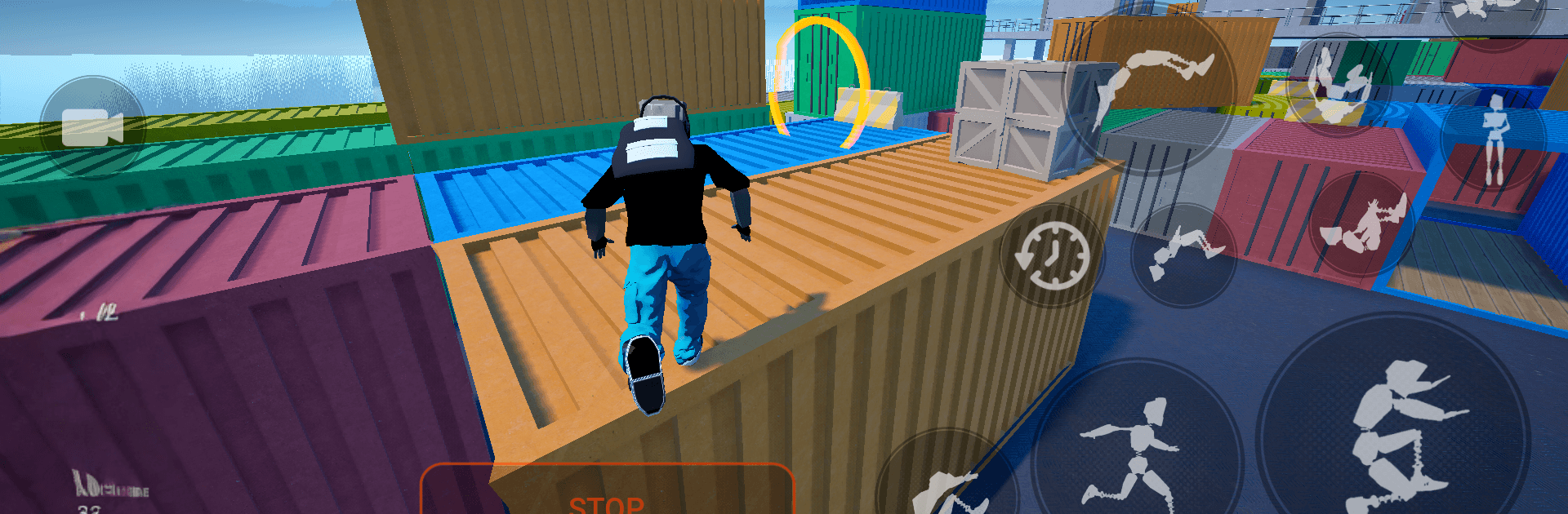
Ragkour: The Parkour Game is an Action sandbox from Loyalty Interactive that puts every step, slip, and scramble under your control. It’s all physics—no auto-jumps or invisible rails holding your hand. Plot a clean line across rooftops, botch a landing, recover with a roll, then link it all into a flow that actually feels earned.

Game Features

  • Physics-Driven Movement: Your momentum, timing, and foot placement decide everything. If a jump feels smooth, it’s because you nailed it; if you bail, that’s on the physics too.
  • Active Ragdoll Feel: Bodies have weight here. Brace for impact, absorb landings, or watch those chaotic (and hilarious) wipeouts when you misjudge a gap.
  • Freestyle Tricks & Flow: Wall runs, vaults, flips, and spins can be mixed on the fly. Build combos, chase higher scores, and find your own rhythm through the city.
  • Open Urban Playgrounds: Rooftops, alleys, and industrial obstacles are laid out to encourage experimentation. Pick routes, create shortcuts, and discover new lines as you progress.
  • No Scripts, No Training Wheels: It’s a true simulator on mobile—simple to start, tough to master. Expect a real learning curve and that satisfying “one more try” loop.
  • Skill-Based Progression: Improve through practice. Clean lines feel faster, rolls save ankles, and smart momentum management opens bolder jumps.
  • PC-Friendly with BlueStacks: Prefer a keyboard and mouse? You can play on PC with BlueStacks for a different feel and tighter control options.

Start your journey now. Download the game on BlueStacks, invite your friends, and march on a new adventure.


Game Features

Enhancements

  • Macros
  • Multi Instance
  • Multi Instance Sync
  • Eco Mode
  • Enhancements
Macros

Macros

Skip the boring parts of a game. Play Ragkour: The Parkour Game with Macros and get the edge. Simply record a sequence of commands and execute them at any moment.
Multi Instance

Multi Instance

Why limit to one game on your phone when you can play many on your PC? Open multiple instances of Ragkour: The Parkour Game at once with Multi-Instance. Leverage the power of different accounts by doing more.
Multi Instance Sync

Multi Instance Sync

Get the best out of Ragkour: The Parkour Game with Multi-Instance Sync. Play the game from different accounts and build your own empire. Use Multi-instance sync to repeat the action in the main BlueStacks instance on all other instances.
Eco Mode

Eco Mode

Find the rarest heroes by making multiple summons in Ragkour: The Parkour Game. And while you are at it, reduce your PC’s resource consumption with the Eco Mode. Farm efficiently. Get the best results.
Read More

How to Download and Play Ragkour: The Parkour Game on PC or Mac

  • Download and install BlueStacks on your PC or Mac

  • Complete Google sign-in to access the Play Store, or do it later

  • Look for Ragkour: The Parkour Game in the search bar at the top right corner

  • Click to install Ragkour: The Parkour Game from the search results

  • Complete Google sign-in (if you skipped step 2) to install Ragkour: The Parkour Game

  • Click the Ragkour: The Parkour Game icon on the home screen to start playing

video
Watch Video

Minimum System Requirements

With BlueStacks 5, you can get started on a PC that fulfills the following requirements.

  • Operating System

    Microsoft Windows 7 or above, macOS 11 (Big Sur) or above

  • Processor

    Intel, AMD or Apple Silicon Processor

  • RAM

    at least 4GB

  • HDD

    10GB Free Disk Space

Note:

* You must be an Administrator on your PC. Up to date graphics drivers from Microsoft or the chipset vendor.

Ragkour: The Parkour Game - FAQs

  • How to play Ragkour: The Parkour Game on Windows PC & Mac?

    Play Ragkour: The Parkour Game on your PC or Mac by following these simple steps.

    • Click on 'Play Ragkour: The Parkour Game on PC’ to download BlueStacks
    • Install it and log-in to Google Play Store
    • Launch and play the game.
  • Why is BlueStacks the fastest and safest platform to play games on PC?

    BlueStacks respects your privacy and is always safe and secure to use. It does not carry any malware, spyware, or any sort of additional software that could harm your PC.

    It is engineered to optimize speed and performance for a seamless gaming experience.

  • What are Ragkour: The Parkour Game PC requirements?

    Minimum requirement to run Ragkour: The Parkour Game on your PC

    • OS: Microsoft Windows 7 or above MacOS 11 (Big Sur) or above
    • Processor: Intel, AMD or Apple Silicon Processor
    • RAM: Your PC must have at least 4GB of RAM. (Note that having 4GB or more disk space is not a substitute for RAM)
    • HDD: 10GB Free Disk Space.
    • You must be an Administrator on your PC.