
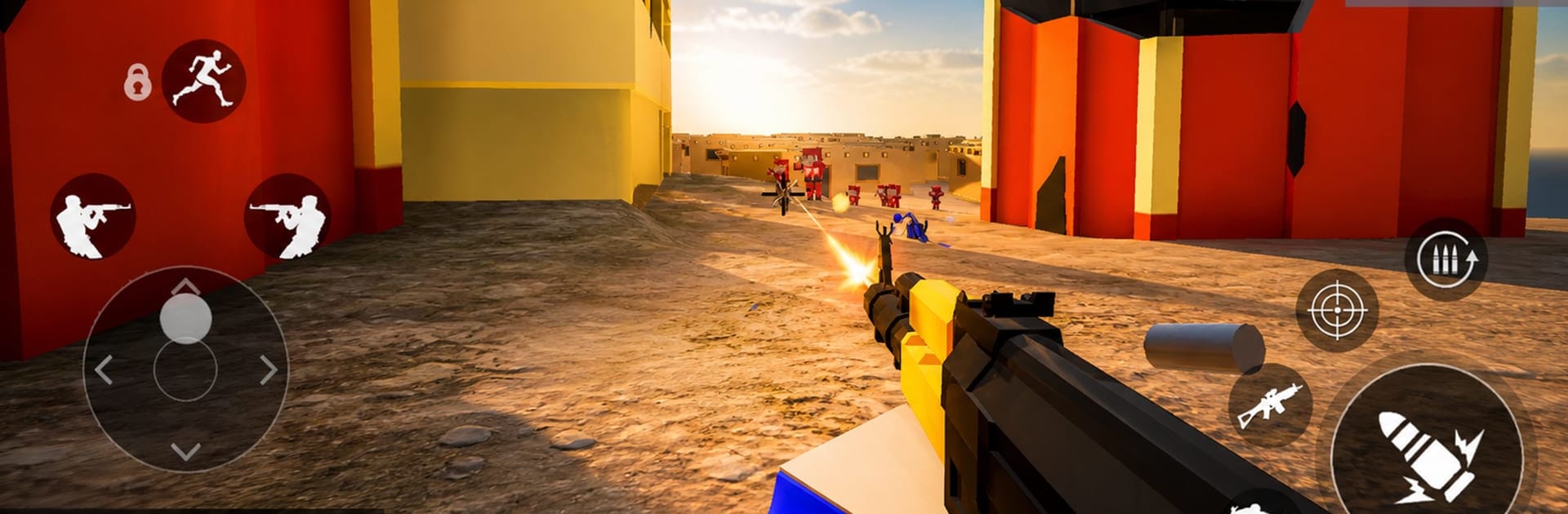
Ravenline: Block War FPS

Ravenline: Block War FPS

Action

| Anfoz

Play on PC with BlueStacks or from our cloud

  • Overview
  • Game Features
  • How to Play

Page Modified On: September 18, 2026

Play Ravenline: Block War FPS on PC or Mac

Explore a whole new adventure with Ravenline: Block War FPS, a Action game created by Anfoz. Experience great gameplay with BlueStacks, the most popular gaming platform to play Android games on your PC or Mac.

About the Game

Ravenline: Block War FPS is a fast, blocky take on the Action shooter—big teams, bigger explosions, and zero fluff. Jump into red-vs-blue battles where you command an AI squad, capture flags, and roll out in tanks, choppers, and boats. It’s fully offline with no ads and no in-app purchases, so every match is all combat, no strings.

Game Features

  • Large-Scale Team Fights: Red vs Blue skirmishes turn into full-blown wars with infantry pushes, vehicle support, and shifting front lines.
  • Smarter Squadmates: Your AI teammates actually flank, capture, defend, and back you up instead of standing around.
  • Vehicle Warfare: Drive tanks, fly helicopters, speed across water in boats, or rush objectives in armored cars and jeeps.
  • Objective-Based Combat: Capture and hold flag zones, lock down chokepoints, and turn momentum in your favor.
  • Custom Loadouts: Build your kit with rifles, shotguns, sidearms, snipers, and grenades to match how you like to fight.
  • Offline, No Paywalls: Play anywhere without internet—no ads and no microtransactions getting in the way.
  • Varied Maps: Battle through urban streets, island chains, castles, beaches, and quiet villages with plenty of tactical angles.
  • Clean Pixel Look: A crisp, blocky style keeps everything readable and smooth when the action gets chaotic.
  • Responsive Controls: Snappy aiming, quick movement, and a clear HUD make fights feel tight and satisfying.
  • Earned Progression: Unlock weapons, gear, and vehicle upgrades just by playing matches—no purchases required.
  • Handy Tutorial: Learn the basics fast—movement, aiming, ammo management, capturing zones, and handling vehicles.
  • Flexible Setup: Kick back and play offline on your device, or jump onto BlueStacks if you want keyboard-and-mouse precision.

Start your journey now. Download the game on BlueStacks, invite your friends, and march on a new adventure.


Game Features

Enhancements

  • Macros
  • Multi Instance
  • Multi Instance Sync
  • Eco Mode
  • Enhancements
Macros

Macros

Skip the boring parts of a game. Play Ravenline: Block War FPS with Macros and get the edge. Simply record a sequence of commands and execute them at any moment.
Multi Instance

Multi Instance

Why limit to one game on your phone when you can play many on your PC? Open multiple instances of Ravenline: Block War FPS at once with Multi-Instance. Leverage the power of different accounts by doing more.
Multi Instance Sync

Multi Instance Sync

Get the best out of Ravenline: Block War FPS with Multi-Instance Sync. Play the game from different accounts and build your own empire. Use Multi-instance sync to repeat the action in the main BlueStacks instance on all other instances.
Eco Mode

Eco Mode

Find the rarest heroes by making multiple summons in Ravenline: Block War FPS. And while you are at it, reduce your PC’s resource consumption with the Eco Mode. Farm efficiently. Get the best results.
Read More

How to Download and Play Ravenline: Block War FPS on PC or Mac

  • Download and install BlueStacks on your PC or Mac

  • Complete Google sign-in to access the Play Store, or do it later

  • Look for Ravenline: Block War FPS in the search bar at the top right corner

  • Click to install Ravenline: Block War FPS from the search results

  • Complete Google sign-in (if you skipped step 2) to install Ravenline: Block War FPS

  • Click the Ravenline: Block War FPS icon on the home screen to start playing

video
Watch Video

Minimum System Requirements

With BlueStacks 5, you can get started on a PC that fulfills the following requirements.

  • Operating System

    Microsoft Windows 7 or above, macOS 11 (Big Sur) or above

  • Processor

    Intel, AMD or Apple Silicon Processor

  • RAM

    at least 4GB

  • HDD

    10GB Free Disk Space

Note:

* You must be an Administrator on your PC. Up to date graphics drivers from Microsoft or the chipset vendor.

Ravenline: Block War FPS - FAQs

  • How to play Ravenline: Block War FPS on Windows PC & Mac?

    Play Ravenline: Block War FPS on your PC or Mac by following these simple steps.

    • Click on 'Play Ravenline: Block War FPS on PC’ to download BlueStacks
    • Install it and log-in to Google Play Store
    • Launch and play the game.
  • Why is BlueStacks the fastest and safest platform to play games on PC?

    BlueStacks respects your privacy and is always safe and secure to use. It does not carry any malware, spyware, or any sort of additional software that could harm your PC.

    It is engineered to optimize speed and performance for a seamless gaming experience.

  • What are Ravenline: Block War FPS PC requirements?

    Minimum requirement to run Ravenline: Block War FPS on your PC

    • OS: Microsoft Windows 7 or above MacOS 11 (Big Sur) or above
    • Processor: Intel, AMD or Apple Silicon Processor
    • RAM: Your PC must have at least 4GB of RAM. (Note that having 4GB or more disk space is not a substitute for RAM)
    • HDD: 10GB Free Disk Space.
    • You must be an Administrator on your PC.







