Real Street Combat Fight Game

Real Street Combat Fight Game

Action

| Play Edge

Play on PC with BlueStacks or from our cloud

  • Overview
  • Game Features
  • How to Play

Page Modified On: August 20, 2026

Play Real Street Combat Fight Game on PC or Mac

Bring your A-game to Real Street Combat Fight Game, the Action game sensation from Play Edge. Give your gameplay the much-needed boost with precise game controls, high FPS graphics, and top-tier features on your PC or Mac with BlueStacks.

About the Game

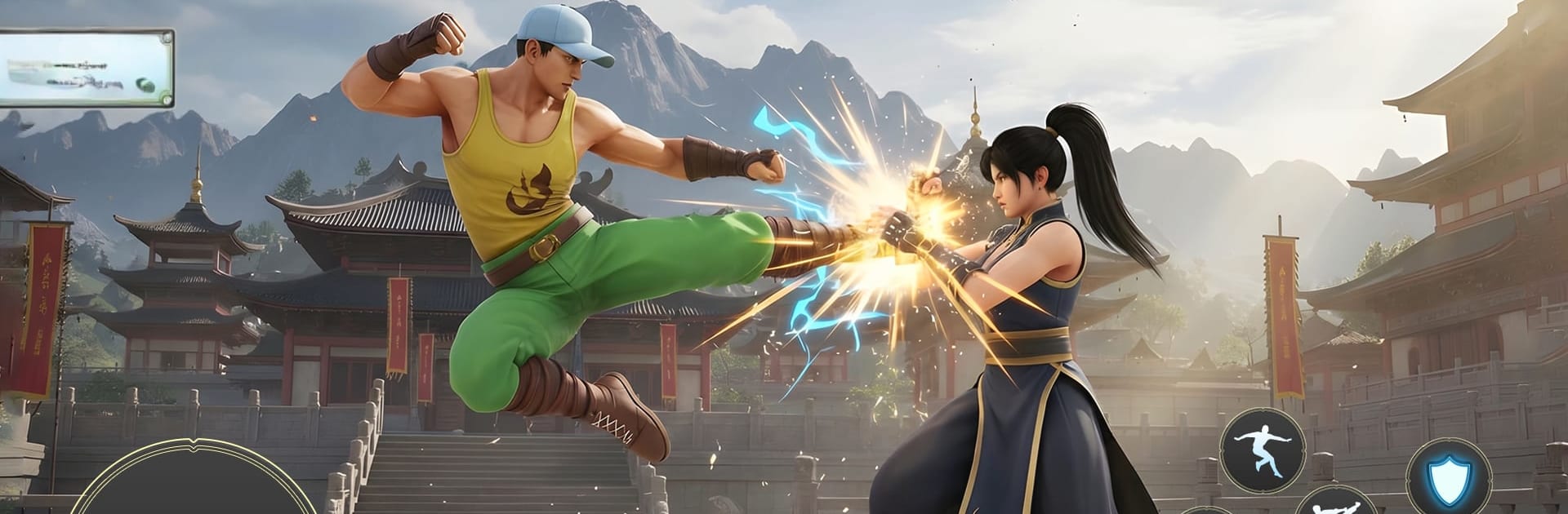
Real Street Combat Fight Game throws you into gritty head-to-head battles with a focus on timing, reads, and raw skill. It’s an Action experience built around two core modes—one for steady progression and one for straight-up duels—wrapped in moody city backdrops and punchy, responsive combat. Want tighter inputs and a cleaner look? It feels especially sharp on BlueStacks.

Game Features

  • Two Game Modes: Work through Career with 5 chapters, each packed with 3 tough levels, or jump into Champion mode for intense 1v1 bouts that push your reflexes to the limit.
  • Realistic Combat Flow: String together strikes, blocks, and counters while sharpening karate techniques that reward precision over button mashing.
  • Gritty Urban Arenas: Fight across varied city environments, each with its own vibe and layout, keeping every matchup fresh and a bit unpredictable.
  • Fluid Animation & Lighting: Smooth character movement, dramatic lighting, and detailed textures make every hit feel weighty and every arena feel alive.
  • Responsive Controls: Snappy, dependable inputs help you read openings, punish mistakes, and hold your ground in clutch moments.
  • Challenge-Driven Progression: Clear levels, unlock tougher encounters, and prove you’ve got the nerve and timing to stand among street champions.
  • Learn, Adapt, Win: Study opponent patterns, tweak your approach on the fly, and outsmart rivals with smart spacing and well-timed counters.

BlueStacks gives you more room to focus on the game and less time adjusting around mobile limitations.


Game Features

Enhancements

  • Macros
  • Multi Instance
  • Multi Instance Sync
  • Eco Mode
  • Enhancements
Macros

Macros

Skip the boring parts of a game. Play Real Street Combat Fight Game with Macros and get the edge. Simply record a sequence of commands and execute them at any moment.
Multi Instance

Multi Instance

Why limit to one game on your phone when you can play many on your PC? Open multiple instances of Real Street Combat Fight Game at once with Multi-Instance. Leverage the power of different accounts by doing more.
Multi Instance Sync

Multi Instance Sync

Get the best out of Real Street Combat Fight Game with Multi-Instance Sync. Play the game from different accounts and build your own empire. Use Multi-instance sync to repeat the action in the main BlueStacks instance on all other instances.
Eco Mode

Eco Mode

Find the rarest heroes by making multiple summons in Real Street Combat Fight Game. And while you are at it, reduce your PC’s resource consumption with the Eco Mode. Farm efficiently. Get the best results.
Read More

How to Download and Play Real Street Combat Fight Game on PC or Mac

  • Download and install BlueStacks on your PC or Mac

  • Complete Google sign-in to access the Play Store, or do it later

  • Look for Real Street Combat Fight Game in the search bar at the top right corner

  • Click to install Real Street Combat Fight Game from the search results

  • Complete Google sign-in (if you skipped step 2) to install Real Street Combat Fight Game

  • Click the Real Street Combat Fight Game icon on the home screen to start playing

video
Watch Video

Minimum System Requirements

With BlueStacks 5, you can get started on a PC that fulfills the following requirements.

  • Operating System

    Microsoft Windows 7 or above, macOS 11 (Big Sur) or above

  • Processor

    Intel, AMD or Apple Silicon Processor

  • RAM

    at least 4GB

  • HDD

    10GB Free Disk Space

Note:

* You must be an Administrator on your PC. Up to date graphics drivers from Microsoft or the chipset vendor.

Real Street Combat Fight Game - FAQs

  • How to play Real Street Combat Fight Game on Windows PC & Mac?

    Play Real Street Combat Fight Game on your PC or Mac by following these simple steps.

    • Click on 'Play Real Street Combat Fight Game on PC’ to download BlueStacks
    • Install it and log-in to Google Play Store
    • Launch and play the game.
  • Why is BlueStacks the fastest and safest platform to play games on PC?

    BlueStacks respects your privacy and is always safe and secure to use. It does not carry any malware, spyware, or any sort of additional software that could harm your PC.

    It is engineered to optimize speed and performance for a seamless gaming experience.

  • What are Real Street Combat Fight Game PC requirements?

    Minimum requirement to run Real Street Combat Fight Game on your PC

    • OS: Microsoft Windows 7 or above MacOS 11 (Big Sur) or above
    • Processor: Intel, AMD or Apple Silicon Processor
    • RAM: Your PC must have at least 4GB of RAM. (Note that having 4GB or more disk space is not a substitute for RAM)
    • HDD: 10GB Free Disk Space.
    • You must be an Administrator on your PC.