Red Dead Redemption
Red Dead Redemption

Red Dead Redemption

Action

| Rockstar Games

Play on PC with BlueStacks or from our cloud

  • Overview
  • Game Features
  • How to Play

Page Modified On: December 15, 2025

Play Red Dead Redemption on PC or Mac

Step into the World of Red Dead Redemption, a thrilling Action game from the house of Rockstar Games. Play this Android game on BlueStacks App Player and experience immersive gaming on PC or Mac.

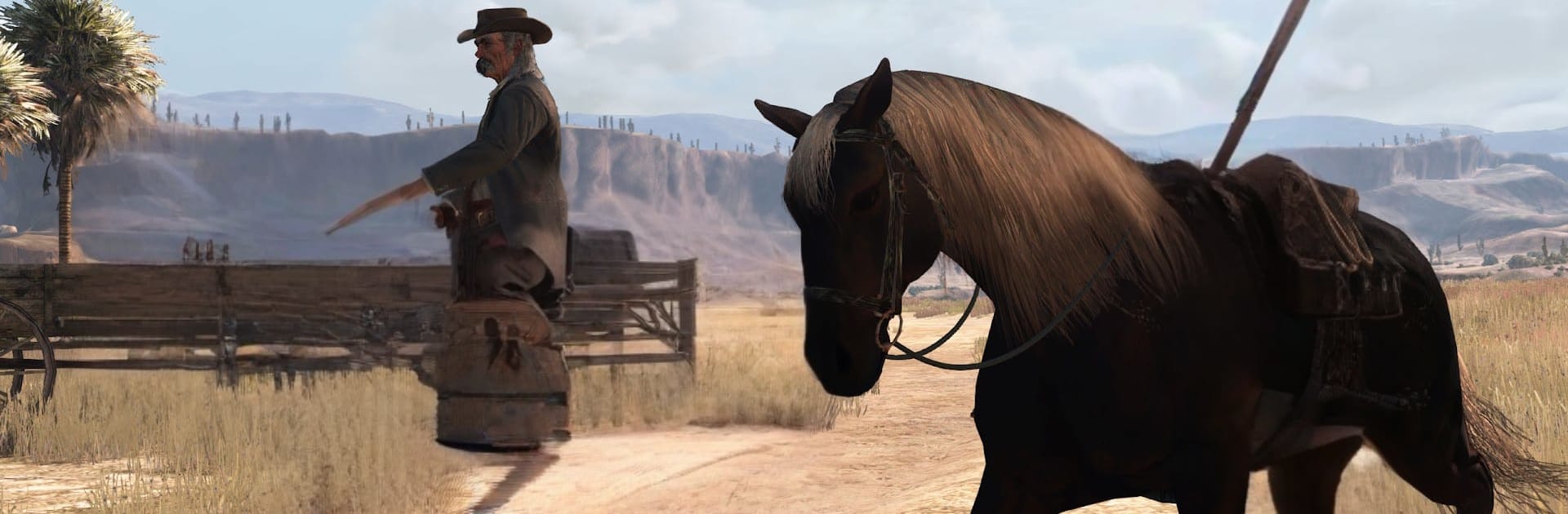
Red Dead Redemption plays like a slow-burn Western that actually lets the player live in it, not just rush through shootouts. The player steps into John Marston, an ex-outlaw pushed by government men to track down the gang he used to ride with. The map stretches from dusty frontier towns to the deserts of Mexico, with long rides where the wind and music do their thing, then sudden trouble on the roadside. Gunfights feel deliberate and weighty, with that Dead Eye mark-and-shoot trick making duels and ambushes tense but fair. There is plenty to do between missions too, like bounties, hunting, poker, herding, and those odd stranger stories that pop up and stick in the head. The writing lands hard, the performances feel human, and the world has that worn look that makes campfires hit different at night.

This release is the full single player deal, no multiplayer, which fits the tone. It also includes Undead Nightmare, a pulpy side story that turns the same map into a zombie problem, where towns need saving, ammo matters, and holy water suddenly feels useful. On PC through BlueStacks, mouse aim and key remapping help a lot, though a controller still feels natural for riding and dead-on camera control. The pace is not rushed, the rewards are more about mood and story than constant fireworks, and that is the hook. If someone wants a grounded Western with solid gunplay, meaningful quests, and a big, lonely map that keeps surprising, this nails it.

Ready to top the leaderboard? We bet you do. Let precise controls and sharp visuals optimized on BlueStacks lead you to victory.

Game Features

Enhancements

  • Macros
  • Multi Instance
  • Multi Instance Sync
  • Eco Mode
  • Enhancements
Macros

Macros

Skip the boring parts of a game. Play Red Dead Redemption with Macros and get the edge. Simply record a sequence of commands and execute them at any moment.
Multi Instance

Multi Instance

Why limit to one game on your phone when you can play many on your PC? Open multiple instances of Red Dead Redemption at once with Multi-Instance. Leverage the power of different accounts by doing more.
Multi Instance Sync

Multi Instance Sync

Get the best out of Red Dead Redemption with Multi-Instance Sync. Play the game from different accounts and build your own empire. Use Multi-instance sync to repeat the action in the main BlueStacks instance on all other instances.
Eco Mode

Eco Mode

Find the rarest heroes by making multiple summons in Red Dead Redemption. And while you are at it, reduce your PC’s resource consumption with the Eco Mode. Farm efficiently. Get the best results.
Read More

How to Download and Play Red Dead Redemption on PC or Mac

  • Download and install BlueStacks on your PC or Mac

  • Complete Google sign-in to access the Play Store, or do it later

  • Look for Red Dead Redemption in the search bar at the top right corner

  • Click to install Red Dead Redemption from the search results

  • Complete Google sign-in (if you skipped step 2) to install Red Dead Redemption

  • Click the Red Dead Redemption icon on the home screen to start playing

video
Watch Video

Minimum System Requirements

With BlueStacks 5, you can get started on a PC that fulfills the following requirements.

  • Operating System

    Microsoft Windows 7 or above, macOS 11 (Big Sur) or above

  • Processor

    Intel, AMD or Apple Silicon Processor

  • RAM

    at least 4GB

  • HDD

    10GB Free Disk Space

Note:

* You must be an Administrator on your PC. Up to date graphics drivers from Microsoft or the chipset vendor.

Red Dead Redemption - FAQs

  • How to play Red Dead Redemption on Windows PC & Mac?

    Play Red Dead Redemption on your PC or Mac by following these simple steps.

    • Click on 'Play Red Dead Redemption on PC’ to download BlueStacks
    • Install it and log-in to Google Play Store
    • Launch and play the game.
  • Why is BlueStacks the fastest and safest platform to play games on PC?

    BlueStacks respects your privacy and is always safe and secure to use. It does not carry any malware, spyware, or any sort of additional software that could harm your PC.

    It is engineered to optimize speed and performance for a seamless gaming experience.

  • What are Red Dead Redemption PC requirements?

    Minimum requirement to run Red Dead Redemption on your PC

    • OS: Microsoft Windows 7 or above MacOS 11 (Big Sur) or above
    • Processor: Intel, AMD or Apple Silicon Processor
    • RAM: Your PC must have at least 4GB of RAM. (Note that having 4GB or more disk space is not a substitute for RAM)
    • HDD: 10GB Free Disk Space.
    • You must be an Administrator on your PC.