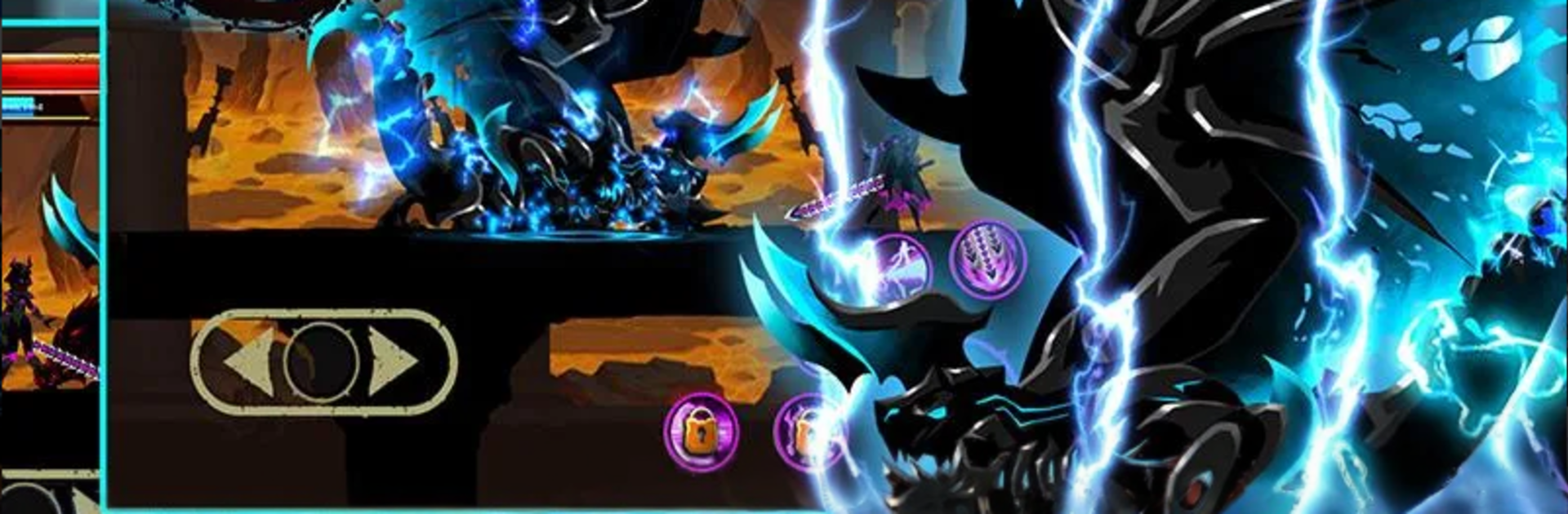
Shadow Stick Warrior

Shadow Stick Warrior

Action

| KTND Family

Play on PC with BlueStacks or from our cloud

  • Overview
  • Game Features
  • How to Play

Page Modified On: December 15, 2025

Play Shadow Stick Warrior on PC or Mac

From the innovators and creators at KTND Family, Shadow Stick Warrior is another fun addition to the World of Action games. Go beyond your mobile screen and play it bigger and better on your PC or Mac. An immersive experience awaits you.

Shadow Stick Warrior plays like a fast side-scrolling brawler with that clean shadow silhouette look, bright hits, and a lot of flashy skill effects. The setup is simple enough, a cursed land, stolen magic stone, people in trouble, so the focus stays on combat. Pick one of four fighters and learn their move sets, then string combos while timing skills to keep crowds under control. Enemies are not just punching bags either. Different monster types come in with odd tricks, shields, jumps, or ranged pokes, so fights turn into a pattern-reading thing rather than button mashing. Bosses have heavier swings and long windups that punish greed, which feels fair when the dodge lands just right.

There is a ton of gear to collect. Weapons, armor, and little jewels slot in to push damage or defense, and swapping builds to handle a tough stage actually matters. The game spreads out across four areas with plenty of bite-sized stages and survival rooms, so it is easy to say one more run and then it is suddenly an hour. The sound is punchy, the effects are loud in a good way, and the rhythm of hit, juggle, and dash feels smooth. On PC with BlueStacks, keyboard mapping makes skill rotations easier and the bigger screen helps read enemy telegraphs, so grinding gear hurts the hands less. It is light on story but heavy on that arcade feel, with regular little updates and a share button if someone likes throwing clips on Facebook.

Get ready for a buttery smooth, high-performance gaming action only on BlueStacks.

Game Features

Enhancements

  • Macros
  • Multi Instance
  • Multi Instance Sync
  • Eco Mode
  • Enhancements
Macros

Macros

Skip the boring parts of a game. Play Shadow Stick Warrior with Macros and get the edge. Simply record a sequence of commands and execute them at any moment.
Multi Instance

Multi Instance

Why limit to one game on your phone when you can play many on your PC? Open multiple instances of Shadow Stick Warrior at once with Multi-Instance. Leverage the power of different accounts by doing more.
Multi Instance Sync

Multi Instance Sync

Get the best out of Shadow Stick Warrior with Multi-Instance Sync. Play the game from different accounts and build your own empire. Use Multi-instance sync to repeat the action in the main BlueStacks instance on all other instances.
Eco Mode

Eco Mode

Find the rarest heroes by making multiple summons in Shadow Stick Warrior. And while you are at it, reduce your PC’s resource consumption with the Eco Mode. Farm efficiently. Get the best results.
Read More

How to Download and Play Shadow Stick Warrior on PC or Mac

  • Download and install BlueStacks on your PC or Mac

  • Complete Google sign-in to access the Play Store, or do it later

  • Look for Shadow Stick Warrior in the search bar at the top right corner

  • Click to install Shadow Stick Warrior from the search results

  • Complete Google sign-in (if you skipped step 2) to install Shadow Stick Warrior

  • Click the Shadow Stick Warrior icon on the home screen to start playing

video
Watch Video

Minimum System Requirements

With BlueStacks 5, you can get started on a PC that fulfills the following requirements.

  • Operating System

    Microsoft Windows 7 or above, macOS 11 (Big Sur) or above

  • Processor

    Intel, AMD or Apple Silicon Processor

  • RAM

    at least 4GB

  • HDD

    10GB Free Disk Space

Note:

* You must be an Administrator on your PC. Up to date graphics drivers from Microsoft or the chipset vendor.

Shadow Stick Warrior - FAQs

  • How to play Shadow Stick Warrior on Windows PC & Mac?

    Play Shadow Stick Warrior on your PC or Mac by following these simple steps.

    • Click on 'Play Shadow Stick Warrior on PC’ to download BlueStacks
    • Install it and log-in to Google Play Store
    • Launch and play the game.
  • Why is BlueStacks the fastest and safest platform to play games on PC?

    BlueStacks respects your privacy and is always safe and secure to use. It does not carry any malware, spyware, or any sort of additional software that could harm your PC.

    It is engineered to optimize speed and performance for a seamless gaming experience.

  • What are Shadow Stick Warrior PC requirements?

    Minimum requirement to run Shadow Stick Warrior on your PC

    • OS: Microsoft Windows 7 or above MacOS 11 (Big Sur) or above
    • Processor: Intel, AMD or Apple Silicon Processor
    • RAM: Your PC must have at least 4GB of RAM. (Note that having 4GB or more disk space is not a substitute for RAM)
    • HDD: 10GB Free Disk Space.
    • You must be an Administrator on your PC.