[3D Platformer] Super Bear Adventure
[3D Platformer] Super Bear Adventure

[3D Platformer] Super Bear Adventure

Action

| Earthkwak Games

Play on PC with BlueStacks or from our cloud

  • Overview
  • Game Features
  • How to Play

Page Modified On: April 09, 2026

Play [3D Platformer] Super Bear Adventure on PC or Mac

Step into the World of Super Bear Adventure, a thrilling Adventure game from the house of Earthkwak Games. Play this Android game on BlueStacks App Player and experience immersive gaming on PC or Mac.

About the Game

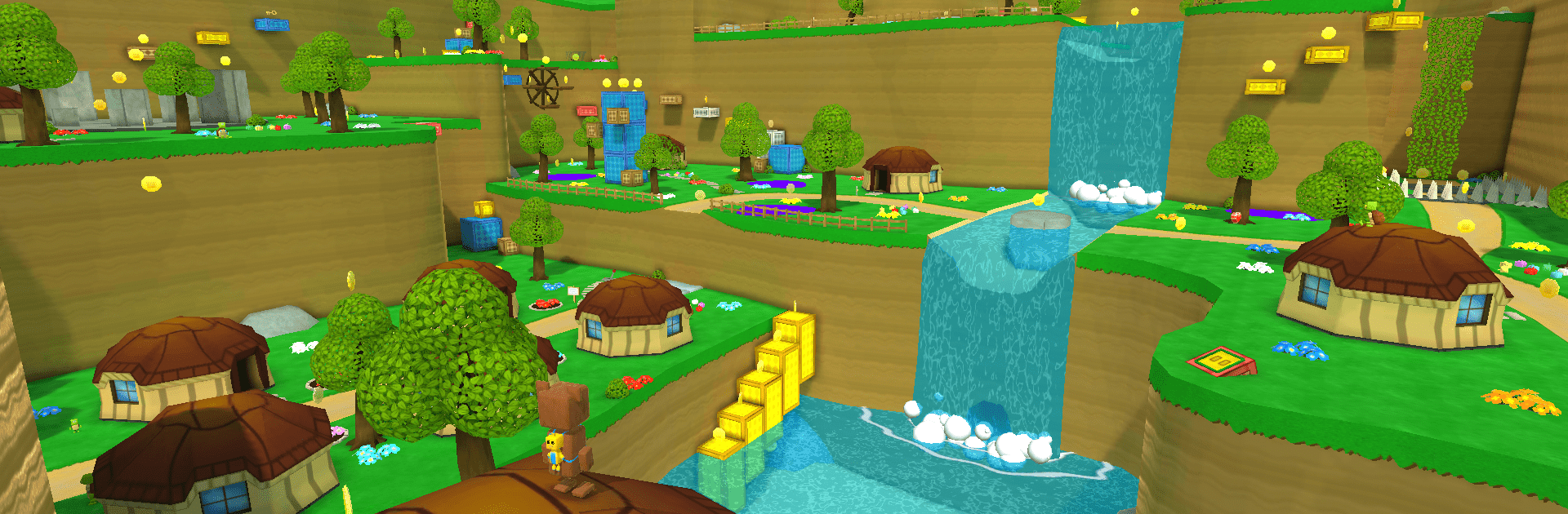
Super Bear Adventure by Earthkwak Games is a cheerful, 3D Adventure where you roam a whimsical kingdom as a bold little bear named Baaren. Things used to be calm here—until the bees started cooking up a weird purple honey that turns sweet neighbors into aggressive troublemakers. Your job? Wander the regions, sniff out secrets, and help your bear friends snap out of it, one rescue at a time. It plays like a cozy nod to classic late-90s platformers, but with modern comfort and plenty of surprises.

Game Features

  • Open-world regions: Trek through varied areas at your own pace—forests, peaks, and off-the-path nooks—each hiding shortcuts, puzzles, and collectibles.
  • A sticky mystery: That purple honey isn’t just odd; it’s dangerous. Uncover who’s behind it, clear corrupted foes, and restore the kingdom’s good vibes.
  • Moves that matter: A clean, responsive move set lets you leap across gaps, scale steep ledges, and handle scraps without fuss.
  • Collect and customize: Grab coins and curios to unlock outfits and accessories, giving Baaren a look that’s all you.
  • Fast rides: Hop into speedy vehicles for quick travel, time challenges, and a little chaos when you want it.
  • Daily challenges: Short, punchy tasks keep your skills sharp and your stash growing.
  • Mini-games on the side: Take breaks from the main quest with playful diversions that reward curiosity.
  • Play your way: Chase every secret or just wander—both styles feel right at home.
  • Nice on PC with BlueStacks: Prefer a bigger screen and crisp controls? Running Super Bear Adventure on BlueStacks feels smooth and natural.

Make your gaming sessions memorable with precise controls that give you an edge in close combats and visuals that pop up, bringing every character to life.

Game Features

Enhancements

  • Macros
  • Multi Instance
  • Multi Instance Sync
  • Eco Mode
  • Enhancements
Macros

Macros

Skip the boring parts of a game. Play [3D Platformer] Super Bear Adventure with Macros and get the edge. Simply record a sequence of commands and execute them at any moment.
Multi Instance

Multi Instance

Why limit to one game on your phone when you can play many on your PC? Open multiple instances of [3D Platformer] Super Bear Adventure at once with Multi-Instance. Leverage the power of different accounts by doing more.
Multi Instance Sync

Multi Instance Sync

Get the best out of [3D Platformer] Super Bear Adventure with Multi-Instance Sync. Play the game from different accounts and build your own empire. Use Multi-instance sync to repeat the action in the main BlueStacks instance on all other instances.
Eco Mode

Eco Mode

Find the rarest heroes by making multiple summons in [3D Platformer] Super Bear Adventure. And while you are at it, reduce your PC’s resource consumption with the Eco Mode. Farm efficiently. Get the best results.
Read More

How to Download and Play [3D Platformer] Super Bear Adventure on PC or Mac

  • Download and install BlueStacks on your PC or Mac

  • Complete Google sign-in to access the Play Store, or do it later

  • Look for [3D Platformer] Super Bear Adventure in the search bar at the top right corner

  • Click to install [3D Platformer] Super Bear Adventure from the search results

  • Complete Google sign-in (if you skipped step 2) to install [3D Platformer] Super Bear Adventure

  • Click the [3D Platformer] Super Bear Adventure icon on the home screen to start playing

video
Watch Video

Minimum System Requirements

With BlueStacks 5, you can get started on a PC that fulfills the following requirements.

  • Operating System

    Microsoft Windows 7 or above, macOS 11 (Big Sur) or above

  • Processor

    Intel, AMD or Apple Silicon Processor

  • RAM

    at least 4GB

  • HDD

    10GB Free Disk Space

Note:

* You must be an Administrator on your PC. Up to date graphics drivers from Microsoft or the chipset vendor.

[3D Platformer] Super Bear Adventure - FAQs

  • How to play [3D Platformer] Super Bear Adventure on Windows PC & Mac?

    Play [3D Platformer] Super Bear Adventure on your PC or Mac by following these simple steps.

    • Click on 'Play [3D Platformer] Super Bear Adventure on PC’ to download BlueStacks
    • Install it and log-in to Google Play Store
    • Launch and play the game.
  • Why is BlueStacks the fastest and safest platform to play games on PC?

    BlueStacks respects your privacy and is always safe and secure to use. It does not carry any malware, spyware, or any sort of additional software that could harm your PC.

    It is engineered to optimize speed and performance for a seamless gaming experience.

  • What are [3D Platformer] Super Bear Adventure PC requirements?

    Minimum requirement to run [3D Platformer] Super Bear Adventure on your PC

    • OS: Microsoft Windows 7 or above MacOS 11 (Big Sur) or above
    • Processor: Intel, AMD or Apple Silicon Processor
    • RAM: Your PC must have at least 4GB of RAM. (Note that having 4GB or more disk space is not a substitute for RAM)
    • HDD: 10GB Free Disk Space.
    • You must be an Administrator on your PC.