Toy Wars: Air Defenders

Toy Wars: Air Defenders

Action

| Square Carrot

Play on PC with BlueStacks or from our cloud

  • Overview
  • Game Features
  • How to Play

Page Modified On: September 02, 2025

Play Toy Wars: Air Defenders on PC or Mac

Join millions to experience Toy Wars: Air Defenders, an exciting Action game from Square Carrot. With BlueStacks App Player, you are always a step ahead of your opponent, ready to outplay them with faster gameplay and better control with the mouse and keyboard on your PC or Mac.

About the Game

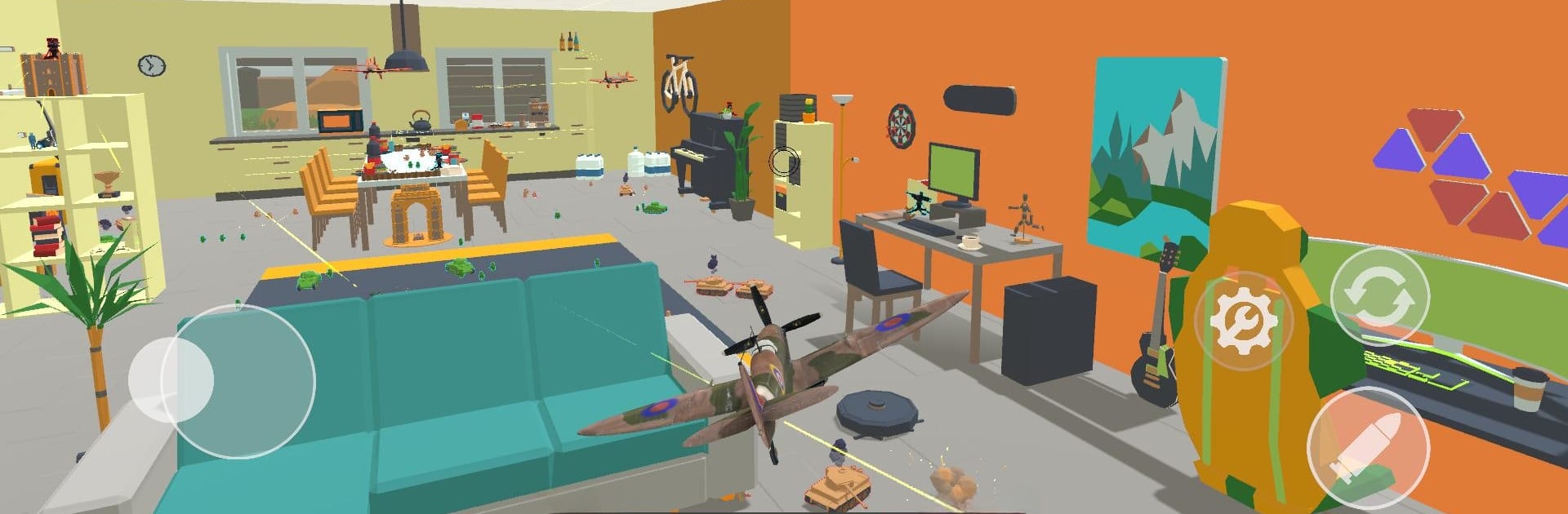
Toy Wars: Air Defenders turns your home into a battlefield, only everything’s pint-sized and way more charming. You’re piloting tiny warplanes across familiar spaces—sofas become cliffs, lamps turn into hazards, and the garden feels like a jungle. It’s an Action game from Square Carrot that’s all about fast maneuvers, tight shots, and that “one more run” feeling.

Game Features

  • Miniature Dogfights
  • Hop into nimble toy warplanes and pull off sharp turns, quick rolls, and steady strafing runs as you chase down enemies in close quarters.

  • Everyday Battlefields

  • Fly through the living room, the garden, and more. Coffee tables, chairs, and plants aren’t just scenery—they’re cover, blind spots, and obstacles to outsmart.

  • Fast, Arcade-Style Combat

  • Expect quick encounters with enemy squadrons and lots of split-second decisions. Thread the needle between furniture, line up your shots, and keep moving.

  • Nostalgic Toy Vibe

  • It’s toys come to life, with playful scale and a cozy, lived-in backdrop. The world feels familiar, but the action is anything but ordinary.

  • Learnable, Not Easy

  • Simple to pick up, yet there’s plenty of nuance in timing, positioning, and pathing. Mastery comes from reading the room—literally.

  • Smooth on PC with BlueStacks

  • Prefer a keyboard and mouse for precision flight? Playing on BlueStacks can make those tight dodges and clean angles feel extra satisfying.

Make your gaming sessions memorable with precise controls that give you an edge in close combats and visuals that pop up, bringing every character to life.


Game Features

Enhancements

  • Macros
  • Multi Instance
  • Multi Instance Sync
  • Eco Mode
  • Enhancements
Macros

Macros

Skip the boring parts of a game. Play Toy Wars: Air Defenders with Macros and get the edge. Simply record a sequence of commands and execute them at any moment.
Multi Instance

Multi Instance

Why limit to one game on your phone when you can play many on your PC? Open multiple instances of Toy Wars: Air Defenders at once with Multi-Instance. Leverage the power of different accounts by doing more.
Multi Instance Sync

Multi Instance Sync

Get the best out of Toy Wars: Air Defenders with Multi-Instance Sync. Play the game from different accounts and build your own empire. Use Multi-instance sync to repeat the action in the main BlueStacks instance on all other instances.
Eco Mode

Eco Mode

Find the rarest heroes by making multiple summons in Toy Wars: Air Defenders. And while you are at it, reduce your PC’s resource consumption with the Eco Mode. Farm efficiently. Get the best results.
Read More

How to Download and Play Toy Wars: Air Defenders on PC or Mac

  • Download and install BlueStacks on your PC or Mac

  • Complete Google sign-in to access the Play Store, or do it later

  • Look for Toy Wars: Air Defenders in the search bar at the top right corner

  • Click to install Toy Wars: Air Defenders from the search results

  • Complete Google sign-in (if you skipped step 2) to install Toy Wars: Air Defenders

  • Click the Toy Wars: Air Defenders icon on the home screen to start playing

video
Watch Video

Minimum System Requirements

With BlueStacks 5, you can get started on a PC that fulfills the following requirements.

  • Operating System

    Microsoft Windows 7 or above, macOS 11 (Big Sur) or above

  • Processor

    Intel, AMD or Apple Silicon Processor

  • RAM

    at least 4GB

  • HDD

    10GB Free Disk Space

Note:

* You must be an Administrator on your PC. Up to date graphics drivers from Microsoft or the chipset vendor.

Toy Wars: Air Defenders - FAQs

  • How to play Toy Wars: Air Defenders on Windows PC & Mac?

    Play Toy Wars: Air Defenders on your PC or Mac by following these simple steps.

    • Click on 'Play Toy Wars: Air Defenders on PC’ to download BlueStacks
    • Install it and log-in to Google Play Store
    • Launch and play the game.
  • Why is BlueStacks the fastest and safest platform to play games on PC?

    BlueStacks respects your privacy and is always safe and secure to use. It does not carry any malware, spyware, or any sort of additional software that could harm your PC.

    It is engineered to optimize speed and performance for a seamless gaming experience.

  • What are Toy Wars: Air Defenders PC requirements?

    Minimum requirement to run Toy Wars: Air Defenders on your PC

    • OS: Microsoft Windows 7 or above MacOS 11 (Big Sur) or above
    • Processor: Intel, AMD or Apple Silicon Processor
    • RAM: Your PC must have at least 4GB of RAM. (Note that having 4GB or more disk space is not a substitute for RAM)
    • HDD: 10GB Free Disk Space.
    • You must be an Administrator on your PC.