Tung Tung Sahur vs Tralalero

Tung Tung Sahur vs Tralalero

Action

| Dexus Wild

Play on PC with BlueStacks or from our cloud

  • Overview
  • Game Features
  • How to Play

Page Modified On: October 03, 2025

Play Tung Tung Sahur vs Tralalero on PC or Mac

Tung Tung Sahur vs Tralalero brings the Action genre to life, and throws up exciting challenges for gamers. Developed by Dexus Wild, this Android game is best experienced on BlueStacks, the World’s #1 app player for PC and Mac users.

About the Game

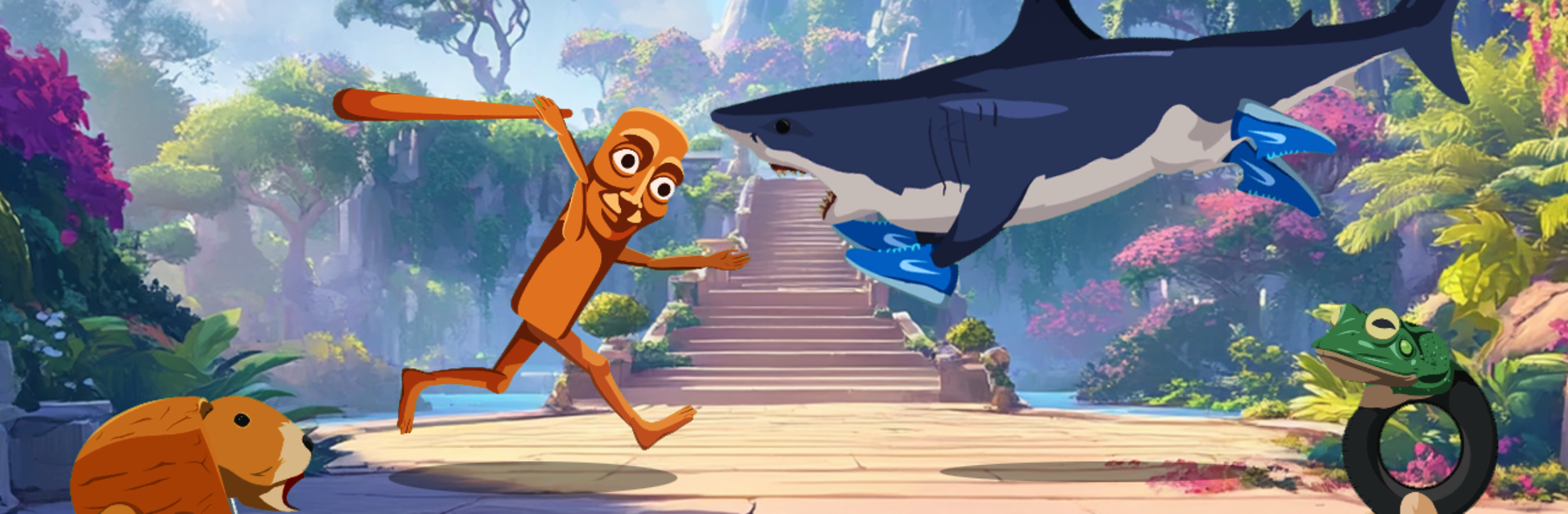
Tung Tung Sahur vs Tralalero is a chaotic 2D brawler where internet brainrot gets a pair of boxing gloves and absolutely goes to town. It’s an Action game by Dexus Wild that pits a bat-swinging sahur legend against a shark in sneakers, then invites a parade of even stranger anomalies to crash the party. Expect fast rounds, bizarre matchups, and a steady stream of WTF moments—playable offline or on BlueStacks if you want the madness on your PC.

Game Features

  • Meme-fueled battles: Two icons lead the charge—Tung Tung with his trusty bat and Tralalero with stomp-happy shoes—while a roster of weirdos jumps into the ring.
  • Pick your anomaly: Roll with favorites like Boneca Ambalabu, Capybarello Cocosini, Tak Tak Takbiran, or Trippi Troppi Troppa, each with their own ridiculous flair.
  • Simple, punchy controls: Move with a virtual joystick and mash one of four attack buttons to bonk, bite, kick, or slap your way through trouble.
  • Combos and specials: Build a meter as you land hits, then drop an over-the-top special to stun foes and swing momentum your way.
  • Wave-based chaos: Survive five increasingly unhinged waves, from alley brawls to strange liminal arenas that feel like the internet’s subconscious.
  • Hand-drawn weirdness: Unsettling creatures, loud props, and scenery that shifts from jungle to void—stylish, scrappy, and delightfully unhinged.
  • Sounds that pop: Crisp effects and rowdy music that make every hit, chomp, and bat smack feel extra crunchy.
  • Team showdown: Choose a side—Tung Tung Sahur or Tralalero—and prove which flavor of nonsense wins.
  • Offline mayhem: No Wi-Fi necessary, so the frog-legged chaos keeps rolling wherever you are.
  • Growing roster: More anomalies are queued up to join the nonsense, keeping the matchups fresh and the surprises coming.
  • Smooth on PC: Prefer a bigger screen or a gamepad? Running it on BlueStacks keeps the frenzy feeling slick.

Make your gaming sessions memorable with precise controls that give you an edge in close combats and visuals that pop up, bringing every character to life.


Game Features

Enhancements

  • Macros
  • Multi Instance
  • Multi Instance Sync
  • Eco Mode
  • Enhancements
Macros

Macros

Skip the boring parts of a game. Play Tung Tung Sahur vs Tralalero with Macros and get the edge. Simply record a sequence of commands and execute them at any moment.
Multi Instance

Multi Instance

Why limit to one game on your phone when you can play many on your PC? Open multiple instances of Tung Tung Sahur vs Tralalero at once with Multi-Instance. Leverage the power of different accounts by doing more.
Multi Instance Sync

Multi Instance Sync

Get the best out of Tung Tung Sahur vs Tralalero with Multi-Instance Sync. Play the game from different accounts and build your own empire. Use Multi-instance sync to repeat the action in the main BlueStacks instance on all other instances.
Eco Mode

Eco Mode

Find the rarest heroes by making multiple summons in Tung Tung Sahur vs Tralalero. And while you are at it, reduce your PC’s resource consumption with the Eco Mode. Farm efficiently. Get the best results.
Read More

How to Download and Play Tung Tung Sahur vs Tralalero on PC or Mac

  • Download and install BlueStacks on your PC or Mac

  • Complete Google sign-in to access the Play Store, or do it later

  • Look for Tung Tung Sahur vs Tralalero in the search bar at the top right corner

  • Click to install Tung Tung Sahur vs Tralalero from the search results

  • Complete Google sign-in (if you skipped step 2) to install Tung Tung Sahur vs Tralalero

  • Click the Tung Tung Sahur vs Tralalero icon on the home screen to start playing

video
Watch Video

Minimum System Requirements

With BlueStacks 5, you can get started on a PC that fulfills the following requirements.

  • Operating System

    Microsoft Windows 7 or above, macOS 11 (Big Sur) or above

  • Processor

    Intel, AMD or Apple Silicon Processor

  • RAM

    at least 4GB

  • HDD

    10GB Free Disk Space

Note:

* You must be an Administrator on your PC. Up to date graphics drivers from Microsoft or the chipset vendor.

Tung Tung Sahur vs Tralalero - FAQs

  • How to play Tung Tung Sahur vs Tralalero on Windows PC & Mac?

    Play Tung Tung Sahur vs Tralalero on your PC or Mac by following these simple steps.

    • Click on 'Play Tung Tung Sahur vs Tralalero on PC’ to download BlueStacks
    • Install it and log-in to Google Play Store
    • Launch and play the game.
  • Why is BlueStacks the fastest and safest platform to play games on PC?

    BlueStacks respects your privacy and is always safe and secure to use. It does not carry any malware, spyware, or any sort of additional software that could harm your PC.

    It is engineered to optimize speed and performance for a seamless gaming experience.

  • What are Tung Tung Sahur vs Tralalero PC requirements?

    Minimum requirement to run Tung Tung Sahur vs Tralalero on your PC

    • OS: Microsoft Windows 7 or above MacOS 11 (Big Sur) or above
    • Processor: Intel, AMD or Apple Silicon Processor
    • RAM: Your PC must have at least 4GB of RAM. (Note that having 4GB or more disk space is not a substitute for RAM)
    • HDD: 10GB Free Disk Space.
    • You must be an Administrator on your PC.