Wobble Tower
Wobble Tower

Wobble Tower

Action

| ZeptoLab

Play on PC with BlueStacks or from our cloud

  • Overview
  • Game Features
  • How to Play

Page Modified On: July 06, 2026

Play Wobble Tower on PC or Mac

Bring your A-game to Wobble Tower, the Action game sensation from ZeptoLab. Give your gameplay the much-needed boost with precise game controls, high FPS graphics, and top-tier features on your PC or Mac with BlueStacks.

About the Game

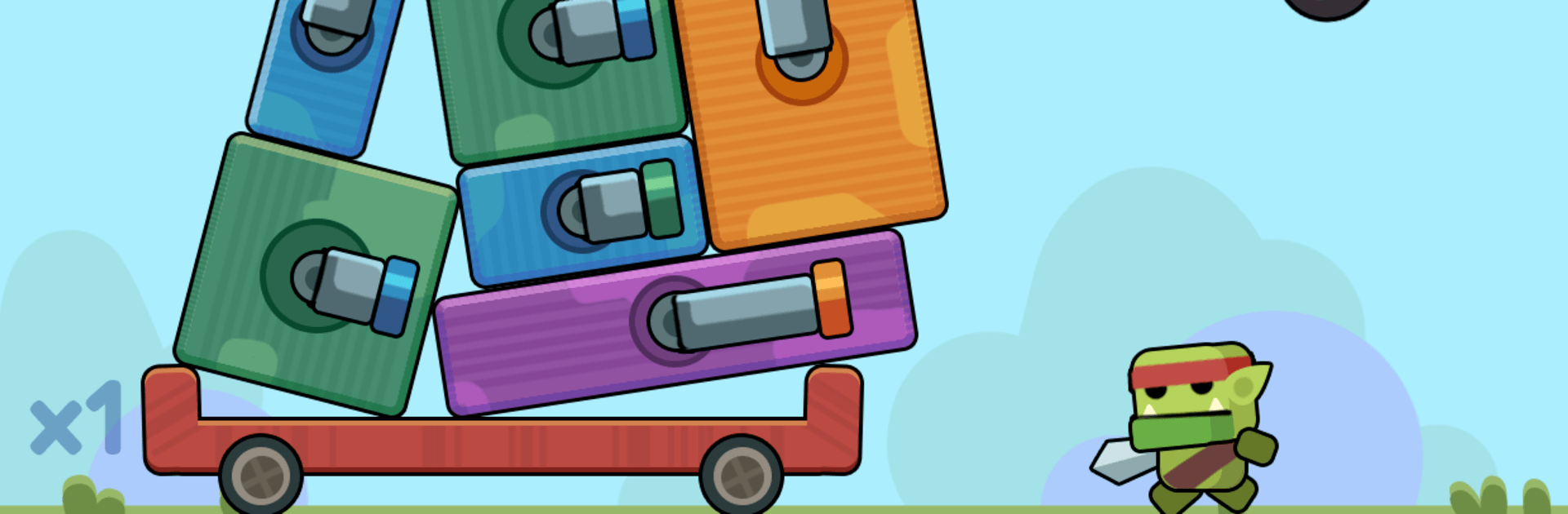
Wobble Tower is a physics-powered Action game about building a rickety cannon tower and blasting anything that dares to rush it. It’s part quick-reflex arcade, part clever planning, and every block you place can make the difference between a sturdy fortress and a spectacular collapse. Prefer a bigger screen and smoother aiming? It runs great on BlueStacks.

Game Features

  • Build-and-Blast Stacking: Drop cannon blocks into place, line them up just right, and keep the whole thing standing while enemies pile in.
  • Cannons with Personalities: Mix heavy hitters, rapid sprayers, and wide-coverage turrets to create a setup that fits your style—and the next wave.
  • Height Multipliers: The taller you stack, the faster upper cannons fire, unlocking x2, x4, and x8 speed boosts that turn altitude into raw power.
  • Waves and Bosses: Fight swarms of fast movers, chunky tanks, and screen-filling bosses that demand different layouts and timing.
  • Physics That Fights Back: Every nudge and collision matters. One sloppy placement can tilt your tower and make the next piece a nail-biter.
  • Snap Decisions, Smart Planning: Blocks swing in, enemies close fast, and you’ve got seconds to choose between a safe brace or a greedy damage upgrade.
  • Upgrades That Matter: Spend what you earn to buff damage, rotation speed, firing rate, and sturdiness so your tower survives longer runs.
  • Simple Taps, High Ceiling: Easy tap controls are welcoming, but true mastery comes from precise timing and smart positioning.
  • Vivid Vibes: Colorful effects, crunchy impacts, and a growing skyline of cannons make every successful stack feel extra satisfying.

BlueStacks gives you more room to focus on the game and less time adjusting around mobile limitations.


Game Features

Enhancements

  • Macros
  • Multi Instance
  • Multi Instance Sync
  • Eco Mode
  • Enhancements
Macros

Macros

Skip the boring parts of a game. Play Wobble Tower with Macros and get the edge. Simply record a sequence of commands and execute them at any moment.
Multi Instance

Multi Instance

Why limit to one game on your phone when you can play many on your PC? Open multiple instances of Wobble Tower at once with Multi-Instance. Leverage the power of different accounts by doing more.
Multi Instance Sync

Multi Instance Sync

Get the best out of Wobble Tower with Multi-Instance Sync. Play the game from different accounts and build your own empire. Use Multi-instance sync to repeat the action in the main BlueStacks instance on all other instances.
Eco Mode

Eco Mode

Find the rarest heroes by making multiple summons in Wobble Tower. And while you are at it, reduce your PC’s resource consumption with the Eco Mode. Farm efficiently. Get the best results.
Read More

How to Download and Play Wobble Tower on PC or Mac

  • Download and install BlueStacks on your PC or Mac

  • Complete Google sign-in to access the Play Store, or do it later

  • Look for Wobble Tower in the search bar at the top right corner

  • Click to install Wobble Tower from the search results

  • Complete Google sign-in (if you skipped step 2) to install Wobble Tower

  • Click the Wobble Tower icon on the home screen to start playing

video
Watch Video

Minimum System Requirements

With BlueStacks 5, you can get started on a PC that fulfills the following requirements.

  • Operating System

    Microsoft Windows 7 or above, macOS 11 (Big Sur) or above

  • Processor

    Intel, AMD or Apple Silicon Processor

  • RAM

    at least 4GB

  • HDD

    10GB Free Disk Space

Note:

* You must be an Administrator on your PC. Up to date graphics drivers from Microsoft or the chipset vendor.

Wobble Tower - FAQs

  • How to play Wobble Tower on Windows PC & Mac?

    Play Wobble Tower on your PC or Mac by following these simple steps.

    • Click on 'Play Wobble Tower on PC’ to download BlueStacks
    • Install it and log-in to Google Play Store
    • Launch and play the game.
  • Why is BlueStacks the fastest and safest platform to play games on PC?

    BlueStacks respects your privacy and is always safe and secure to use. It does not carry any malware, spyware, or any sort of additional software that could harm your PC.

    It is engineered to optimize speed and performance for a seamless gaming experience.

  • What are Wobble Tower PC requirements?

    Minimum requirement to run Wobble Tower on your PC

    • OS: Microsoft Windows 7 or above MacOS 11 (Big Sur) or above
    • Processor: Intel, AMD or Apple Silicon Processor
    • RAM: Your PC must have at least 4GB of RAM. (Note that having 4GB or more disk space is not a substitute for RAM)
    • HDD: 10GB Free Disk Space.
    • You must be an Administrator on your PC.