Wolfsschanze Lite
Wolfsschanze Lite

Wolfsschanze Lite

Action

| Oleksandr Sukhorukov

Play on PC with BlueStacks or from our cloud

  • Overview
  • Game Features
  • How to Play

Page Modified On: August 03, 2026

Play Wolfsschanze Lite on PC or Mac

Play Wolfsschanze Lite by Oleksandr Sukhorukov on PC or Mac with BlueStacks. Use a bigger screen, mouse and keyboard controls, and smoother performance while you play.

About the Game

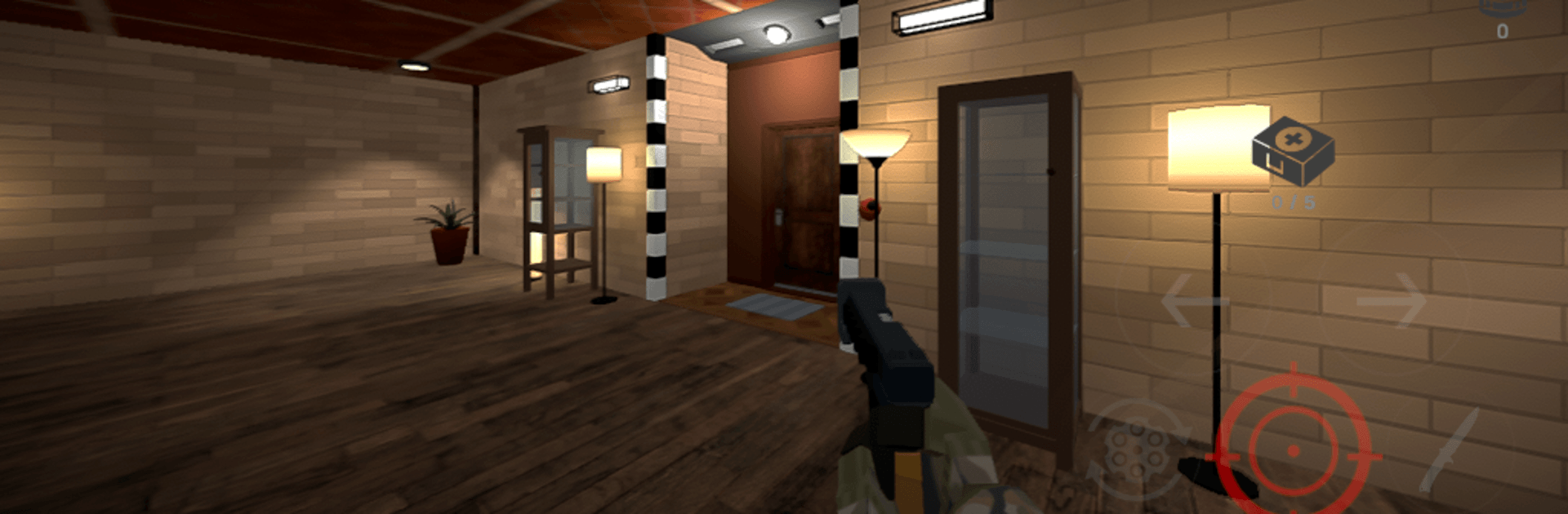
Wolfsschanze Lite is an Action game that drops you into a tense, post‑war bunker crawl. Your target? A hidden commander pulling strings from the shadows. Every floor twists into another maze, packed with traps, secrets, and armed patrols—so you’ll be balancing quick reactions with careful steps the whole way.

Game Features

  • Alternate‑history setting: Explore a fictional world right after World War II, where a ruthless leader hides deep in a fortified complex.
  • Labyrinthine bunker: Navigate multi‑level corridors and chambers that loop, fork, and reconnect, rewarding smart pathfinding and sharp memory.
  • Traps and secrets: Watch for pressure plates, hidden hazards, and concealed passageways; thorough exploration pays off.
  • Soldiers and bots: Face disciplined guards alongside mechanical sentries, each demanding a different approach to survive.
  • Boss hunt: Follow the trail, clear out defenses, and confront the mastermind at the heart of the stronghold.
  • Escalating challenge: Each level tightens the screws with trickier layouts, tougher enemies, and nastier surprises.
  • Focused Action: Snappy encounters keep you moving—push forward when it’s safe, back off when it’s not, and pick your moments.
  • Lite edition access: Jump in for free and get a feel for the core experience before deciding if you want more.
  • BlueStacks support: Prefer a bigger screen and comfortable controls on PC? Wolfsschanze Lite plays smoothly on BlueStacks, making it easier to read the map and track threats.

Start playing Wolfsschanze Lite on BlueStacks and get a smoother, more comfortable PC or Mac setup.


Game Features

Enhancements

  • Macros
  • Multi Instance
  • Multi Instance Sync
  • Eco Mode
  • Enhancements
Macros

Macros

Skip the boring parts of a game. Play Wolfsschanze Lite with Macros and get the edge. Simply record a sequence of commands and execute them at any moment.
Multi Instance

Multi Instance

Why limit to one game on your phone when you can play many on your PC? Open multiple instances of Wolfsschanze Lite at once with Multi-Instance. Leverage the power of different accounts by doing more.
Multi Instance Sync

Multi Instance Sync

Get the best out of Wolfsschanze Lite with Multi-Instance Sync. Play the game from different accounts and build your own empire. Use Multi-instance sync to repeat the action in the main BlueStacks instance on all other instances.
Eco Mode

Eco Mode

Find the rarest heroes by making multiple summons in Wolfsschanze Lite. And while you are at it, reduce your PC’s resource consumption with the Eco Mode. Farm efficiently. Get the best results.
Read More

How to Download and Play Wolfsschanze Lite on PC or Mac

  • Download and install BlueStacks on your PC or Mac

  • Complete Google sign-in to access the Play Store, or do it later

  • Look for Wolfsschanze Lite in the search bar at the top right corner

  • Click to install Wolfsschanze Lite from the search results

  • Complete Google sign-in (if you skipped step 2) to install Wolfsschanze Lite

  • Click the Wolfsschanze Lite icon on the home screen to start playing

video
Watch Video

Minimum System Requirements

With BlueStacks 5, you can get started on a PC that fulfills the following requirements.

  • Operating System

    Microsoft Windows 7 or above, macOS 11 (Big Sur) or above

  • Processor

    Intel, AMD or Apple Silicon Processor

  • RAM

    at least 4GB

  • HDD

    10GB Free Disk Space

Note:

* You must be an Administrator on your PC. Up to date graphics drivers from Microsoft or the chipset vendor.

Wolfsschanze Lite - FAQs

  • How to play Wolfsschanze Lite on Windows PC & Mac?

    Play Wolfsschanze Lite on your PC or Mac by following these simple steps.

    • Click on 'Play Wolfsschanze Lite on PC’ to download BlueStacks
    • Install it and log-in to Google Play Store
    • Launch and play the game.
  • Why is BlueStacks the fastest and safest platform to play games on PC?

    BlueStacks respects your privacy and is always safe and secure to use. It does not carry any malware, spyware, or any sort of additional software that could harm your PC.

    It is engineered to optimize speed and performance for a seamless gaming experience.

  • What are Wolfsschanze Lite PC requirements?

    Minimum requirement to run Wolfsschanze Lite on your PC

    • OS: Microsoft Windows 7 or above MacOS 11 (Big Sur) or above
    • Processor: Intel, AMD or Apple Silicon Processor
    • RAM: Your PC must have at least 4GB of RAM. (Note that having 4GB or more disk space is not a substitute for RAM)
    • HDD: 10GB Free Disk Space.
    • You must be an Administrator on your PC.