WoT Blitz Reforged Update

WoT Blitz Reforged Update

Action

| Wargaming Group

Play on PC with BlueStacks or from our cloud

  • Overview
  • Game Features
  • How to Play

Page Modified On: January 02, 2026

Play WoT Blitz Reforged Update on PC or Mac

Join millions to experience WoT Blitz Reforged Update, an exciting Action game from Wargaming Group. With BlueStacks App Player, you are always a step ahead of your opponent, ready to outplay them with faster gameplay and better control with the mouse and keyboard on your PC or Mac.

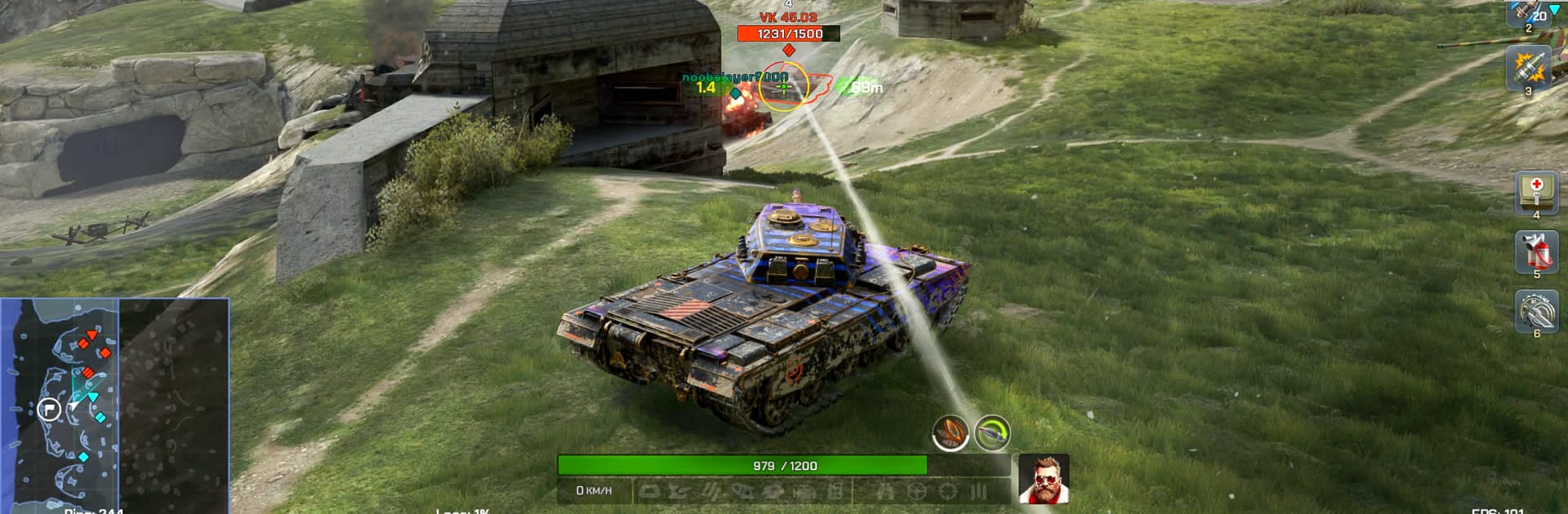
WoT Blitz Reforged feels like quick 7v7 skirmishes where every choice matters, from where a tank is parked to when a shot is taken. Matches are short, but there is a nice weight to the vehicles, shells smack hard, and armor angles actually matter. The update moves things to Unreal Engine 5, so explosions pop more, tracks bite into dirt, and collisions have a bit more punch. It is not a sim, but there is enough physics and feedback to make a well placed shot or a clean flank feel earned.

There are hundreds of tanks to unlock, not only the usual World War stuff but also weird sci‑fi prototypes and some wild themed machines. Each one leans into a different playstyle, like chunky armor that shrugs off hits, glass cannons with huge guns, or speedy scouts that live on map awareness. Upgrades and boosters come from building out the Base, and there are plenty of cosmetics if someone wants their ride to look loud. Maps jump all over the place, from sunburnt deserts to a low gravity moon, and there are side modes with odd rules like resurrection that keep things from going stale. Ranked is there for a steady grind up the ladder with rewards, and platoons or clans make it better if a small squad wants to coordinate pushes. On PC through BlueStacks, mouse aim and keybinds make turret control smoother, which helps when those last seconds decide who keeps the cap and who goes back to garage.

Get ready for a buttery smooth, high-performance gaming action only on BlueStacks.

Game Features

Enhancements

  • Macros
  • Multi Instance
  • Multi Instance Sync
  • Eco Mode
  • Enhancements
Macros

Macros

Skip the boring parts of a game. Play WoT Blitz Reforged Update with Macros and get the edge. Simply record a sequence of commands and execute them at any moment.
Multi Instance

Multi Instance

Why limit to one game on your phone when you can play many on your PC? Open multiple instances of WoT Blitz Reforged Update at once with Multi-Instance. Leverage the power of different accounts by doing more.
Multi Instance Sync

Multi Instance Sync

Get the best out of WoT Blitz Reforged Update with Multi-Instance Sync. Play the game from different accounts and build your own empire. Use Multi-instance sync to repeat the action in the main BlueStacks instance on all other instances.
Eco Mode

Eco Mode

Find the rarest heroes by making multiple summons in WoT Blitz Reforged Update. And while you are at it, reduce your PC’s resource consumption with the Eco Mode. Farm efficiently. Get the best results.
Read More

How to Download and Play WoT Blitz Reforged Update on PC or Mac

  • Download and install BlueStacks on your PC or Mac

  • Complete Google sign-in to access the Play Store, or do it later

  • Look for WoT Blitz Reforged Update in the search bar at the top right corner

  • Click to install WoT Blitz Reforged Update from the search results

  • Complete Google sign-in (if you skipped step 2) to install WoT Blitz Reforged Update

  • Click the WoT Blitz Reforged Update icon on the home screen to start playing

video
Watch Video

Minimum System Requirements

With BlueStacks 5, you can get started on a PC that fulfills the following requirements.

  • Operating System

    Microsoft Windows 7 or above, macOS 11 (Big Sur) or above

  • Processor

    Intel, AMD or Apple Silicon Processor

  • RAM

    at least 4GB

  • HDD

    10GB Free Disk Space

Note:

* You must be an Administrator on your PC. Up to date graphics drivers from Microsoft or the chipset vendor.

WoT Blitz Reforged Update - FAQs

  • How to play WoT Blitz Reforged Update on Windows PC & Mac?

    Play WoT Blitz Reforged Update on your PC or Mac by following these simple steps.

    • Click on 'Play WoT Blitz Reforged Update on PC’ to download BlueStacks
    • Install it and log-in to Google Play Store
    • Launch and play the game.
  • Why is BlueStacks the fastest and safest platform to play games on PC?

    BlueStacks respects your privacy and is always safe and secure to use. It does not carry any malware, spyware, or any sort of additional software that could harm your PC.

    It is engineered to optimize speed and performance for a seamless gaming experience.

  • What are WoT Blitz Reforged Update PC requirements?

    Minimum requirement to run WoT Blitz Reforged Update on your PC

    • OS: Microsoft Windows 7 or above MacOS 11 (Big Sur) or above
    • Processor: Intel, AMD or Apple Silicon Processor
    • RAM: Your PC must have at least 4GB of RAM. (Note that having 4GB or more disk space is not a substitute for RAM)
    • HDD: 10GB Free Disk Space.
    • You must be an Administrator on your PC.