Barry Parkour 3D Prison Escape

Barry Parkour 3D Prison Escape

Adventure

| Dream Rise Entertainment LLC

Play on PC with BlueStacks or from our cloud

  • Overview
  • Game Features
  • How to Play

Page Modified On: April 13, 2026

Play Barry Parkour 3D Prison Escape on PC or Mac

Explore a whole new adventure with Barry Parkour 3D Prison Escape, a Adventure game created by Dream Rise Entertainment LLC. Experience great gameplay with BlueStacks, the most popular gaming platform to play Android games on your PC or Mac.

About the Game

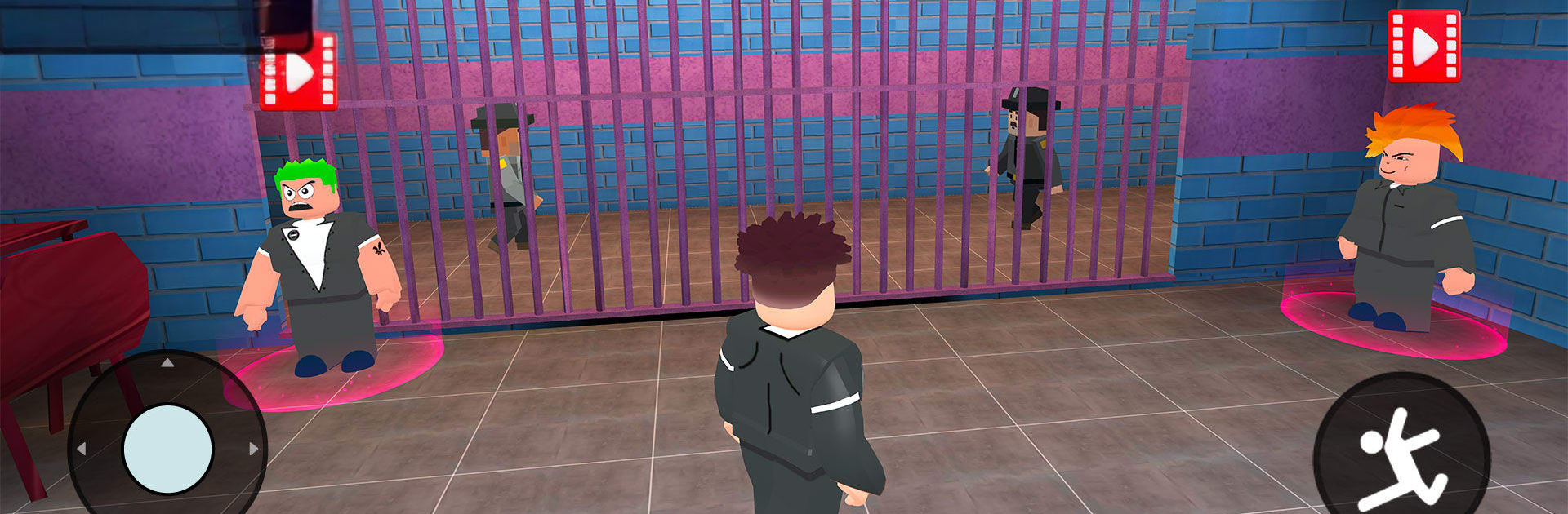
You’re stuck in a towering lockup with one big problem: Barry, the no-nonsense head guard, is on your trail. Barry Parkour 3D Prison Escape is an Adventure game from Dream Rise Entertainment LLC that turns corridors, vents, and ledges into a nerve‑wracking obstacle course. Plan your route, make gutsy jumps, and keep your cool as you push for the one door that leads out.

Game Features

  • Barry won’t back off: The guard is always nearby, forcing you to time your moves, take alternate routes, and outthink his patrols to slip past.

  • A prison built for parkour: Multiple floors, tight shafts, and hidden paths give you options. Find sneaky shortcuts or take the long way if it’s safer.

  • Precision jumps in full 3D: Every leap, edge, and wall matters. Depth and momentum feel real, making each landing a mini victory.

  • Traps that keep you honest: Watch for electrified panels and other nasty surprises. Read the room, adjust your pace, and don’t get greedy.

  • Climb, hop, and sprint: Scale walls, clear gaps, and string moves together. The better your flow, the faster you break away.

  • Difficulty that ramps up: Early routes teach the basics; later sections demand sharper timing, cleaner lines, and steadier nerves.

  • Checkpoints that respect your time: Nail a tough segment and lock it in so you can practice the next challenge without redoing everything.

  • One last gate to freedom: Map the best line, throw Barry off your trail, and make that final push.

  • Comfortable on PC with BlueStacks: Prefer a bigger screen and keyboard controls? It plays smoothly there, too.

Start your journey now. Download the game on BlueStacks, invite your friends, and march on a new adventure.


Game Features

Enhancements

  • Macros
  • Multi Instance
  • Multi Instance Sync
  • Script
  • Enhancements
Macros

Macros

Automate the predictable in Barry Parkour 3D Prison Escape and transform your gameplay with Macros. Get access to inventive Macros in the BlueStacks Macro Community
Multi Instance

Multi Instance

Play Barry Parkour 3D Prison Escape on one window. And chat with your friend on the other. Press CTRL + Shift + 8 to open the Multi-Instance Manager. And start creating fresh instances or clone an existing one.
Multi Instance Sync

Multi Instance Sync

Play Barry Parkour 3D Prison Escape with the power of Multi-Instance Sync. Replicate what you are doing on the main instance on all other instances. Level up faster, play more.
Script

Script

Script your way to gaming glory in Barry Parkour 3D Prison Escape with BlueStacks Script. Write and run a set of commands to automate repeated tasks. Trigger the command by assigning it to any key.
Read More

How to Download and Play Barry Parkour 3D Prison Escape on PC or Mac

  • Download and install BlueStacks on your PC or Mac

  • Complete Google sign-in to access the Play Store, or do it later

  • Look for Barry Parkour 3D Prison Escape in the search bar at the top right corner

  • Click to install Barry Parkour 3D Prison Escape from the search results

  • Complete Google sign-in (if you skipped step 2) to install Barry Parkour 3D Prison Escape

  • Click the Barry Parkour 3D Prison Escape icon on the home screen to start playing

video
Watch Video

Minimum System Requirements

With BlueStacks 5, you can get started on a PC that fulfills the following requirements.

  • Operating System

    Microsoft Windows 7 or above, macOS 11 (Big Sur) or above

  • Processor

    Intel, AMD or Apple Silicon Processor

  • RAM

    at least 4GB

  • HDD

    10GB Free Disk Space

Note:

* You must be an Administrator on your PC. Up to date graphics drivers from Microsoft or the chipset vendor.

Barry Parkour 3D Prison Escape - FAQs

  • How to play Barry Parkour 3D Prison Escape on Windows PC & Mac?

    Play Barry Parkour 3D Prison Escape on your PC or Mac by following these simple steps.

    • Click on 'Play Barry Parkour 3D Prison Escape on PC’ to download BlueStacks
    • Install it and log-in to Google Play Store
    • Launch and play the game.
  • Why is BlueStacks the fastest and safest platform to play games on PC?

    BlueStacks respects your privacy and is always safe and secure to use. It does not carry any malware, spyware, or any sort of additional software that could harm your PC.

    It is engineered to optimize speed and performance for a seamless gaming experience.

  • What are Barry Parkour 3D Prison Escape PC requirements?

    Minimum requirement to run Barry Parkour 3D Prison Escape on your PC

    • OS: Microsoft Windows 7 or above MacOS 11 (Big Sur) or above
    • Processor: Intel, AMD or Apple Silicon Processor
    • RAM: Your PC must have at least 4GB of RAM. (Note that having 4GB or more disk space is not a substitute for RAM)
    • HDD: 10GB Free Disk Space.
    • You must be an Administrator on your PC.