Bibi & Tina: Pferde-Abenteuer

Bibi & Tina: Pferde-Abenteuer

Adventure

| Blue Ocean Entertainment AG

Play on PC with BlueStacks or from our cloud

  • Overview
  • Game Features
  • How to Play

Page Modified On: August 14, 2026

Play Bibi & Tina: Pferde-Abenteuer on PC or Mac

Bibi & Tina: Pferde-Abenteuer by Blue Ocean Entertainment AG has plenty to keep you busy. BlueStacks lets you play it on PC or Mac with more screen space, better control, and fewer mobile limits.

About the Game

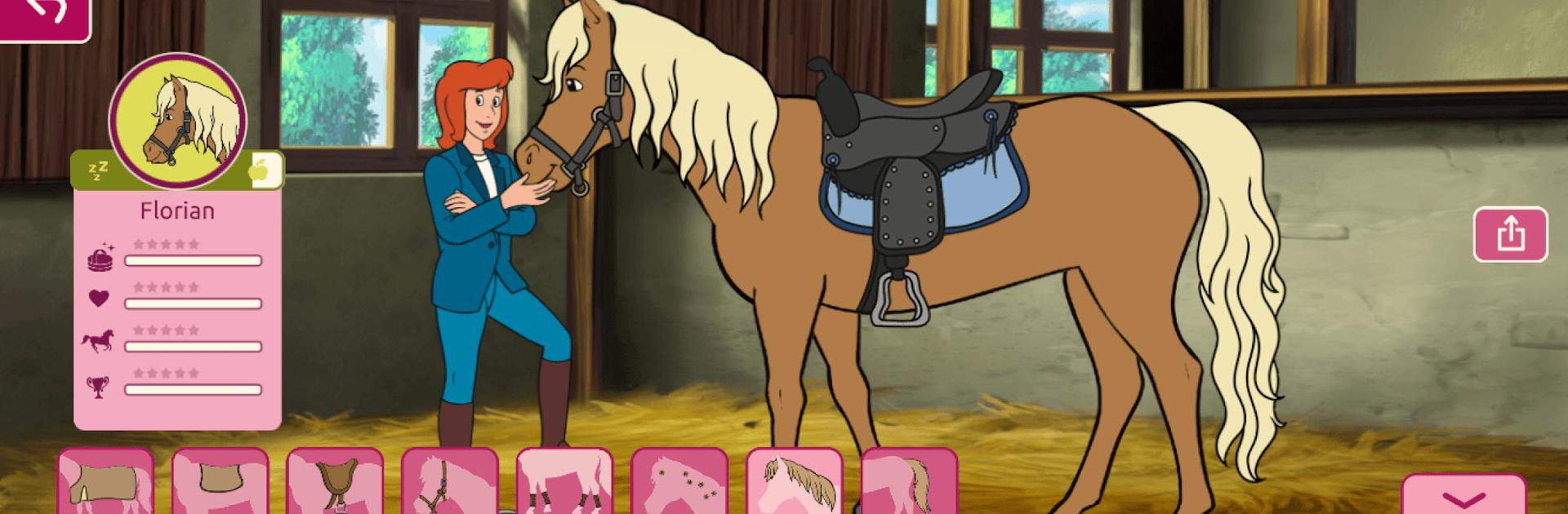
Bibi & Tina: Pferde-Abenteuer is a warm, horse-loving Adventure set at Martinshof, where you hang out with Bibi Blocksberg and her best friend Tina. Pick and care for your own horses, head out for relaxed rides or train for show-jumping, and spin your barnyard moments into fun, handmade comics. There’s even a full-length audio story to listen to while you play. Prefer a bigger screen? It also runs nicely on BlueStacks.

Game Features

  • Your Dream Horse: Choose from different manes, tails, and coat colors, then finish the look with saddles, halters, and lots of cute accessories.
  • Care and Bond: Brush, pet, ride, and train your horse. Earn stars as you go to unlock fresh gear and sweet little surprises.
  • Ride and Jump: Explore the grounds on leisurely rides or practice on show-jumping courses to sharpen your timing and control.
  • Comic Studio: Build your own comic from scenes around Martinshof. Drag in characters, horses, animals, and props to tell the story your way.
  • Snap and Decorate: Take a photo of yourself, design a frame, add stickers, and drop the picture right into your comic.
  • Audio Story on Tap: Listen to “Shadows over the Martinshof” (about 138 minutes) while grooming, riding, or creating—no switching screens needed.
  • Made for Kids: Playable even without reading, with activities that support concentration and fine motor skills. Includes adjustable difficulty and extra tasks.
  • Authentic Vibes: Enjoy original voice acting and bright, high-quality visuals that bring the stable to life—plus no in-app purchases.

Start playing Bibi & Tina: Pferde-Abenteuer on BlueStacks and get a smoother, more comfortable PC or Mac setup.


Game Features

Enhancements

  • Macros
  • Multi Instance
  • Multi Instance Sync
  • Script
  • Enhancements
Macros

Macros

Automate the predictable in Bibi & Tina: Pferde-Abenteuer and transform your gameplay with Macros. Get access to inventive Macros in the BlueStacks Macro Community
Multi Instance

Multi Instance

Play Bibi & Tina: Pferde-Abenteuer on one window. And chat with your friend on the other. Press CTRL + Shift + 8 to open the Multi-Instance Manager. And start creating fresh instances or clone an existing one.
Multi Instance Sync

Multi Instance Sync

Play Bibi & Tina: Pferde-Abenteuer with the power of Multi-Instance Sync. Replicate what you are doing on the main instance on all other instances. Level up faster, play more.
Script

Script

Script your way to gaming glory in Bibi & Tina: Pferde-Abenteuer with BlueStacks Script. Write and run a set of commands to automate repeated tasks. Trigger the command by assigning it to any key.
Read More

How to Download and Play Bibi & Tina: Pferde-Abenteuer on PC or Mac

  • Download and install BlueStacks on your PC or Mac

  • Complete Google sign-in to access the Play Store, or do it later

  • Look for Bibi & Tina: Pferde-Abenteuer in the search bar at the top right corner

  • Click to install Bibi & Tina: Pferde-Abenteuer from the search results

  • Complete Google sign-in (if you skipped step 2) to install Bibi & Tina: Pferde-Abenteuer

  • Click the Bibi & Tina: Pferde-Abenteuer icon on the home screen to start playing

video
Watch Video

Minimum System Requirements

With BlueStacks 5, you can get started on a PC that fulfills the following requirements.

  • Operating System

    Microsoft Windows 7 or above, macOS 11 (Big Sur) or above

  • Processor

    Intel, AMD or Apple Silicon Processor

  • RAM

    at least 4GB

  • HDD

    10GB Free Disk Space

Note:

* You must be an Administrator on your PC. Up to date graphics drivers from Microsoft or the chipset vendor.

Bibi & Tina: Pferde-Abenteuer - FAQs

  • How to play Bibi & Tina: Pferde-Abenteuer on Windows PC & Mac?

    Play Bibi & Tina: Pferde-Abenteuer on your PC or Mac by following these simple steps.

    • Click on 'Play Bibi & Tina: Pferde-Abenteuer on PC’ to download BlueStacks
    • Install it and log-in to Google Play Store
    • Launch and play the game.
  • Why is BlueStacks the fastest and safest platform to play games on PC?

    BlueStacks respects your privacy and is always safe and secure to use. It does not carry any malware, spyware, or any sort of additional software that could harm your PC.

    It is engineered to optimize speed and performance for a seamless gaming experience.

  • What are Bibi & Tina: Pferde-Abenteuer PC requirements?

    Minimum requirement to run Bibi & Tina: Pferde-Abenteuer on your PC

    • OS: Microsoft Windows 7 or above MacOS 11 (Big Sur) or above
    • Processor: Intel, AMD or Apple Silicon Processor
    • RAM: Your PC must have at least 4GB of RAM. (Note that having 4GB or more disk space is not a substitute for RAM)
    • HDD: 10GB Free Disk Space.
    • You must be an Administrator on your PC.