
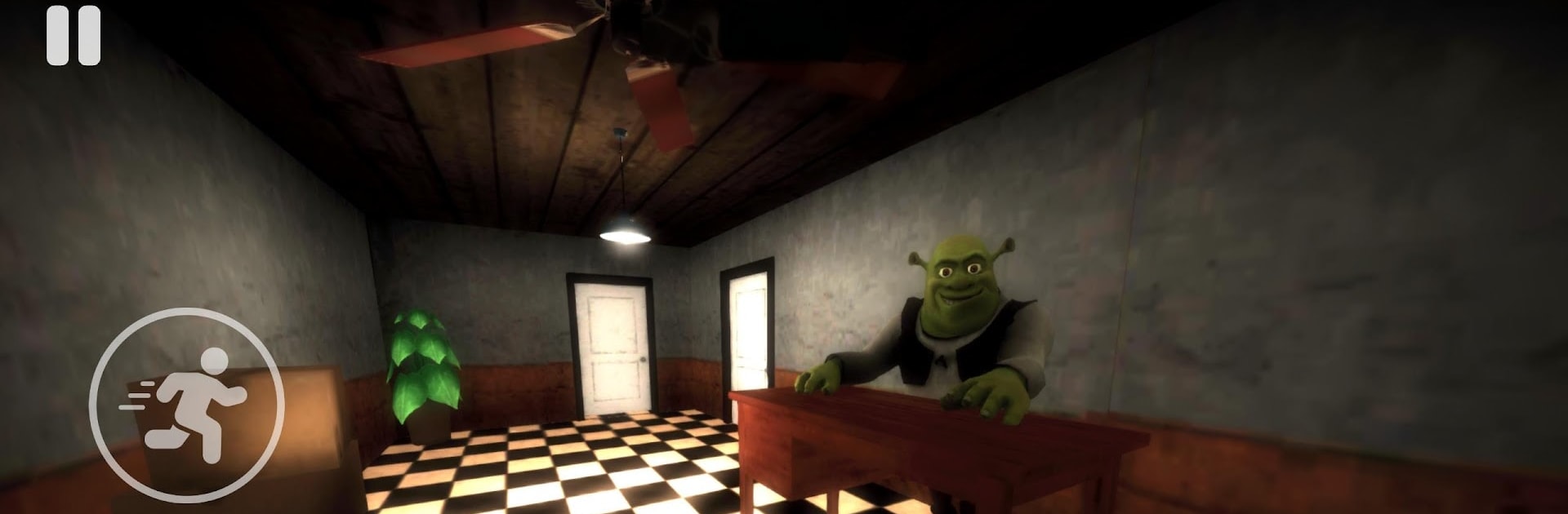
Five Nights at Shrek’s Hotel

Five Nights at Shrek’s Hotel

Adventure

| 3A BUREAU

Play on PC with BlueStacks or from our cloud

  • Overview
  • Game Features
  • How to Play

Page Modified On: May 25, 2026

Play Five Nights at Shrek’s Hotel on PC or Mac

Five Nights at Shrek’s Hotel by 3A BUREAU has plenty to keep you busy. BlueStacks lets you play it on PC or Mac with more screen space, better control, and fewer mobile limits.

About the Game

Five Nights at Shrek’s Hotel is a creepy, offbeat Adventure where you’re stuck spending a few nights in the cheapest place you could find—run by a very familiar green manager. You’re between homes, watching your wallet, and just need a bed. But the longer you stay, the more the hotel starts to feel… wrong. Each night brings new noises, weirder encounters, and a rising sense that something in those halls doesn’t want company.

Game Features

  • Oddly Cozy, Deeply Unsettling Setup: You check into a budget hotel run by Shrek, and at first everything seems fine—until it absolutely isn’t.
  • Night-by-Night Escalation: Five nights, each one more intense than the last, with fresh disturbances that push your nerves to the edge.
  • Suspenseful Exploration: Step out of your room to investigate empty corridors and shadowy corners; every hallway has a story you probably don’t want to hear at midnight.
  • Tension You Can Feel: Footsteps, creaks, distant thuds—sound design turns small noises into big problems, and jump scares hit when you least expect them.
  • Simple to Pick Up: No complicated systems or tutorials; you’ll rely on instinct, timing, and a bit of courage to keep moving.
  • Choice Under Pressure: Do you check that suspicious door or pretend you didn’t hear anything? Your curiosity might help—or make things worse.
  • Compact, Replay-Friendly Sessions: Short, focused nights make it easy to try different approaches and see how far your nerve can take you.
  • Smooth on PC with BlueStacks: Crisp controls and steady performance help you keep your cool when the hotel doesn’t.

BlueStacks gives you more room to focus on the game and less time adjusting around mobile limitations.


Game Features

Enhancements

  • Macros
  • Multi Instance
  • Multi Instance Sync
  • Script
  • Enhancements
Macros

Macros

Automate the predictable in Five Nights at Shrek’s Hotel and transform your gameplay with Macros. Get access to inventive Macros in the BlueStacks Macro Community
Multi Instance

Multi Instance

Play Five Nights at Shrek’s Hotel on one window. And chat with your friend on the other. Press CTRL + Shift + 8 to open the Multi-Instance Manager. And start creating fresh instances or clone an existing one.
Multi Instance Sync

Multi Instance Sync

Play Five Nights at Shrek’s Hotel with the power of Multi-Instance Sync. Replicate what you are doing on the main instance on all other instances. Level up faster, play more.
Script

Script

Script your way to gaming glory in Five Nights at Shrek’s Hotel with BlueStacks Script. Write and run a set of commands to automate repeated tasks. Trigger the command by assigning it to any key.
Read More

How to Download and Play Five Nights at Shrek’s Hotel on PC or Mac

  • Download and install BlueStacks on your PC or Mac

  • Complete Google sign-in to access the Play Store, or do it later

  • Look for Five Nights at Shrek’s Hotel in the search bar at the top right corner

  • Click to install Five Nights at Shrek’s Hotel from the search results

  • Complete Google sign-in (if you skipped step 2) to install Five Nights at Shrek’s Hotel

  • Click the Five Nights at Shrek’s Hotel icon on the home screen to start playing

video
Watch Video

Minimum System Requirements

With BlueStacks 5, you can get started on a PC that fulfills the following requirements.

  • Operating System

    Microsoft Windows 7 or above, macOS 11 (Big Sur) or above

  • Processor

    Intel, AMD or Apple Silicon Processor

  • RAM

    at least 4GB

  • HDD

    10GB Free Disk Space

Note:

* You must be an Administrator on your PC. Up to date graphics drivers from Microsoft or the chipset vendor.

Five Nights at Shrek’s Hotel - FAQs

  • How to play Five Nights at Shrek’s Hotel on Windows PC & Mac?

    Play Five Nights at Shrek’s Hotel on your PC or Mac by following these simple steps.

    • Click on 'Play Five Nights at Shrek’s Hotel on PC’ to download BlueStacks
    • Install it and log-in to Google Play Store
    • Launch and play the game.
  • Why is BlueStacks the fastest and safest platform to play games on PC?

    BlueStacks respects your privacy and is always safe and secure to use. It does not carry any malware, spyware, or any sort of additional software that could harm your PC.

    It is engineered to optimize speed and performance for a seamless gaming experience.

  • What are Five Nights at Shrek’s Hotel PC requirements?

    Minimum requirement to run Five Nights at Shrek’s Hotel on your PC

    • OS: Microsoft Windows 7 or above MacOS 11 (Big Sur) or above
    • Processor: Intel, AMD or Apple Silicon Processor
    • RAM: Your PC must have at least 4GB of RAM. (Note that having 4GB or more disk space is not a substitute for RAM)
    • HDD: 10GB Free Disk Space.
    • You must be an Administrator on your PC.







