Garage: Bad Dream Adventure

Garage: Bad Dream Adventure

Adventure

| 作場金属製作所 Sakuba Metal Works

Play on PC with BlueStacks or from our cloud

  • Overview
  • Game Features
  • How to Play

Page Modified On: December 05, 2025

Play Garage: Bad Dream Adventure on PC or Mac

Step into the World of Garage: Bad Dream Adventure, a thrilling Adventure game from the house of 作場金属製作所 Sakuba Metal Works. Play this Android game on BlueStacks App Player and experience immersive gaming on PC or Mac.

About the Game

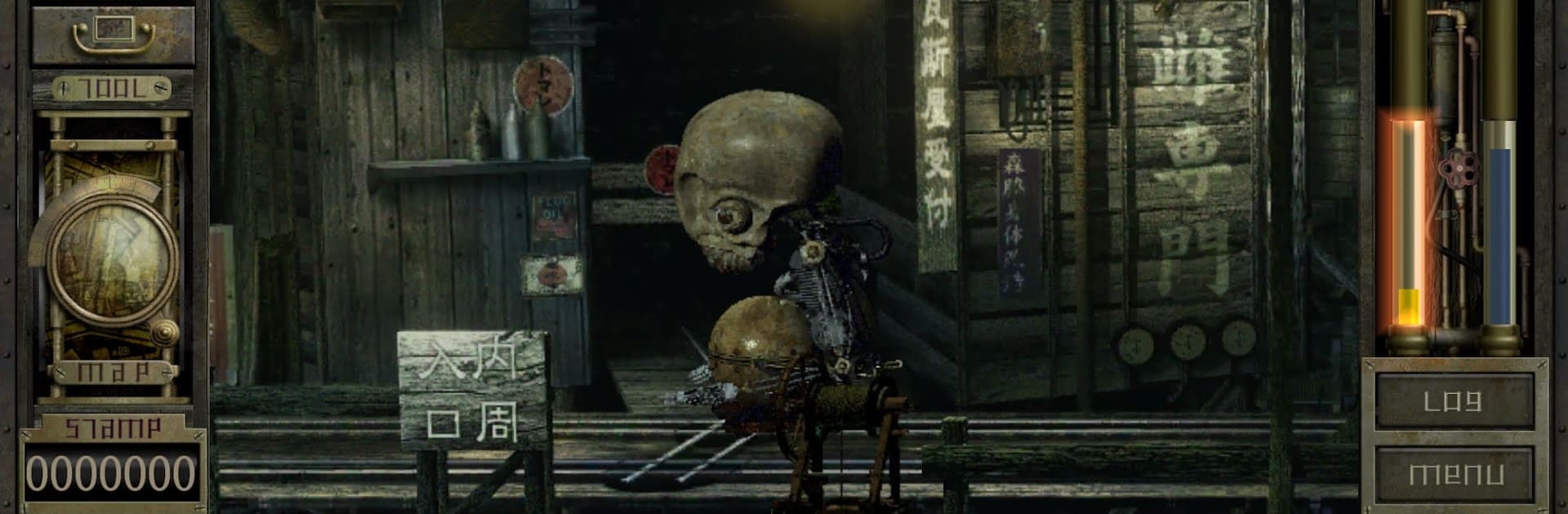
Garage: Bad Dream Adventure is a surreal Adventure from 作場金属製作所 Sakuba Metal Works that drops you into a claustrophobic world built from a troubled mind. You wake in a maze of wet wood and rusted metal, reshaped into a strange biomechanical body, unsure whether escaping is the right move—or even possible. It’s eerie without going full horror, and it rewards patience, curiosity, and a knack for poking at systems to see how they react.

Game Features

  • A mind-born world: Explore sewage canals, crooked wooden structures, and corroded corridors that follow their own unsettling logic.
  • Biomechanical body mods: Tinker with organic-and-metal parts to adjust stats, unlock tools, and subtly change how you navigate and survive.
  • Mystery-first exploration: Track down clues, decode odd mechanisms, and find routes through an intricate, maze-like layout.
  • Living systems: Energy circulation, a grimy ecosystem, and resource loops aren’t just lore—they directly shape how you play.
  • Fishing that matters: An unexpectedly deep fishing system fuels upgrades and keeps your hybrid body humming.
  • Choices with weight: Subquests, small decisions, and major calls can bend the narrative toward multiple endings.
  • Remastered presentation: Retouched art, smoother video playback, a cleaner UI, and improved balance make the mobile version more readable and satisfying.
  • Classic roots, fresh feel: Built on the 1999 cult original and carefully modernized while keeping that anxious, off-kilter mood.
  • Optional PC comfort: Prefer a bigger display and mouse control? You can run it on your computer with BlueStacks when that setup suits you.

Start your journey now. Download the game on BlueStacks, invite your friends, and march on a new adventure.


Game Features

Enhancements

  • Macros
  • Multi Instance
  • Multi Instance Sync
  • Script
  • Enhancements
Macros

Macros

Automate the predictable in Garage: Bad Dream Adventure and transform your gameplay with Macros. Get access to inventive Macros in the BlueStacks Macro Community
Multi Instance

Multi Instance

Play Garage: Bad Dream Adventure on one window. And chat with your friend on the other. Press CTRL + Shift + 8 to open the Multi-Instance Manager. And start creating fresh instances or clone an existing one.
Multi Instance Sync

Multi Instance Sync

Play Garage: Bad Dream Adventure with the power of Multi-Instance Sync. Replicate what you are doing on the main instance on all other instances. Level up faster, play more.
Script

Script

Script your way to gaming glory in Garage: Bad Dream Adventure with BlueStacks Script. Write and run a set of commands to automate repeated tasks. Trigger the command by assigning it to any key.
Read More

How to Download and Play Garage: Bad Dream Adventure on PC or Mac

  • Download and install BlueStacks on your PC or Mac

  • Complete Google sign-in to access the Play Store, or do it later

  • Look for Garage: Bad Dream Adventure in the search bar at the top right corner

  • Click to install Garage: Bad Dream Adventure from the search results

  • Complete Google sign-in (if you skipped step 2) to install Garage: Bad Dream Adventure

  • Click the Garage: Bad Dream Adventure icon on the home screen to start playing

video
Watch Video

Minimum System Requirements

With BlueStacks 5, you can get started on a PC that fulfills the following requirements.

  • Operating System

    Microsoft Windows 7 or above, macOS 11 (Big Sur) or above

  • Processor

    Intel, AMD or Apple Silicon Processor

  • RAM

    at least 4GB

  • HDD

    10GB Free Disk Space

Note:

* You must be an Administrator on your PC. Up to date graphics drivers from Microsoft or the chipset vendor.

Garage: Bad Dream Adventure - FAQs

  • How to play Garage: Bad Dream Adventure on Windows PC & Mac?

    Play Garage: Bad Dream Adventure on your PC or Mac by following these simple steps.

    • Click on 'Play Garage: Bad Dream Adventure on PC’ to download BlueStacks
    • Install it and log-in to Google Play Store
    • Launch and play the game.
  • Why is BlueStacks the fastest and safest platform to play games on PC?

    BlueStacks respects your privacy and is always safe and secure to use. It does not carry any malware, spyware, or any sort of additional software that could harm your PC.

    It is engineered to optimize speed and performance for a seamless gaming experience.

  • What are Garage: Bad Dream Adventure PC requirements?

    Minimum requirement to run Garage: Bad Dream Adventure on your PC

    • OS: Microsoft Windows 7 or above MacOS 11 (Big Sur) or above
    • Processor: Intel, AMD or Apple Silicon Processor
    • RAM: Your PC must have at least 4GB of RAM. (Note that having 4GB or more disk space is not a substitute for RAM)
    • HDD: 10GB Free Disk Space.
    • You must be an Administrator on your PC.