Iron Shadow : Undestroyed V2

Iron Shadow : Undestroyed V2

Adventure

| Dreamplay Games

Play on PC with BlueStacks or from our cloud

  • Overview
  • Game Features
  • How to Play

Page Modified On: August 11, 2026

Play Iron Shadow : Undestroyed V2 on PC or Mac

Explore a whole new adventure with Iron Shadow : Undestroyed V2, a Adventure game created by Dreamplay Games. Experience great gameplay with BlueStacks, the most popular gaming platform to play Android games on your PC or Mac.

About the Game

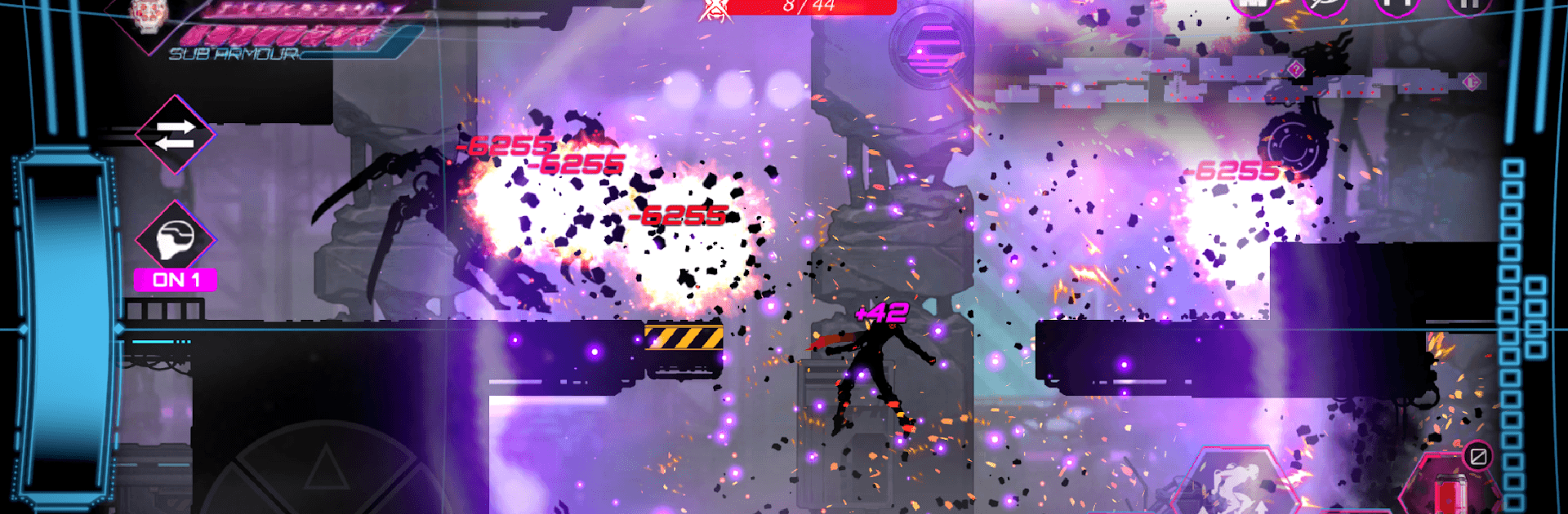
Iron Shadow : Undestroyed V2 drops you into a bleak, machine-ruled future and hands you the tools to fight back. It’s an Adventure that blends slick, side-scrolling hack-and-slash action with smart build choices and tense encounters. Play on mobile or fire it up with BlueStacks if you want crisp visuals and tighter controls while you slice through the darkness.

Game Features

  • Shadow-Style Combat: Cut through enemies with fast, precise strikes that feel weighty and responsive. Timing your dodges and combos matters as much as raw power.
  • Four Ways to Suffer (or Shine): Each stage offers multiple difficulty levels, so you can learn the ropes or push your skills to the limit without feeling stuck.
  • 70+ Weapons to Tinker With: Find, summon, and upgrade a huge arsenal—blades, blasters, and everything between—then fine-tune them to fit your playstyle.
  • Skills That Change Fights: Trigger powerful abilities to stun, shred, or outmaneuver tougher foes when the pressure spikes.
  • Units With Personality: Swap between diverse playable units, each with a distinct combat rhythm and toolkit that makes runs feel fresh.
  • Controller Support: Prefer a gamepad? Plug one in and go. The controls map cleanly for smooth, reliable inputs.
  • Gritty 2D Aesthetic: Brooding, high-quality artwork paints a world swallowed by steel and shadow, with crisp effects that make every strike pop.
  • Progress Built for Replays: Tweak builds, upgrade gear, and refine routes as enemy patterns evolve—perfect for short bursts or long sessions.

Ready to top the leaderboard? We bet you do. Let precise controls and sharp visuals optimized on BlueStacks lead you to victory.


Game Features

Enhancements

  • Macros
  • Multi Instance
  • Multi Instance Sync
  • Script
  • Enhancements
Macros

Macros

Automate the predictable in Iron Shadow : Undestroyed V2 and transform your gameplay with Macros. Get access to inventive Macros in the BlueStacks Macro Community
Multi Instance

Multi Instance

Play Iron Shadow : Undestroyed V2 on one window. And chat with your friend on the other. Press CTRL + Shift + 8 to open the Multi-Instance Manager. And start creating fresh instances or clone an existing one.
Multi Instance Sync

Multi Instance Sync

Play Iron Shadow : Undestroyed V2 with the power of Multi-Instance Sync. Replicate what you are doing on the main instance on all other instances. Level up faster, play more.
Script

Script

Script your way to gaming glory in Iron Shadow : Undestroyed V2 with BlueStacks Script. Write and run a set of commands to automate repeated tasks. Trigger the command by assigning it to any key.
Read More

How to Download and Play Iron Shadow : Undestroyed V2 on PC or Mac

  • Download and install BlueStacks on your PC or Mac

  • Complete Google sign-in to access the Play Store, or do it later

  • Look for Iron Shadow : Undestroyed V2 in the search bar at the top right corner

  • Click to install Iron Shadow : Undestroyed V2 from the search results

  • Complete Google sign-in (if you skipped step 2) to install Iron Shadow : Undestroyed V2

  • Click the Iron Shadow : Undestroyed V2 icon on the home screen to start playing

video
Watch Video

Minimum System Requirements

With BlueStacks 5, you can get started on a PC that fulfills the following requirements.

  • Operating System

    Microsoft Windows 7 or above, macOS 11 (Big Sur) or above

  • Processor

    Intel, AMD or Apple Silicon Processor

  • RAM

    at least 4GB

  • HDD

    10GB Free Disk Space

Note:

* You must be an Administrator on your PC. Up to date graphics drivers from Microsoft or the chipset vendor.

Iron Shadow : Undestroyed V2 - FAQs

  • How to play Iron Shadow : Undestroyed V2 on Windows PC & Mac?

    Play Iron Shadow : Undestroyed V2 on your PC or Mac by following these simple steps.

    • Click on 'Play Iron Shadow : Undestroyed V2 on PC’ to download BlueStacks
    • Install it and log-in to Google Play Store
    • Launch and play the game.
  • Why is BlueStacks the fastest and safest platform to play games on PC?

    BlueStacks respects your privacy and is always safe and secure to use. It does not carry any malware, spyware, or any sort of additional software that could harm your PC.

    It is engineered to optimize speed and performance for a seamless gaming experience.

  • What are Iron Shadow : Undestroyed V2 PC requirements?

    Minimum requirement to run Iron Shadow : Undestroyed V2 on your PC

    • OS: Microsoft Windows 7 or above MacOS 11 (Big Sur) or above
    • Processor: Intel, AMD or Apple Silicon Processor
    • RAM: Your PC must have at least 4GB of RAM. (Note that having 4GB or more disk space is not a substitute for RAM)
    • HDD: 10GB Free Disk Space.
    • You must be an Administrator on your PC.