Monster Truck Game Robot Fight

Monster Truck Game Robot Fight

Adventure

| Battle Jobs - Shooting Games & Robot Games

Play on PC with BlueStacks or from our cloud

  • Overview
  • Game Features
  • How to Play

Page Modified On: August 15, 2026

Play Monster Truck Game Robot Fight on PC or Mac

Explore a whole new adventure with Monster Truck Game Robot Fight, a Adventure game created by Battle Jobs – Shooting Games & Robot Games. Experience great gameplay with BlueStacks, the most popular gaming platform to play Android games on your PC or Mac.

About the Game

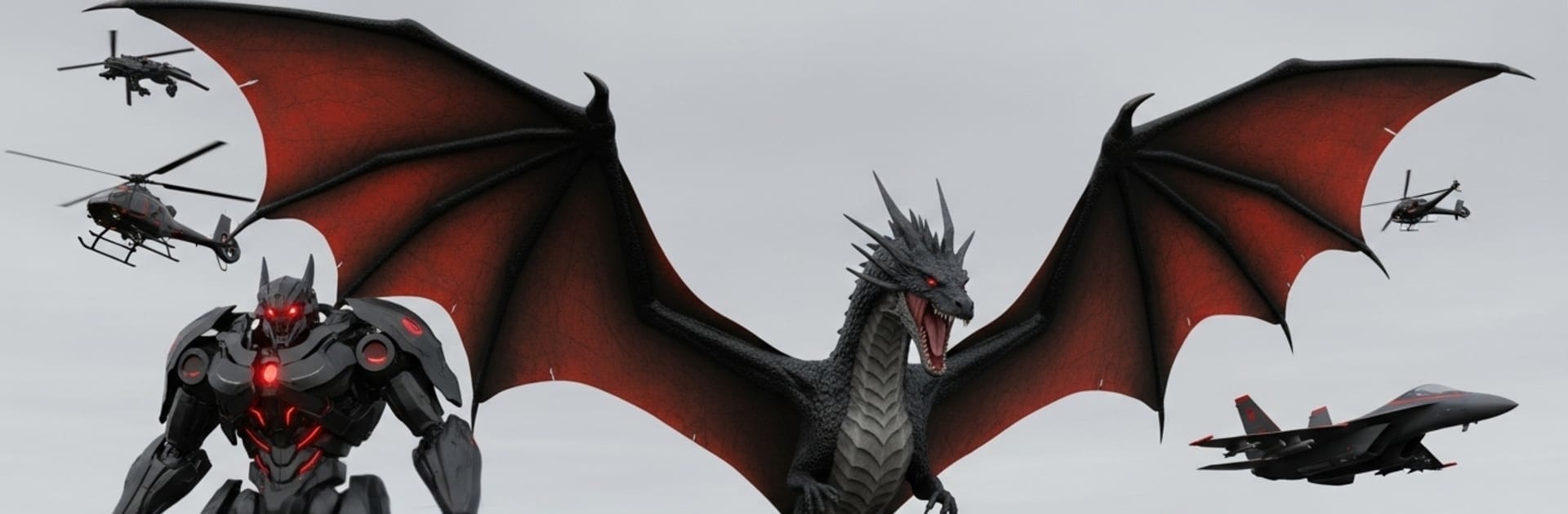
Monster Truck Game Robot Fight is an Adventure that mashes up heavy-duty driving with full-throttle mech combat. One minute you’re tearing up dirt trails in a big-tire beast; the next, you’re a fire-spewing dragon robot or a helicopter frame raining shots from above. Expect fast switches between forms, snappy shooting, and wild set pieces across city streets and rugged off-road zones. Prefer a bigger screen and steadier aim? It also runs smoothly on PC with BlueStacks.

Game Features

  • Multi-Form Transformations: Swap on the fly between monster truck, dragon bot, helicopter, and classic mech forms to handle whatever the fight throws at you.
  • Off-Road Power Slides: Feel the weight and grip of a true monster truck as you smash through ramps, mud, and uneven terrain with satisfying control.
  • Aerial Combat, Your Way: Take the skies as a dragon or helicopter, dodge incoming fire, and strike back with breath blasts, rockets, and cannons.
  • City Showdowns: Push back invading machines and alien tech in dense urban districts filled with traffic, tight corners, and ambush spots.
  • Quick, Intuitive Controls: Transform, boost, and unleash special abilities with simple inputs that keep the action fast and fluid.
  • Mission Variety: Jump into boss encounters, escort runs, time trials, and survival waves—short, punchy objectives that reward smart form switching.
  • Punchy 3D Presentation: Bright effects, chunky explosions, and bold enemy designs land with clean visuals and impactful sound.
  • Grow Your Arsenal: Earn upgrades and new powers for each form, then mix them to build your own favorite combat loadout.

Start playing Monster Truck Game Robot Fight on BlueStacks and get a smoother, more comfortable PC or Mac setup.


Game Features

Enhancements

  • Macros
  • Multi Instance
  • Multi Instance Sync
  • Script
  • Enhancements
Macros

Macros

Automate the predictable in Monster Truck Game Robot Fight and transform your gameplay with Macros. Get access to inventive Macros in the BlueStacks Macro Community
Multi Instance

Multi Instance

Play Monster Truck Game Robot Fight on one window. And chat with your friend on the other. Press CTRL + Shift + 8 to open the Multi-Instance Manager. And start creating fresh instances or clone an existing one.
Multi Instance Sync

Multi Instance Sync

Play Monster Truck Game Robot Fight with the power of Multi-Instance Sync. Replicate what you are doing on the main instance on all other instances. Level up faster, play more.
Script

Script

Script your way to gaming glory in Monster Truck Game Robot Fight with BlueStacks Script. Write and run a set of commands to automate repeated tasks. Trigger the command by assigning it to any key.
Read More

How to Download and Play Monster Truck Game Robot Fight on PC or Mac

  • Download and install BlueStacks on your PC or Mac

  • Complete Google sign-in to access the Play Store, or do it later

  • Look for Monster Truck Game Robot Fight in the search bar at the top right corner

  • Click to install Monster Truck Game Robot Fight from the search results

  • Complete Google sign-in (if you skipped step 2) to install Monster Truck Game Robot Fight

  • Click the Monster Truck Game Robot Fight icon on the home screen to start playing

video
Watch Video

Minimum System Requirements

With BlueStacks 5, you can get started on a PC that fulfills the following requirements.

  • Operating System

    Microsoft Windows 7 or above, macOS 11 (Big Sur) or above

  • Processor

    Intel, AMD or Apple Silicon Processor

  • RAM

    at least 4GB

  • HDD

    10GB Free Disk Space

Note:

* You must be an Administrator on your PC. Up to date graphics drivers from Microsoft or the chipset vendor.

Monster Truck Game Robot Fight - FAQs

  • How to play Monster Truck Game Robot Fight on Windows PC & Mac?

    Play Monster Truck Game Robot Fight on your PC or Mac by following these simple steps.

    • Click on 'Play Monster Truck Game Robot Fight on PC’ to download BlueStacks
    • Install it and log-in to Google Play Store
    • Launch and play the game.
  • Why is BlueStacks the fastest and safest platform to play games on PC?

    BlueStacks respects your privacy and is always safe and secure to use. It does not carry any malware, spyware, or any sort of additional software that could harm your PC.

    It is engineered to optimize speed and performance for a seamless gaming experience.

  • What are Monster Truck Game Robot Fight PC requirements?

    Minimum requirement to run Monster Truck Game Robot Fight on your PC

    • OS: Microsoft Windows 7 or above MacOS 11 (Big Sur) or above
    • Processor: Intel, AMD or Apple Silicon Processor
    • RAM: Your PC must have at least 4GB of RAM. (Note that having 4GB or more disk space is not a substitute for RAM)
    • HDD: 10GB Free Disk Space.
    • You must be an Administrator on your PC.