Nuclear Prosperity: Dead City

Nuclear Prosperity: Dead City

Adventure

| Play More Games

Play on PC with BlueStacks or from our cloud

  • Overview
  • Game Features
  • How to Play

Page Modified On: October 30, 2026

Play Nuclear Prosperity: Dead City on PC or Mac

Step into the World of Nuclear Prosperity: Dead City, a thrilling Adventure game from the house of Play More Games. Play this Android game on BlueStacks App Player and experience immersive gaming on PC or Mac.

About the Game

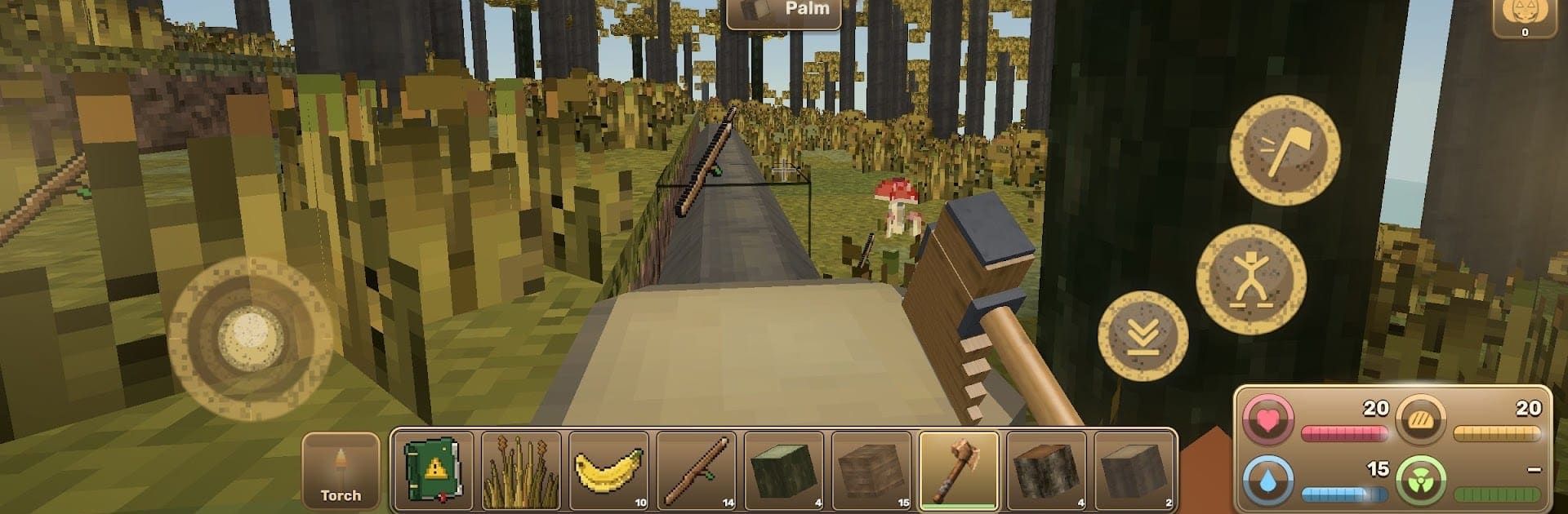
Nuclear Prosperity: Dead City drops you into a bleak, post‑war wasteland where every run spins up a fresh world to explore and survive. It’s an Adventure that mixes open‑ended survival, deep crafting, and haunting urban exploration as you scavenge, build, and push into places you probably shouldn’t. Prefer a bigger screen? It runs smoothly on BlueStacks.

Game Features

  • Procedurally Generated World: Start in a new map every time, from pine forests and snowfields to deserts, tropics, and open ocean, dotted with ruins, a nuclear plant, a military base, an airport, and a sprawling dead Soviet city.
  • From Bare Hands to Hardware: Chop wood, craft your first tools, light a campfire, and keep an eye on health, hunger, thirst, body temperature, and radiation as you make it through the first night.
  • Quests That Build You Up: Tackle 120 guided tasks that carry you from stone and smelting to electricity, machinery, circuits, and chips—eventually powering an oil rig and a full refinery.
  • The Dead City: Wander towering apartment blocks with stairwells, basements, and rooftops; poke into schools, a hospital, a culture palace, a cinema, and a square with a T‑34 memorial surrounded by frozen traffic.
  • Night Tension: After dark, expect distant gunshots, prowling dogs, and unsettling silhouettes in windows—flashlights help, but a solid shelter helps more.
  • Radiation Hotspots: Hear the Geiger counter chatter and suit up; hot zones will eat you alive without a proper hazmat setup.
  • Hostile Company and Firepower: Face armed marauders, bears, and wild dogs, and fight back with pistols, rifles, bows, crossbows, grenades, assault rifles, and even a rocket launcher.
  • Build, Wire, Automate: Throw up a cabin, a fortress, or a factory using blocks, then run wires, pipes, and conveyors; place lamps and furniture to make it yours.
  • Creative Mode Freedom: Toggle a mode that lets you fly and place anything instantly when you’re in the mood to design without limits.
  • Weather and World Detail: Deal with day–night cycles, rain, thunderstorms, snowfall, blizzards, and sandstorms while exploring metro stations with escalators, sealed bunkers, supply crates, and a wandering trader.
  • Co‑op Survival: Team up over a local network (Wi‑Fi) to share loot routes, split chores, and watch each other’s backs.
  • Skins With Personality: Switch up your look with dozens of outfits—from a hard‑working janitor to a police officer or a ghostly nod to Pripyat.

BlueStacks gives you more room to focus on the game and less time adjusting around mobile limitations.


Game Features

Enhancements

  • Macros
  • Multi Instance
  • Multi Instance Sync
  • Script
  • Enhancements
Macros

Macros

Automate the predictable in Nuclear Prosperity: Dead City and transform your gameplay with Macros. Get access to inventive Macros in the BlueStacks Macro Community
Multi Instance

Multi Instance

Play Nuclear Prosperity: Dead City on one window. And chat with your friend on the other. Press CTRL + Shift + 8 to open the Multi-Instance Manager. And start creating fresh instances or clone an existing one.
Multi Instance Sync

Multi Instance Sync

Play Nuclear Prosperity: Dead City with the power of Multi-Instance Sync. Replicate what you are doing on the main instance on all other instances. Level up faster, play more.
Script

Script

Script your way to gaming glory in Nuclear Prosperity: Dead City with BlueStacks Script. Write and run a set of commands to automate repeated tasks. Trigger the command by assigning it to any key.
Read More

How to Download and Play Nuclear Prosperity: Dead City on PC or Mac

  • Download and install BlueStacks on your PC or Mac

  • Complete Google sign-in to access the Play Store, or do it later

  • Look for Nuclear Prosperity: Dead City in the search bar at the top right corner

  • Click to install Nuclear Prosperity: Dead City from the search results

  • Complete Google sign-in (if you skipped step 2) to install Nuclear Prosperity: Dead City

  • Click the Nuclear Prosperity: Dead City icon on the home screen to start playing

video
Watch Video

Minimum System Requirements

With BlueStacks 5, you can get started on a PC that fulfills the following requirements.

  • Operating System

    Microsoft Windows 7 or above, macOS 11 (Big Sur) or above

  • Processor

    Intel, AMD or Apple Silicon Processor

  • RAM

    at least 4GB

  • HDD

    10GB Free Disk Space

Note:

* You must be an Administrator on your PC. Up to date graphics drivers from Microsoft or the chipset vendor.

Nuclear Prosperity: Dead City - FAQs

  • How to play Nuclear Prosperity: Dead City on Windows PC & Mac?

    Play Nuclear Prosperity: Dead City on your PC or Mac by following these simple steps.

    • Click on 'Play Nuclear Prosperity: Dead City on PC’ to download BlueStacks
    • Install it and log-in to Google Play Store
    • Launch and play the game.
  • Why is BlueStacks the fastest and safest platform to play games on PC?

    BlueStacks respects your privacy and is always safe and secure to use. It does not carry any malware, spyware, or any sort of additional software that could harm your PC.

    It is engineered to optimize speed and performance for a seamless gaming experience.

  • What are Nuclear Prosperity: Dead City PC requirements?

    Minimum requirement to run Nuclear Prosperity: Dead City on your PC

    • OS: Microsoft Windows 7 or above MacOS 11 (Big Sur) or above
    • Processor: Intel, AMD or Apple Silicon Processor
    • RAM: Your PC must have at least 4GB of RAM. (Note that having 4GB or more disk space is not a substitute for RAM)
    • HDD: 10GB Free Disk Space.
    • You must be an Administrator on your PC.