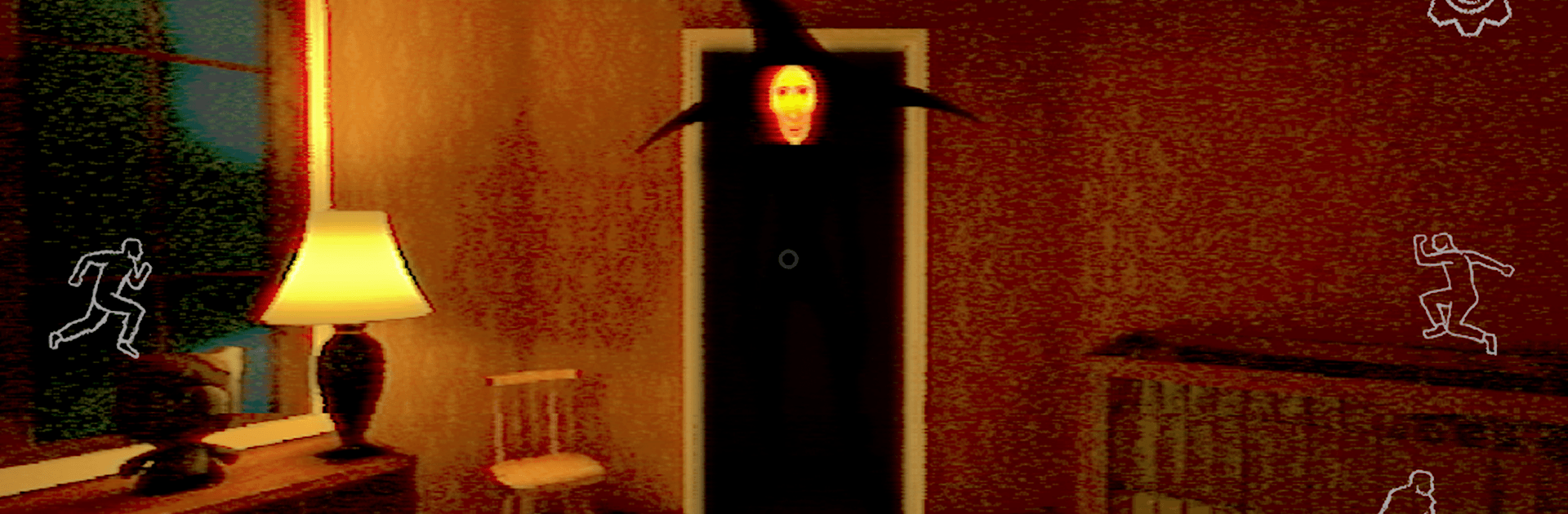
Obelisk Analog Horror Game

Obelisk Analog Horror Game

Adventure

| CapyCapy Studio

Play on PC with BlueStacks or from our cloud

  • Overview
  • Game Features
  • How to Play

Page Modified On: April 07, 2026

Play Obelisk Analog Horror Game on PC or Mac

Explore a whole new adventure with Obelisk Analog Horror Game, a Adventure game created by CapyCapy Studio. Experience great gameplay with BlueStacks, the most popular gaming platform to play Android games on your PC or Mac.

About the Game

Obelisk Analog Horror Game turns a whispered internet nightmare into a tense, first-person Adventure you can’t quite shake. You’re stuck in the House with no windows—a shifting maze where rooms don’t behave and an “imaginary friend” isn’t so imaginary. Expect quiet stalking, strange tasks, and crunchy VHS vibes that make every flicker feel wrong.

Game Features

  • Five Nights, Worse Each Time: Make it through a full run of five nights, with harder objectives and a more aggressive presence closing in as you go.
  • Stealth, Not Combat: You don’t fight here—you disappear. Slip into closets, crawl under beds, duck behind furniture, and wait out danger. Footsteps, breathing, and static are your early warnings.
  • The House With No Windows: Explore a claustrophobic, ever-shifting layout that hides shortcuts, locked spaces, and unsettling dead ends. The place itself feels like it’s watching.
  • Analog Interference: Grainy video, tracking lines, and warped audio sell the retro horror feel. When the static spikes, you know it’s nearby.
  • Cryptic Tasks and Puzzles: Complete unnerving chores, untangle codes, and piece together clues that don’t always want to be found.
  • Notes, Tapes, and Clues: Read scattered notes and watch tapes to dig into the deeper lore. Every scrap might help—if your nerves hold.
  • The Obelisk Hunts You: An unblinking entity roams the halls and reacts to noise and movement. Break line of sight, stay still, and keep calm when it lingers.
  • Mood-Heavy Sound Design: Directional creaks, distant knocks, and audio glitches guide your choices—and occasionally mislead you.
  • Made by CapyCapy Studio: A focused, psychological take on the Adventure genre that leans into suspense over jump scares.
  • Play Comfortably: Prefer a bigger screen and steady controls? Running it on BlueStacks with headphones makes tracking those tiny sound cues a lot easier.

Ready to top the leaderboard? We bet you do. Let precise controls and sharp visuals optimized on BlueStacks lead you to victory.


Game Features

Enhancements

  • Macros
  • Multi Instance
  • Multi Instance Sync
  • Script
  • Enhancements
Macros

Macros

Automate the predictable in Obelisk Analog Horror Game and transform your gameplay with Macros. Get access to inventive Macros in the BlueStacks Macro Community
Multi Instance

Multi Instance

Play Obelisk Analog Horror Game on one window. And chat with your friend on the other. Press CTRL + Shift + 8 to open the Multi-Instance Manager. And start creating fresh instances or clone an existing one.
Multi Instance Sync

Multi Instance Sync

Play Obelisk Analog Horror Game with the power of Multi-Instance Sync. Replicate what you are doing on the main instance on all other instances. Level up faster, play more.
Script

Script

Script your way to gaming glory in Obelisk Analog Horror Game with BlueStacks Script. Write and run a set of commands to automate repeated tasks. Trigger the command by assigning it to any key.
Read More

How to Download and Play Obelisk Analog Horror Game on PC or Mac

  • Download and install BlueStacks on your PC or Mac

  • Complete Google sign-in to access the Play Store, or do it later

  • Look for Obelisk Analog Horror Game in the search bar at the top right corner

  • Click to install Obelisk Analog Horror Game from the search results

  • Complete Google sign-in (if you skipped step 2) to install Obelisk Analog Horror Game

  • Click the Obelisk Analog Horror Game icon on the home screen to start playing

video
Watch Video

Minimum System Requirements

With BlueStacks 5, you can get started on a PC that fulfills the following requirements.

  • Operating System

    Microsoft Windows 7 or above, macOS 11 (Big Sur) or above

  • Processor

    Intel, AMD or Apple Silicon Processor

  • RAM

    at least 4GB

  • HDD

    10GB Free Disk Space

Note:

* You must be an Administrator on your PC. Up to date graphics drivers from Microsoft or the chipset vendor.

Obelisk Analog Horror Game - FAQs

  • How to play Obelisk Analog Horror Game on Windows PC & Mac?

    Play Obelisk Analog Horror Game on your PC or Mac by following these simple steps.

    • Click on 'Play Obelisk Analog Horror Game on PC’ to download BlueStacks
    • Install it and log-in to Google Play Store
    • Launch and play the game.
  • Why is BlueStacks the fastest and safest platform to play games on PC?

    BlueStacks respects your privacy and is always safe and secure to use. It does not carry any malware, spyware, or any sort of additional software that could harm your PC.

    It is engineered to optimize speed and performance for a seamless gaming experience.

  • What are Obelisk Analog Horror Game PC requirements?

    Minimum requirement to run Obelisk Analog Horror Game on your PC

    • OS: Microsoft Windows 7 or above MacOS 11 (Big Sur) or above
    • Processor: Intel, AMD or Apple Silicon Processor
    • RAM: Your PC must have at least 4GB of RAM. (Note that having 4GB or more disk space is not a substitute for RAM)
    • HDD: 10GB Free Disk Space.
    • You must be an Administrator on your PC.