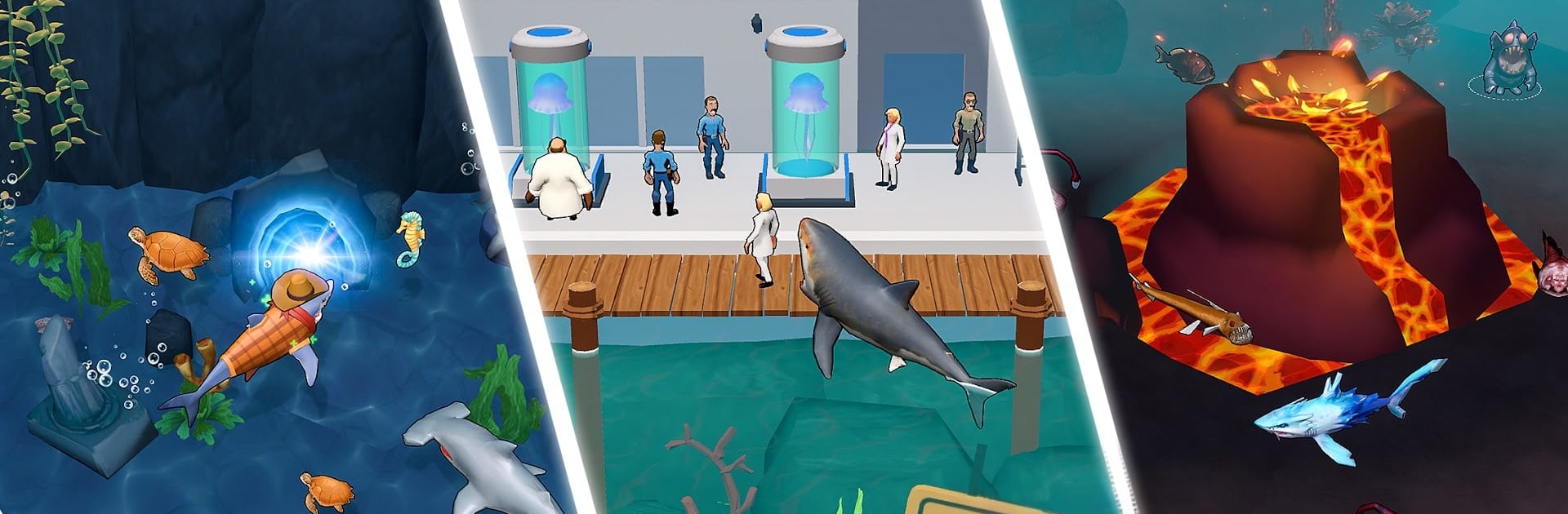
Shark Evolution: Eat & Grow

Shark Evolution: Eat & Grow

Adventure

| Music Avengers

Play on PC with BlueStacks or from our cloud

  • Overview
  • Game Features
  • How to Play

Page Modified On: April 07, 2026

Play Shark Evolution: Eat & Grow on PC or Mac

Join millions to experience Shark Evolution: Eat & Grow, an exciting Adventure game from Music Avengers. With BlueStacks App Player, you are always a step ahead of your opponent, ready to outplay them with faster gameplay and better control with the mouse and keyboard on your PC or Mac.

About the Game

Shark Evolution: Eat & Grow is a snappy, hunger-fueled Adventure where you start as a nibbling newcomer and end up as a terrifying ocean heavyweight. Chomp through anything that looks edible, evolve into weirder and meaner forms, and keep pushing the limits of what a shark can be. Created by Music Avengers, it feels great on mobile—and if you prefer a bigger screen and smooth controls, running it on BlueStacks is an easy win.

Game Features

  • Feed and transform: Every snack powers your next evolution, unlocking new bodies and fresh ways to hunt. The more you eat, the wilder your upgrades get.
  • Build your beast: Customize your predator’s strengths by boosting bite damage, raising max health, and improving regeneration so you can recover right in the middle of a brawl.
  • Boss showdowns: Face off against colossal sea legends in staged encounters that demand smart planning, sharper instincts, and a build that can actually take a hit.
  • Strange mutations: Discover bizarre evolutions—from cyber-enhanced sharks to kraken-like nightmares—that flip your playstyle with unique abilities.
  • Skins with bite: Dress your shark with bold looks, including classics like the Great White, Hammerhead, and Megalodon, along with freaky deep-sea variants.
  • Explore the big blue: Swim through reefs, sift through shipwrecks, and sniff out hidden loot across wide, danger-packed waters.
  • Fill the logbook: Track and collect rare fish, unlucky humans, and mysterious monsters in a satisfying in-game compendium.
  • Progress while you’re away: Your shark keeps hunting when you’re offline, so you return to extra rewards and steady growth.

Get ready for a buttery smooth, high-performance gaming action only on BlueStacks.

Game Features

Enhancements

  • Macros
  • Multi Instance
  • Multi Instance Sync
  • Script
  • Enhancements
Macros

Macros

Automate the predictable in Shark Evolution: Eat & Grow and transform your gameplay with Macros. Get access to inventive Macros in the BlueStacks Macro Community
Multi Instance

Multi Instance

Play Shark Evolution: Eat & Grow on one window. And chat with your friend on the other. Press CTRL + Shift + 8 to open the Multi-Instance Manager. And start creating fresh instances or clone an existing one.
Multi Instance Sync

Multi Instance Sync

Play Shark Evolution: Eat & Grow with the power of Multi-Instance Sync. Replicate what you are doing on the main instance on all other instances. Level up faster, play more.
Script

Script

Script your way to gaming glory in Shark Evolution: Eat & Grow with BlueStacks Script. Write and run a set of commands to automate repeated tasks. Trigger the command by assigning it to any key.
Read More

How to Download and Play Shark Evolution: Eat & Grow on PC or Mac

  • Download and install BlueStacks on your PC or Mac

  • Complete Google sign-in to access the Play Store, or do it later

  • Look for Shark Evolution: Eat & Grow in the search bar at the top right corner

  • Click to install Shark Evolution: Eat & Grow from the search results

  • Complete Google sign-in (if you skipped step 2) to install Shark Evolution: Eat & Grow

  • Click the Shark Evolution: Eat & Grow icon on the home screen to start playing

video
Watch Video

Minimum System Requirements

With BlueStacks 5, you can get started on a PC that fulfills the following requirements.

  • Operating System

    Microsoft Windows 7 or above, macOS 11 (Big Sur) or above

  • Processor

    Intel, AMD or Apple Silicon Processor

  • RAM

    at least 4GB

  • HDD

    10GB Free Disk Space

Note:

* You must be an Administrator on your PC. Up to date graphics drivers from Microsoft or the chipset vendor.

Shark Evolution: Eat & Grow - FAQs

  • How to play Shark Evolution: Eat & Grow on Windows PC & Mac?

    Play Shark Evolution: Eat & Grow on your PC or Mac by following these simple steps.

    • Click on 'Play Shark Evolution: Eat & Grow on PC’ to download BlueStacks
    • Install it and log-in to Google Play Store
    • Launch and play the game.
  • Why is BlueStacks the fastest and safest platform to play games on PC?

    BlueStacks respects your privacy and is always safe and secure to use. It does not carry any malware, spyware, or any sort of additional software that could harm your PC.

    It is engineered to optimize speed and performance for a seamless gaming experience.

  • What are Shark Evolution: Eat & Grow PC requirements?

    Minimum requirement to run Shark Evolution: Eat & Grow on your PC

    • OS: Microsoft Windows 7 or above MacOS 11 (Big Sur) or above
    • Processor: Intel, AMD or Apple Silicon Processor
    • RAM: Your PC must have at least 4GB of RAM. (Note that having 4GB or more disk space is not a substitute for RAM)
    • HDD: 10GB Free Disk Space.
    • You must be an Administrator on your PC.