Spirit Crossing NETFLIX

Spirit Crossing NETFLIX

Adventure

| Netflix, Inc.

Play on PC with BlueStacks or from our cloud

  • Overview
  • Game Features
  • How to Play

Page Modified On: June 17, 2026

Play Spirit Crossing NETFLIX on PC or Mac

Spirit Crossing NETFLIX brings the Adventure genre to life, and throws up exciting challenges for gamers. Developed by Netflix, Inc., this Android game is best experienced on BlueStacks, the World’s #1 app player for PC and Mac users.

About the Game

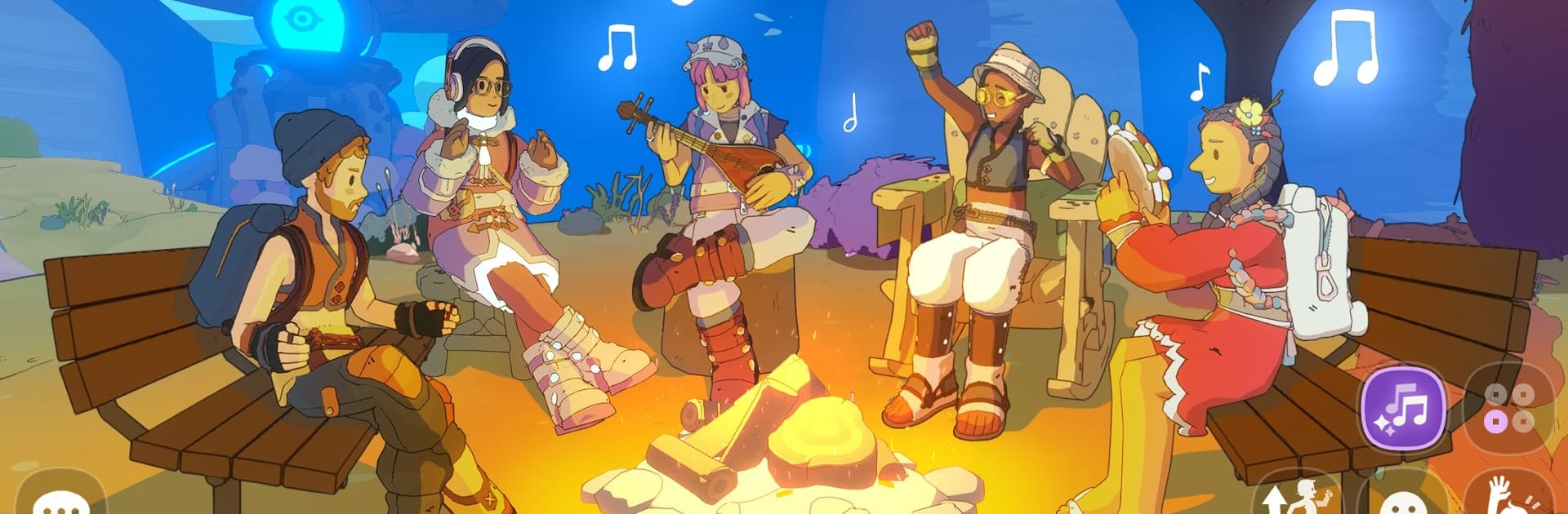
Spirit Crossing NETFLIX is an online Adventure about kindness, community, and a world where humans, bears, and wandering spirits actually hang out. You’ll roam the storm-tossed Crosslands—somewhere between the human and spirit realms—helping neighbors, crafting cool stuff, and turning chance encounters into lasting friendships. It’s relaxed, social, and surprisingly heartfelt, with fresh things to do every time you log in.

Game Features

  • Shared World, Real Connections: Explore a living, always-online village where you’ll meet players, chitchat in the square, swap stories, and throw a little dance party just because.
  • Friends (Human, Bear, and Spirit): Befriend cheerful villagers, lovably goofy bears, and shy spirits who warm up when you lend a hand or leave a thoughtful gift.
  • Build the Waystation Together: Harvest resources, craft supplies, and vote on community projects—lush orchards, sky-high towers, cozy corners—until the town truly feels like home.
  • Your Room, Your Vibe: Decorate a private space with furniture you love, then play around with outfits and fashion to match your mood.
  • Weather the Storms: Tempests roll through, knocking things down and luring in lonely spirits. Restore the Beacons with offerings and good deeds to keep the Waystation safe.
  • A Map That Doesn’t Sit Still: The wilderness shifts every few days, opening new routes, quests, and shortcuts. Go solo or team up to discover what changed.
  • Laid-Back Progress: Gather, craft, collect, and help neighbors at your own pace. Whether you’ve got ten minutes or a lazy evening, there’s always a chill project waiting.
  • Play on PC, Comfortably: Prefer keyboard and mouse? Running it on BlueStacks makes wandering the Crosslands feel extra smooth.

Ready to top the leaderboard? We bet you do. Let precise controls and sharp visuals optimized on BlueStacks lead you to victory.


Game Features

Enhancements

  • Macros
  • Multi Instance
  • Multi Instance Sync
  • Script
  • Enhancements
Macros

Macros

Automate the predictable in Spirit Crossing NETFLIX and transform your gameplay with Macros. Get access to inventive Macros in the BlueStacks Macro Community
Multi Instance

Multi Instance

Play Spirit Crossing NETFLIX on one window. And chat with your friend on the other. Press CTRL + Shift + 8 to open the Multi-Instance Manager. And start creating fresh instances or clone an existing one.
Multi Instance Sync

Multi Instance Sync

Play Spirit Crossing NETFLIX with the power of Multi-Instance Sync. Replicate what you are doing on the main instance on all other instances. Level up faster, play more.
Script

Script

Script your way to gaming glory in Spirit Crossing NETFLIX with BlueStacks Script. Write and run a set of commands to automate repeated tasks. Trigger the command by assigning it to any key.
Read More

How to Download and Play Spirit Crossing NETFLIX on PC or Mac

  • Download and install BlueStacks on your PC or Mac

  • Complete Google sign-in to access the Play Store, or do it later

  • Look for Spirit Crossing NETFLIX in the search bar at the top right corner

  • Click to install Spirit Crossing NETFLIX from the search results

  • Complete Google sign-in (if you skipped step 2) to install Spirit Crossing NETFLIX

  • Click the Spirit Crossing NETFLIX icon on the home screen to start playing

video
Watch Video

Minimum System Requirements

With BlueStacks 5, you can get started on a PC that fulfills the following requirements.

  • Operating System

    Microsoft Windows 7 or above, macOS 11 (Big Sur) or above

  • Processor

    Intel, AMD or Apple Silicon Processor

  • RAM

    at least 4GB

  • HDD

    10GB Free Disk Space

Note:

* You must be an Administrator on your PC. Up to date graphics drivers from Microsoft or the chipset vendor.

Spirit Crossing NETFLIX - FAQs

  • How to play Spirit Crossing NETFLIX on Windows PC & Mac?

    Play Spirit Crossing NETFLIX on your PC or Mac by following these simple steps.

    • Click on 'Play Spirit Crossing NETFLIX on PC’ to download BlueStacks
    • Install it and log-in to Google Play Store
    • Launch and play the game.
  • Why is BlueStacks the fastest and safest platform to play games on PC?

    BlueStacks respects your privacy and is always safe and secure to use. It does not carry any malware, spyware, or any sort of additional software that could harm your PC.

    It is engineered to optimize speed and performance for a seamless gaming experience.

  • What are Spirit Crossing NETFLIX PC requirements?

    Minimum requirement to run Spirit Crossing NETFLIX on your PC

    • OS: Microsoft Windows 7 or above MacOS 11 (Big Sur) or above
    • Processor: Intel, AMD or Apple Silicon Processor
    • RAM: Your PC must have at least 4GB of RAM. (Note that having 4GB or more disk space is not a substitute for RAM)
    • HDD: 10GB Free Disk Space.
    • You must be an Administrator on your PC.