Survival Island: Dinosaurs Pro

Survival Island: Dinosaurs Pro

Adventure

| Not Found Games

Play on PC with BlueStacks or from our cloud

  • Overview
  • Game Features
  • How to Play

Page Modified On: January 02, 2026

Play Survival Island: Dinosaurs Pro on PC or Mac

Step into the World of Survival Island: Dinosaurs Pro, a thrilling Adventure game from the house of Not Found Games. Play this Android game on BlueStacks App Player and experience immersive gaming on PC or Mac.

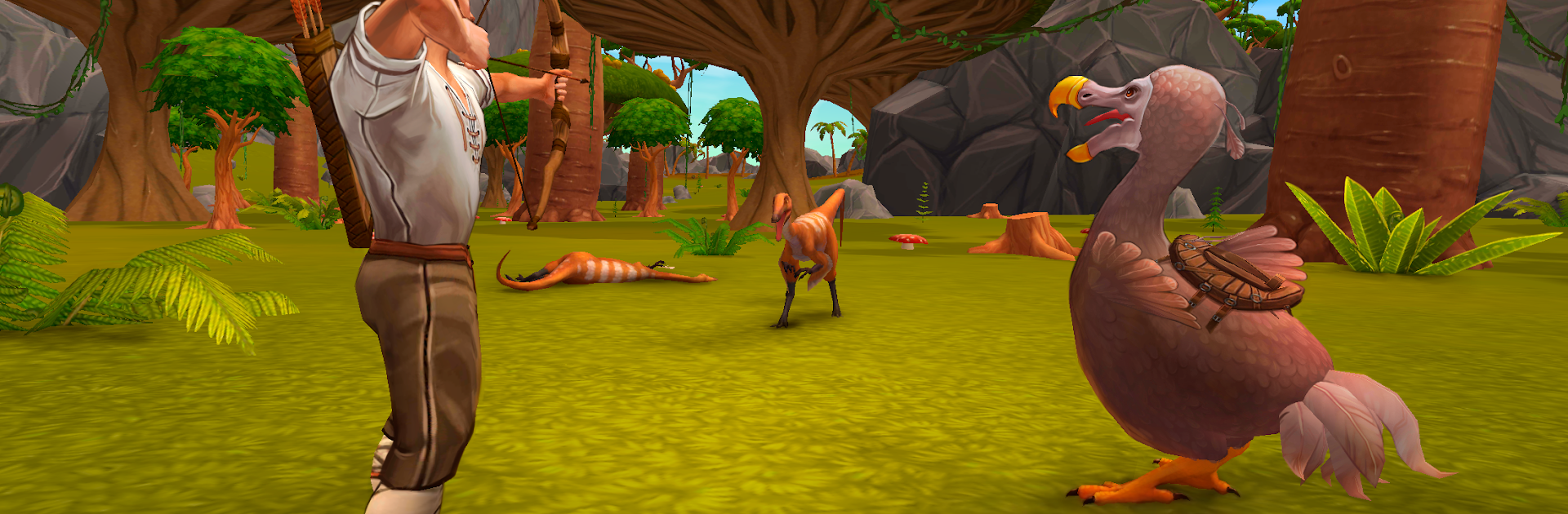
Survival Island: Dinosaurs Pro drops the player on a busted raft after a storm and just lets the whole survival loop unfold. It is that classic start: gather sticks and stones, craft a hatchet, then scramble for food while something big moves in the trees. Days are for chopping, exploring, and putting together a basic hut; nights get tense with roars in the dark and the sense that the campfire is not enough. Combat is simple but scrappy, mostly bows, spears, and axes, and it feels better with mouse aim on BlueStacks. Keyboard hotkeys for swapping tools and opening the backpack make the busywork faster, which helps when a raptor decides to test the walls.

The island is big enough to feel lost in, with thick jungle paths, beaches, and those caves that tempt with rare minerals but also crank up the danger. Crafting goes from basic tools to sturdier shelters, fences, and traps, so building a little base that actually holds is part of the fun. Dinosaurs are the hook: a mix of harmless birds, chunky herbivores, and mean predators. Some can be tamed, some are better as dinner, and egg collecting leads to new creatures if the player sticks with it. There is even a pixel mode that swaps the look to blocky retro, which sounds goofy but gives it a playful twist and runs light. Visuals are not fancy but the 3D jungle and giant lizards do sell the stranded feel, and the audio is full of chirps and distant stomps. It runs offline, so no connection stress, and the loop of explore, gather, craft, survive is straight-forward. If someone enjoys rough survival sandboxes with a focus on scavenging, base building, and dinosaurs that actually matter, this hits that itch.

Start your journey now. Download the game on BlueStacks, invite your friends, and march on a new adventure.


Game Features

Enhancements

  • Macros
  • Multi Instance
  • Multi Instance Sync
  • Script
  • Enhancements
Macros

Macros

Automate the predictable in Survival Island: Dinosaurs Pro and transform your gameplay with Macros. Get access to inventive Macros in the BlueStacks Macro Community
Multi Instance

Multi Instance

Play Survival Island: Dinosaurs Pro on one window. And chat with your friend on the other. Press CTRL + Shift + 8 to open the Multi-Instance Manager. And start creating fresh instances or clone an existing one.
Multi Instance Sync

Multi Instance Sync

Play Survival Island: Dinosaurs Pro with the power of Multi-Instance Sync. Replicate what you are doing on the main instance on all other instances. Level up faster, play more.
Script

Script

Script your way to gaming glory in Survival Island: Dinosaurs Pro with BlueStacks Script. Write and run a set of commands to automate repeated tasks. Trigger the command by assigning it to any key.
Read More

How to Download and Play Survival Island: Dinosaurs Pro on PC or Mac

  • Download and install BlueStacks on your PC or Mac

  • Complete Google sign-in to access the Play Store, or do it later

  • Look for Survival Island: Dinosaurs Pro in the search bar at the top right corner

  • Click to install Survival Island: Dinosaurs Pro from the search results

  • Complete Google sign-in (if you skipped step 2) to install Survival Island: Dinosaurs Pro

  • Click the Survival Island: Dinosaurs Pro icon on the home screen to start playing

video
Watch Video

Minimum System Requirements

With BlueStacks 5, you can get started on a PC that fulfills the following requirements.

  • Operating System

    Microsoft Windows 7 or above, macOS 11 (Big Sur) or above

  • Processor

    Intel, AMD or Apple Silicon Processor

  • RAM

    at least 4GB

  • HDD

    10GB Free Disk Space

Note:

* You must be an Administrator on your PC. Up to date graphics drivers from Microsoft or the chipset vendor.

Survival Island: Dinosaurs Pro - FAQs

  • How to play Survival Island: Dinosaurs Pro on Windows PC & Mac?

    Play Survival Island: Dinosaurs Pro on your PC or Mac by following these simple steps.

    • Click on 'Play Survival Island: Dinosaurs Pro on PC’ to download BlueStacks
    • Install it and log-in to Google Play Store
    • Launch and play the game.
  • Why is BlueStacks the fastest and safest platform to play games on PC?

    BlueStacks respects your privacy and is always safe and secure to use. It does not carry any malware, spyware, or any sort of additional software that could harm your PC.

    It is engineered to optimize speed and performance for a seamless gaming experience.

  • What are Survival Island: Dinosaurs Pro PC requirements?

    Minimum requirement to run Survival Island: Dinosaurs Pro on your PC

    • OS: Microsoft Windows 7 or above MacOS 11 (Big Sur) or above
    • Processor: Intel, AMD or Apple Silicon Processor
    • RAM: Your PC must have at least 4GB of RAM. (Note that having 4GB or more disk space is not a substitute for RAM)
    • HDD: 10GB Free Disk Space.
    • You must be an Administrator on your PC.