AirAttack 1 - Airplane Shooter

AirAttack 1 - Airplane Shooter

Arcade

| Colya Games

Play on PC with BlueStacks or from our cloud

  • Overview
  • Game Features
  • How to Play

Page Modified On: August 10, 2026

Play AirAttack 1 - Airplane Shooter on PC or Mac

Step into the World of AirAttack 1 – Airplane Shooter, a thrilling Arcade game from the house of Colya Games. Play this Android game on BlueStacks App Player and experience immersive gaming on PC or Mac.

About the Game

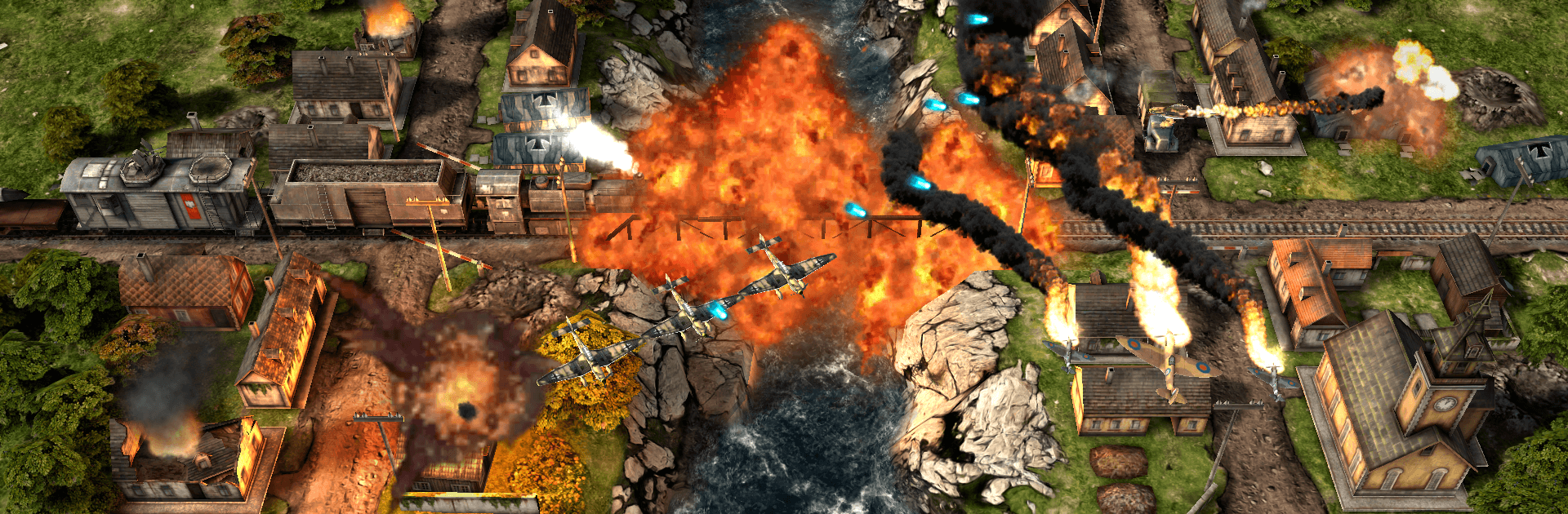
AirAttack 1 – Airplane Shooter is a fast, top-down Arcade blast where WWII-inspired planes meet bold, modern effects. You’ll weave through flak, flatten enemy bases, and light up the sky with an orchestral score pushing you forward. Whether you’re clearing mission objectives or seeing how long you can last, it’s all about tight flying and over-the-top firepower. Prefer playing on PC? It runs great with keyboard and mouse on BlueStacks, too.

Game Features

  • Cinematic 3D battles: Watch buildings crumble and columns of smoke rise as you strafe, bomb, and burn through fully destructible environments with punchy lighting and explosion effects.
  • Campaign and Survival: Tackle handcrafted missions with varied objectives, then jump into Survival to test your reflexes against nonstop waves.
  • Big arsenal, bigger upgrades: Strap on flamethrowers, drop heavy bombs, slice through foes with lasers, send out wingmen, fire homing rockets, and even call in the B-17 when things get hairy.
  • Pick your ride: Fly three distinct airplanes and unlock skins to give your favorite bird some personality.
  • Your screen, your call: Switch between landscape and portrait orientation on the fly—great for one-handed bursts or full-focus sessions.
  • Smooth controls anywhere: Play with a gamepad, mouse, keyboard, or S-Pen/stylus hover. It’s responsive on mobile and feels right at home on BlueStacks.
  • Orchestral soundtrack: A sweeping score adds weight to every dogfight, strafing run, and last-second escape.
  • Offline friendly: No connection? No problem—jump in and play.
  • Fine-tune settings: Adjust graphics quality and stylus hover options to match your device and play style.

Start playing AirAttack 1 – Airplane Shooter on BlueStacks and get a smoother, more comfortable PC or Mac setup.


Game Features

Enhancements

  • Macros
  • Multi Instance
  • Multi Instance Sync
  • Script
  • Enhancements
Macros

Macros

Automate the predictable in AirAttack 1 - Airplane Shooter and transform your gameplay with Macros. Get access to inventive Macros in the BlueStacks Macro Community
Multi Instance

Multi Instance

Play AirAttack 1 - Airplane Shooter on one window. And chat with your friend on the other. Press CTRL + Shift + 8 to open the Multi-Instance Manager. And start creating fresh instances or clone an existing one.
Multi Instance Sync

Multi Instance Sync

Play AirAttack 1 - Airplane Shooter with the power of Multi-Instance Sync. Replicate what you are doing on the main instance on all other instances. Level up faster, play more.
Script

Script

Script your way to gaming glory in AirAttack 1 - Airplane Shooter with BlueStacks Script. Write and run a set of commands to automate repeated tasks. Trigger the command by assigning it to any key.
Read More

How to Download and Play AirAttack 1 - Airplane Shooter on PC or Mac

  • Download and install BlueStacks on your PC or Mac

  • Complete Google sign-in to access the Play Store, or do it later

  • Look for AirAttack 1 - Airplane Shooter in the search bar at the top right corner

  • Click to install AirAttack 1 - Airplane Shooter from the search results

  • Complete Google sign-in (if you skipped step 2) to install AirAttack 1 - Airplane Shooter

  • Click the AirAttack 1 - Airplane Shooter icon on the home screen to start playing

video
Watch Video

Minimum System Requirements

With BlueStacks 5, you can get started on a PC that fulfills the following requirements.

  • Operating System

    Microsoft Windows 7 or above, macOS 11 (Big Sur) or above

  • Processor

    Intel, AMD or Apple Silicon Processor

  • RAM

    at least 4GB

  • HDD

    10GB Free Disk Space

Note:

* You must be an Administrator on your PC. Up to date graphics drivers from Microsoft or the chipset vendor.

AirAttack 1 - Airplane Shooter - FAQs

  • How to play AirAttack 1 - Airplane Shooter on Windows PC & Mac?

    Play AirAttack 1 - Airplane Shooter on your PC or Mac by following these simple steps.

    • Click on 'Play AirAttack 1 - Airplane Shooter on PC’ to download BlueStacks
    • Install it and log-in to Google Play Store
    • Launch and play the game.
  • Why is BlueStacks the fastest and safest platform to play games on PC?

    BlueStacks respects your privacy and is always safe and secure to use. It does not carry any malware, spyware, or any sort of additional software that could harm your PC.

    It is engineered to optimize speed and performance for a seamless gaming experience.

  • What are AirAttack 1 - Airplane Shooter PC requirements?

    Minimum requirement to run AirAttack 1 - Airplane Shooter on your PC

    • OS: Microsoft Windows 7 or above MacOS 11 (Big Sur) or above
    • Processor: Intel, AMD or Apple Silicon Processor
    • RAM: Your PC must have at least 4GB of RAM. (Note that having 4GB or more disk space is not a substitute for RAM)
    • HDD: 10GB Free Disk Space.
    • You must be an Administrator on your PC.