Emuverse: PS2 PSP NES Emulator

Emuverse: PS2 PSP NES Emulator

Arcade

| Emuverse Studio

Play on PC with BlueStacks or from our cloud

  • Overview
  • Game Features
  • How to Play

Page Modified On: September 25, 2026

Play Emuverse: PS2 PSP NES Emulator on PC or Mac

Play Emuverse: PS2 PSP NES Emulator by Emuverse Studio on PC or Mac with BlueStacks. Use a bigger screen, mouse and keyboard controls, and smoother performance while you play.

About the Game

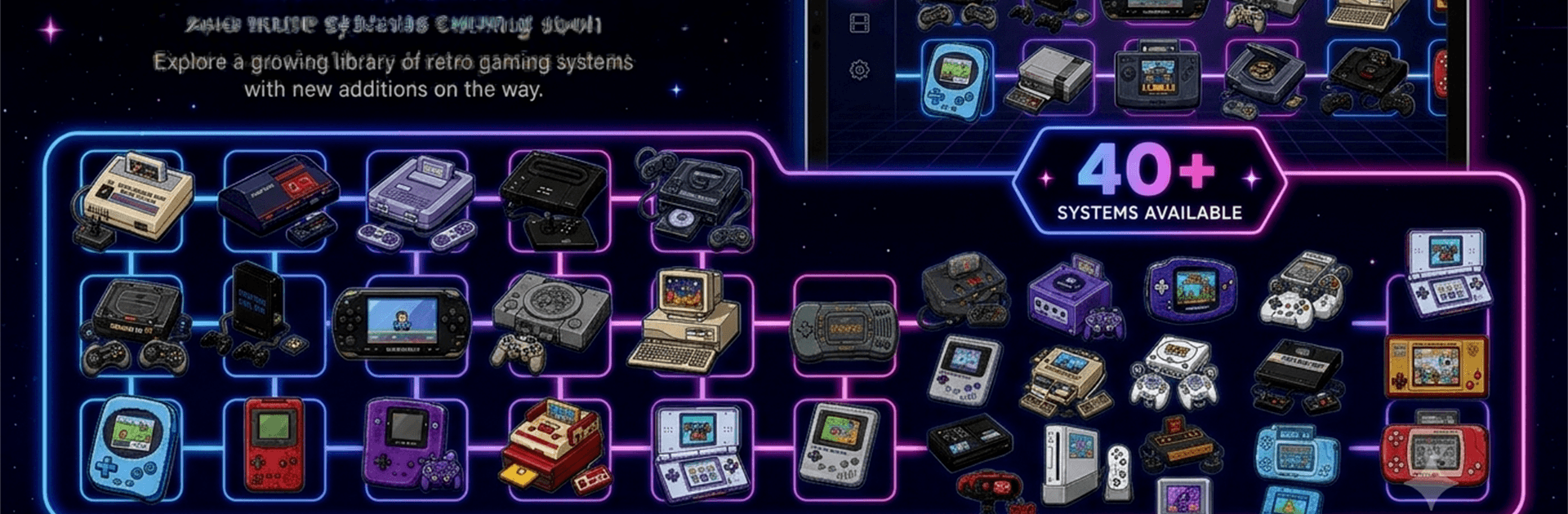
Emuverse: PS2 PSP NES Emulator is your catch-all retro hub for playing classics from a huge lineup of systems. It’s an Arcade experience that’s quick to start, easy to browse, and all about pick-up-and-play nostalgia without the hassle. Prefer a bigger screen? Fire it up on PC with BlueStacks and keep the good vibes rolling.

Game Features

  • 44 Systems, One App: Boot games from PS2, PSP, NES, SNES, N64, GameCube, Wii, PS1, Saturn, Dreamcast, Atari, Neo Geo, PC Engine/TurboGrafx-16, DOS, and more—organized under one roof.
  • Instant Library Setup: Point Emuverse to a folder or add by console and watch your collection appear in seconds—no hopping between different tools.
  • Authentic Per-System Controls: Each platform gets its own on-screen pad modeled after the original layout, so buttons land right where you expect.
  • Fully Custom Touch Layouts: Drag, resize, hide, and tweak opacity for any control; save unique setups per console and turn on optional haptic feedback.
  • Controller Native: Pair Bluetooth or USB controllers in moments, assign players 1–4, and remap any button until it feels just right.
  • Smarter Save States: Use multiple slots per game with screenshot thumbnails; save, load, reset, and even handle disc swaps from a single in-game menu.
  • Portrait or Landscape, Done Right: Separate, purpose-built layouts for both orientations keep everything comfortable instead of stretched or rotated.
  • Built for Big Collections: A clean, retro-inspired interface, quick browsing, and support for 10 languages make managing huge libraries painless.
  • Cloud Sync and Premium Perks: Sync save states across devices; go Premium for an ad-free setup, extra save slots, and cloud backup when you need more room.
  • Emulation Only, Bring Your Own Games: The app doesn’t include or download games or system files; add your own legally obtained content and use it responsibly.

Ready to top the leaderboard? We bet you do. Let precise controls and sharp visuals optimized on BlueStacks lead you to victory.


Game Features

Enhancements

  • Macros
  • Multi Instance
  • Multi Instance Sync
  • Script
  • Enhancements
Macros

Macros

Automate the predictable in Emuverse: PS2 PSP NES Emulator and transform your gameplay with Macros. Get access to inventive Macros in the BlueStacks Macro Community
Multi Instance

Multi Instance

Play Emuverse: PS2 PSP NES Emulator on one window. And chat with your friend on the other. Press CTRL + Shift + 8 to open the Multi-Instance Manager. And start creating fresh instances or clone an existing one.
Multi Instance Sync

Multi Instance Sync

Play Emuverse: PS2 PSP NES Emulator with the power of Multi-Instance Sync. Replicate what you are doing on the main instance on all other instances. Level up faster, play more.
Script

Script

Script your way to gaming glory in Emuverse: PS2 PSP NES Emulator with BlueStacks Script. Write and run a set of commands to automate repeated tasks. Trigger the command by assigning it to any key.
Read More

How to Download and Play Emuverse: PS2 PSP NES Emulator on PC or Mac

  • Download and install BlueStacks on your PC or Mac

  • Complete Google sign-in to access the Play Store, or do it later

  • Look for Emuverse: PS2 PSP NES Emulator in the search bar at the top right corner

  • Click to install Emuverse: PS2 PSP NES Emulator from the search results

  • Complete Google sign-in (if you skipped step 2) to install Emuverse: PS2 PSP NES Emulator

  • Click the Emuverse: PS2 PSP NES Emulator icon on the home screen to start playing

video
Watch Video

Minimum System Requirements

With BlueStacks 5, you can get started on a PC that fulfills the following requirements.

  • Operating System

    Microsoft Windows 7 or above, macOS 11 (Big Sur) or above

  • Processor

    Intel, AMD or Apple Silicon Processor

  • RAM

    at least 4GB

  • HDD

    10GB Free Disk Space

Note:

* You must be an Administrator on your PC. Up to date graphics drivers from Microsoft or the chipset vendor.

Emuverse: PS2 PSP NES Emulator - FAQs

  • How to play Emuverse: PS2 PSP NES Emulator on Windows PC & Mac?

    Play Emuverse: PS2 PSP NES Emulator on your PC or Mac by following these simple steps.

    • Click on 'Play Emuverse: PS2 PSP NES Emulator on PC’ to download BlueStacks
    • Install it and log-in to Google Play Store
    • Launch and play the game.
  • Why is BlueStacks the fastest and safest platform to play games on PC?

    BlueStacks respects your privacy and is always safe and secure to use. It does not carry any malware, spyware, or any sort of additional software that could harm your PC.

    It is engineered to optimize speed and performance for a seamless gaming experience.

  • What are Emuverse: PS2 PSP NES Emulator PC requirements?

    Minimum requirement to run Emuverse: PS2 PSP NES Emulator on your PC

    • OS: Microsoft Windows 7 or above MacOS 11 (Big Sur) or above
    • Processor: Intel, AMD or Apple Silicon Processor
    • RAM: Your PC must have at least 4GB of RAM. (Note that having 4GB or more disk space is not a substitute for RAM)
    • HDD: 10GB Free Disk Space.
    • You must be an Administrator on your PC.