Idle Turret
Idle Turret

Idle Turret

Arcade

| NZKF LLC

Play on PC with BlueStacks or from our cloud

  • Overview
  • Game Features
  • How to Play

Page Modified On: November 12, 2026

Play Idle Turret on PC or Mac

Bring your A-game to Idle Turret, the Arcade game sensation from NZKF LLC. Give your gameplay the much-needed boost with precise game controls, high FPS graphics, and top-tier features on your PC or Mac with BlueStacks.

About the Game

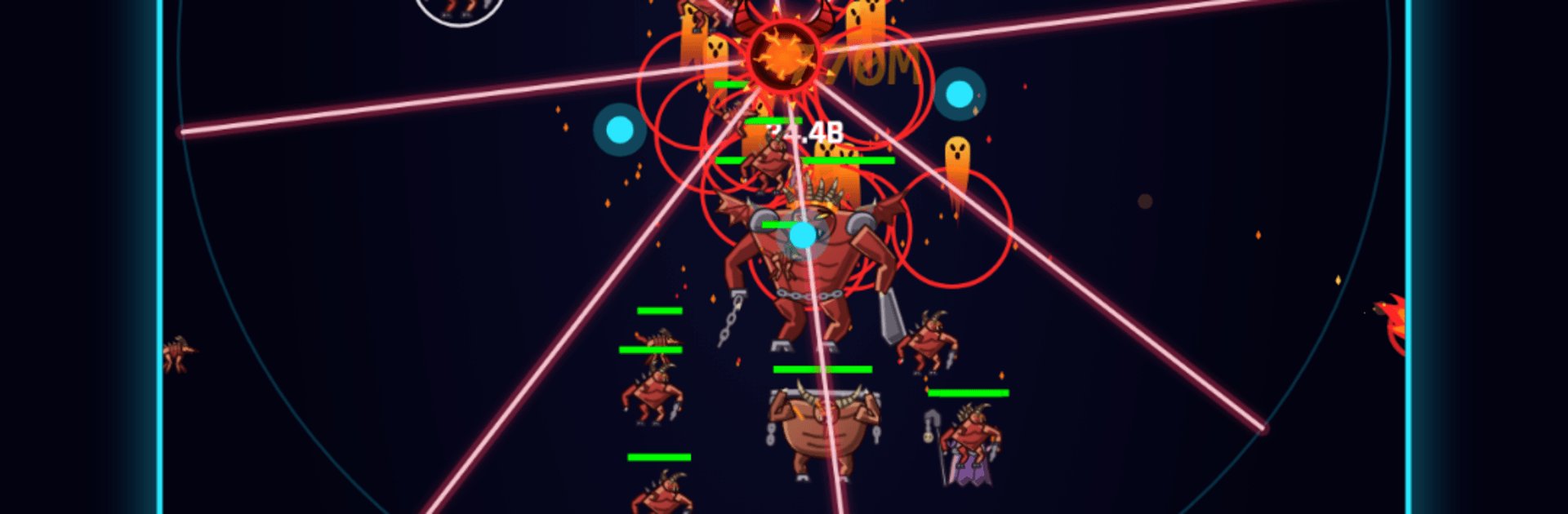
Idle Turret is a one-turret defense obsession where you make the calls and the cannon does the blasting. This Arcade experience blends chill idle gains with crunchy build choices, so you’re always nudging your setup toward the next wild power spike. Prefer playing on a bigger screen? It runs smoothly on BlueStacks, too.

Game Features

  • One-Turret Core: Your cannon fires on its own; your job is steering its evolution through smart upgrade choices and timing.
  • Deep Upgrade Paths: Pour points into damage, fire rate, crit chance, splash, orbiting drones, homing shots, shields, lifesteal, and more—many paths stretch into the thousands of levels.
  • Six Swappable Barrels: Swap between Standard, Twin with a lightning twist, a heavy ricocheting Sniper, close-range Scatter, homing Pulsation, and a spinning five-beam Laser—each with a distinct rhythm.
  • Clever Foes: Face 20 enemy types with quirks—tanks shrug off chip damage, summoners call reinforcements, phasers flicker out, burrowers relocate, blinkers jump across the map, stingers snipe from afar, and taxmen snatch coins if they slip past.
  • Boss Timers & Rule Shifts: Bosses show up on a schedule to test your build, and every 50 waves a Deep Band shakes up the rules to keep you adapting.
  • Idle Progress That Matters: Earn from the Mine while you’re away and queue Study research that completes in real time; come back and scoop it all up in a tap.
  • Cloud Save Support: Sign in with Google to back up your progress and continue on another device without missing a beat.
  • Optional Boosts, No Pressure: Watch a short ad for a temporary x1.5 bonus to damage, coins, or essence—no forced ads and zero energy timers.
  • Challenges & Cosmetics: Climb tiers, clear daily quests and longer challenge tracks, earn trophies, and collect turret skins, projectile trails, and flashy kill effects.
  • Fits Your Schedule: Hop in for a quick check or settle in for a longer push—your turret keeps getting stronger either way.

Start your journey now. Download the game on BlueStacks, invite your friends, and march on a new adventure.


Game Features

Enhancements

  • Macros
  • Multi Instance
  • Multi Instance Sync
  • Script
  • Enhancements
Macros

Macros

Automate the predictable in Idle Turret and transform your gameplay with Macros. Get access to inventive Macros in the BlueStacks Macro Community
Multi Instance

Multi Instance

Play Idle Turret on one window. And chat with your friend on the other. Press CTRL + Shift + 8 to open the Multi-Instance Manager. And start creating fresh instances or clone an existing one.
Multi Instance Sync

Multi Instance Sync

Play Idle Turret with the power of Multi-Instance Sync. Replicate what you are doing on the main instance on all other instances. Level up faster, play more.
Script

Script

Script your way to gaming glory in Idle Turret with BlueStacks Script. Write and run a set of commands to automate repeated tasks. Trigger the command by assigning it to any key.
Read More

How to Download and Play Idle Turret on PC or Mac

  • Download and install BlueStacks on your PC or Mac

  • Complete Google sign-in to access the Play Store, or do it later

  • Look for Idle Turret in the search bar at the top right corner

  • Click to install Idle Turret from the search results

  • Complete Google sign-in (if you skipped step 2) to install Idle Turret

  • Click the Idle Turret icon on the home screen to start playing

video
Watch Video

Minimum System Requirements

With BlueStacks 5, you can get started on a PC that fulfills the following requirements.

  • Operating System

    Microsoft Windows 7 or above, macOS 11 (Big Sur) or above

  • Processor

    Intel, AMD or Apple Silicon Processor

  • RAM

    at least 4GB

  • HDD

    10GB Free Disk Space

Note:

* You must be an Administrator on your PC. Up to date graphics drivers from Microsoft or the chipset vendor.

Idle Turret - FAQs

  • How to play Idle Turret on Windows PC & Mac?

    Play Idle Turret on your PC or Mac by following these simple steps.

    • Click on 'Play Idle Turret on PC’ to download BlueStacks
    • Install it and log-in to Google Play Store
    • Launch and play the game.
  • Why is BlueStacks the fastest and safest platform to play games on PC?

    BlueStacks respects your privacy and is always safe and secure to use. It does not carry any malware, spyware, or any sort of additional software that could harm your PC.

    It is engineered to optimize speed and performance for a seamless gaming experience.

  • What are Idle Turret PC requirements?

    Minimum requirement to run Idle Turret on your PC

    • OS: Microsoft Windows 7 or above MacOS 11 (Big Sur) or above
    • Processor: Intel, AMD or Apple Silicon Processor
    • RAM: Your PC must have at least 4GB of RAM. (Note that having 4GB or more disk space is not a substitute for RAM)
    • HDD: 10GB Free Disk Space.
    • You must be an Administrator on your PC.