Mr Maker 3D Level Editor

Mr Maker 3D Level Editor

Arcade

| Derik DF

Play on PC with BlueStacks or from our cloud

  • Overview
  • Game Features
  • How to Play

Page Modified On: November 20, 2025

Play Mr Maker 3D Level Editor on PC or Mac

Bring your A-game to Mr Maker 3D Level Editor, the Arcade game sensation from Derik DF. Give your gameplay the much-needed boost with precise game controls, high FPS graphics, and top-tier features on your PC or Mac with BlueStacks.

About the Game

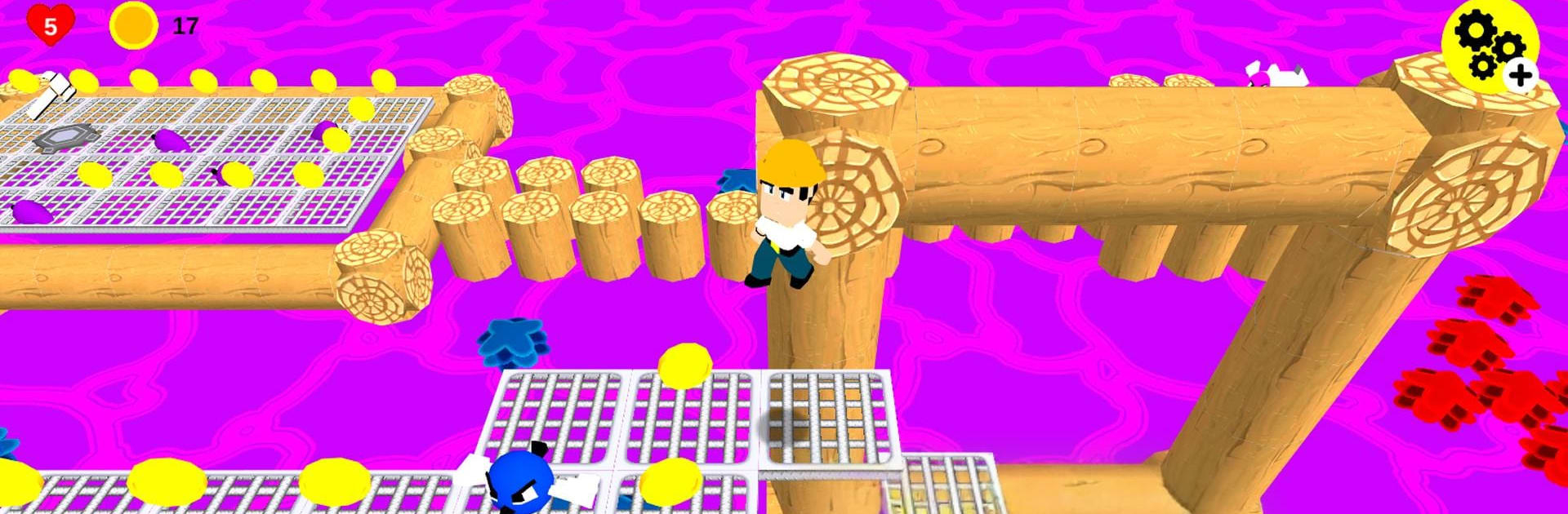
Mr Maker 3D Level Editor blends classic platforming with a full-on building toolkit. It’s a playful, hands-on Arcade experience where you can run, jump, and then turn around and design the kind of stages you wish existed. Build wild obstacle courses, share them with a code, and explore what other creators have cooked up—simple as that. Made by Derik DF, it also slips in a light story about a mysterious hammer that can create or destroy just about anything.

Game Features

  • Play + Create in 3D: Jump through handcrafted stages, then switch gears and make your own with blocks, hazards, enemies, coins, stairs, and more.
  • Flexible Level Editor: Drag, stack, and fine-tune every piece. Mix vertical layouts, secret paths, and tight challenges without getting lost in menus.
  • Five Distinct Themes: Park, lava, clouds, swamp, and desert—swap palettes and moods to give your level the vibe you’re after.
  • Share with Level Codes: Publish your creations in seconds and pass around a simple code so friends can try them.
  • Global “World” Browser: Browse and play levels from creators all over the world, from quick warm-ups to mean, clever gauntlets.
  • Team Creation Mode: Build together with friends or family and brainstorm your next tricky jump or hidden shortcut.
  • Powers and Abilities: Unlock super powers and exclusive abilities that change how you approach platforming and design.
  • Ready-to-Play Content: Tons of official stages if you’d rather play first and get ideas later.
  • Controller Support: Works great with popular gamepads for precise jumps and smoother runs.
  • Ongoing Updates: Regular improvements, new bits to place, and quality-of-life tweaks keep the toolbox fresh.
  • Light Lore Touch: A “magic hammer” sets the scene—fun flavor without getting in the way of creating.
  • PC Friendly via BlueStacks: Prefer a bigger screen and keyboard or controller? You can run it on your PC with BlueStacks.

Slay your opponents with your epic moves. Play it your way on BlueStacks and dominate the battlefield.


Game Features

Enhancements

  • Macros
  • Multi Instance
  • Multi Instance Sync
  • Script
  • Enhancements
Macros

Macros

Automate the predictable in Mr Maker 3D Level Editor and transform your gameplay with Macros. Get access to inventive Macros in the BlueStacks Macro Community
Multi Instance

Multi Instance

Play Mr Maker 3D Level Editor on one window. And chat with your friend on the other. Press CTRL + Shift + 8 to open the Multi-Instance Manager. And start creating fresh instances or clone an existing one.
Multi Instance Sync

Multi Instance Sync

Play Mr Maker 3D Level Editor with the power of Multi-Instance Sync. Replicate what you are doing on the main instance on all other instances. Level up faster, play more.
Script

Script

Script your way to gaming glory in Mr Maker 3D Level Editor with BlueStacks Script. Write and run a set of commands to automate repeated tasks. Trigger the command by assigning it to any key.
Read More

How to Download and Play Mr Maker 3D Level Editor on PC or Mac

  • Download and install BlueStacks on your PC or Mac

  • Complete Google sign-in to access the Play Store, or do it later

  • Look for Mr Maker 3D Level Editor in the search bar at the top right corner

  • Click to install Mr Maker 3D Level Editor from the search results

  • Complete Google sign-in (if you skipped step 2) to install Mr Maker 3D Level Editor

  • Click the Mr Maker 3D Level Editor icon on the home screen to start playing

video
Watch Video

Minimum System Requirements

With BlueStacks 5, you can get started on a PC that fulfills the following requirements.

  • Operating System

    Microsoft Windows 7 or above, macOS 11 (Big Sur) or above

  • Processor

    Intel, AMD or Apple Silicon Processor

  • RAM

    at least 4GB

  • HDD

    10GB Free Disk Space

Note:

* You must be an Administrator on your PC. Up to date graphics drivers from Microsoft or the chipset vendor.

Mr Maker 3D Level Editor - FAQs

  • How to play Mr Maker 3D Level Editor on Windows PC & Mac?

    Play Mr Maker 3D Level Editor on your PC or Mac by following these simple steps.

    • Click on 'Play Mr Maker 3D Level Editor on PC’ to download BlueStacks
    • Install it and log-in to Google Play Store
    • Launch and play the game.
  • Why is BlueStacks the fastest and safest platform to play games on PC?

    BlueStacks respects your privacy and is always safe and secure to use. It does not carry any malware, spyware, or any sort of additional software that could harm your PC.

    It is engineered to optimize speed and performance for a seamless gaming experience.

  • What are Mr Maker 3D Level Editor PC requirements?

    Minimum requirement to run Mr Maker 3D Level Editor on your PC

    • OS: Microsoft Windows 7 or above MacOS 11 (Big Sur) or above
    • Processor: Intel, AMD or Apple Silicon Processor
    • RAM: Your PC must have at least 4GB of RAM. (Note that having 4GB or more disk space is not a substitute for RAM)
    • HDD: 10GB Free Disk Space.
    • You must be an Administrator on your PC.