Ragdoll Throw Challenge

Ragdoll Throw Challenge

Arcade

| PeachHouse

Play on PC with BlueStacks or from our cloud

  • Overview
  • Game Features
  • How to Play

Page Modified On: May 05, 2026

Play Ragdoll Throw Challenge on PC or Mac

Explore a whole new adventure with Ragdoll Throw Challenge, a Arcade game created by PeachHouse. Experience great gameplay with BlueStacks, the most popular gaming platform to play Android games on your PC or Mac.

About the Game

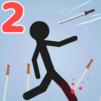
Ragdoll Throw Challenge is a physics-flavored Arcade playground from PeachHouse where stickmen, weapons, and momentum collide in the funniest ways. You’ll tug your floppy fighter around, scoop up a weapon, and send it flying at enemies using simple, satisfying controls that reward timing and angle. Prefer a larger screen and smoother aim? It’s comfy to play on BlueStacks, too.

Game Features

  • Ragdoll Chaos, Real Reactions: Everything hinges on ragdoll physics, so every stumble, swing, and toss turns into a chain of goofy, believable motion.
  • Grab, Aim, Throw: Easy-to-learn controls let you move your character, snatch a weapon, and arc it just right. A clean hit feels great; a wild ricochet feels even better.
  • Tricky Setups, Fresh Scenarios: Tackle a variety of levels that shake up your approach. Use positioning, momentum, and a little creativity to get out of tight spots.
  • Build Your Stickman: Create your own stickman warrior with customization options that make your flailing hero feel a little more “you.”
  • Weapons With Personality: Swap between different tools—light tossers, heavy hitters, straight shooters—to match the situation and your throwing style.
  • Skill Over Luck: Learn to read angles, time your movements, and land throws that thread the needle. The better your feel for physics, the cleaner your clears.

Start your journey now. Download the game on BlueStacks, invite your friends, and march on a new adventure.


Game Features

Enhancements

  • Macros
  • Multi Instance
  • Multi Instance Sync
  • Script
  • Enhancements
Macros

Macros

Automate the predictable in Ragdoll Throw Challenge and transform your gameplay with Macros. Get access to inventive Macros in the BlueStacks Macro Community
Multi Instance

Multi Instance

Play Ragdoll Throw Challenge on one window. And chat with your friend on the other. Press CTRL + Shift + 8 to open the Multi-Instance Manager. And start creating fresh instances or clone an existing one.
Multi Instance Sync

Multi Instance Sync

Play Ragdoll Throw Challenge with the power of Multi-Instance Sync. Replicate what you are doing on the main instance on all other instances. Level up faster, play more.
Script

Script

Script your way to gaming glory in Ragdoll Throw Challenge with BlueStacks Script. Write and run a set of commands to automate repeated tasks. Trigger the command by assigning it to any key.
Read More

How to Download and Play Ragdoll Throw Challenge on PC or Mac

  • Download and install BlueStacks on your PC or Mac

  • Complete Google sign-in to access the Play Store, or do it later

  • Look for Ragdoll Throw Challenge in the search bar at the top right corner

  • Click to install Ragdoll Throw Challenge from the search results

  • Complete Google sign-in (if you skipped step 2) to install Ragdoll Throw Challenge

  • Click the Ragdoll Throw Challenge icon on the home screen to start playing

video
Watch Video

Minimum System Requirements

With BlueStacks 5, you can get started on a PC that fulfills the following requirements.

  • Operating System

    Microsoft Windows 7 or above, macOS 11 (Big Sur) or above

  • Processor

    Intel, AMD or Apple Silicon Processor

  • RAM

    at least 4GB

  • HDD

    10GB Free Disk Space

Note:

* You must be an Administrator on your PC. Up to date graphics drivers from Microsoft or the chipset vendor.

Ragdoll Throw Challenge - FAQs

  • How to play Ragdoll Throw Challenge on Windows PC & Mac?

    Play Ragdoll Throw Challenge on your PC or Mac by following these simple steps.

    • Click on 'Play Ragdoll Throw Challenge on PC’ to download BlueStacks
    • Install it and log-in to Google Play Store
    • Launch and play the game.
  • Why is BlueStacks the fastest and safest platform to play games on PC?

    BlueStacks respects your privacy and is always safe and secure to use. It does not carry any malware, spyware, or any sort of additional software that could harm your PC.

    It is engineered to optimize speed and performance for a seamless gaming experience.

  • What are Ragdoll Throw Challenge PC requirements?

    Minimum requirement to run Ragdoll Throw Challenge on your PC

    • OS: Microsoft Windows 7 or above MacOS 11 (Big Sur) or above
    • Processor: Intel, AMD or Apple Silicon Processor
    • RAM: Your PC must have at least 4GB of RAM. (Note that having 4GB or more disk space is not a substitute for RAM)
    • HDD: 10GB Free Disk Space.
    • You must be an Administrator on your PC.