Slingshot Monsters - Angry Defenders Of Planet X

Slingshot Monsters - Angry Defenders Of Planet X

Arcade

| Team Honcho

Play on PC with BlueStacks or from our cloud

  • Overview
  • Game Features
  • How to Play

Page Modified On: August 14, 2025

Play Slingshot Monsters - Angry Defenders Of Planet X on PC or Mac

Bring your A-game to Slingshot Monsters – Angry Defenders Of Planet X, the Arcade game sensation from Team Honcho. Give your gameplay the much-needed boost with precise game controls, high FPS graphics, and top-tier features on your PC or Mac with BlueStacks.

About the Game

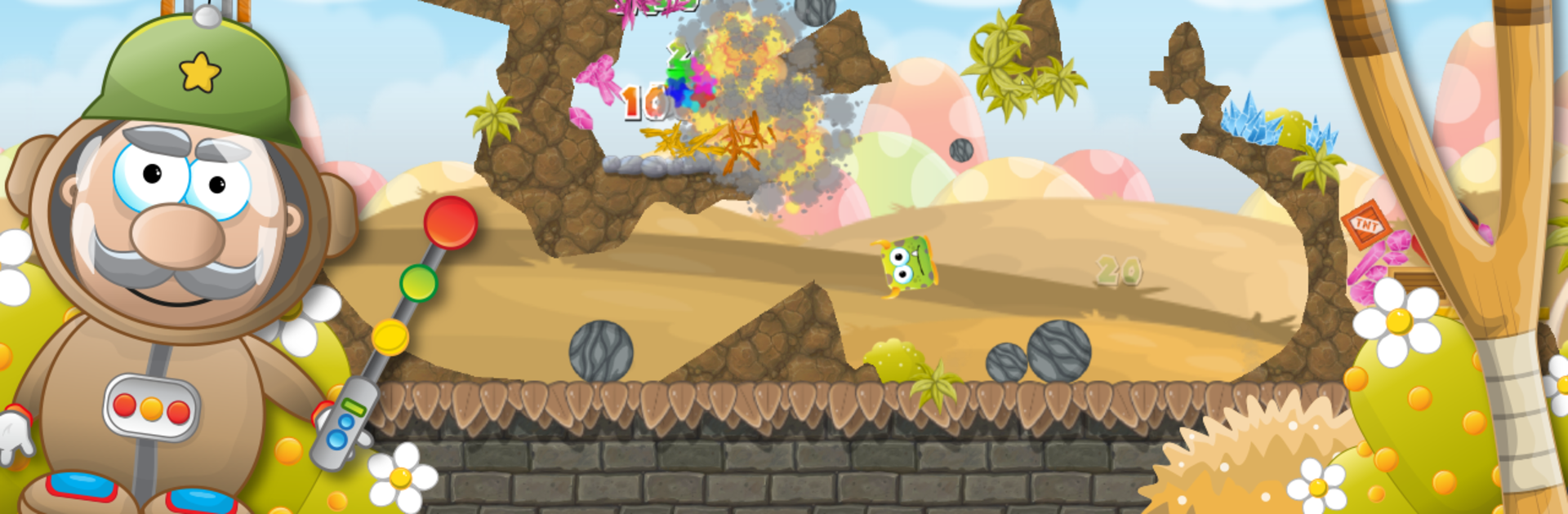
If you’re in the mood for some wild, flinging chaos, Slingshot Monsters – Angry Defenders Of Planet X is calling your name. Developed by Team Honcho, this arcade adventure puts you in charge of a rowdy crew of monsters, all ready to launch themselves at pesky invaders on their home turf. Expect a mix of physics-based mayhem, creative monster powers, and a whole lot of destruction—all in the name of saving Planet X.

Game Features

  • Satisfying Slingshot Action
    Line up your shots and launch your monsters with a trusty slingshot—each one tumbles through the air differently, so you’ll need good aim and a little strategy.

  • Unique Monster Squad
    Pick from ten distinct monsters, each packing their own outrageous abilities. Whether you want bounce, blast, or fly, there’s a monster for the job.

  • Make Your Own Ammo Lineup
    You get to choose the order your monsters go into battle. Sometimes it’s all about leading with muscle or maybe ending with a bang. Mix it up and see what happens!

  • Chain Reactions & Big Combos
    Hit the right spot and watch the madness unfold—walls collapse, objects tumble, and sometimes a chain of destruction leaves nothing standing.

  • Flappy-Style Challenges
    Try your skills with Flappy the bird—tap to keep it airborne and reach those out-of-reach invaders. It’s trickier than you’d expect!

  • Physics-Driven Gameplay
    Every monster and object behaves just like you’d imagine in the real world (if monsters existed). Sometimes you’ll be surprised by what your shots set in motion.

  • Tons of Levels Across Wild Worlds
    Travel through over 140 levels, each one with its own vibe—from icy tundras to bubbling lava fields—and six big worlds to conquer.

  • Epic Boss Fights
    Go head-to-head against massive boss machines. They won’t go down easy, so bring your best slingshot skills.

  • Easy to Start, Tough to Master
    You can pick this up in a snap, but perfecting your monster-flinging game is a whole other story. There’s always a new trick shot to try.

Play Slingshot Monsters – Angry Defenders Of Planet X from Team Honcho on BlueStacks if you want that smooth, big-screen arcade fun.

Get ready for a buttery smooth, high-performance gaming action only on BlueStacks.

Game Features

Enhancements

  • Macros
  • Multi Instance
  • Multi Instance Sync
  • Script
  • Enhancements
Macros

Macros

Automate the predictable in Slingshot Monsters - Angry Defenders Of Planet X and transform your gameplay with Macros. Get access to inventive Macros in the BlueStacks Macro Community
Multi Instance

Multi Instance

Play Slingshot Monsters - Angry Defenders Of Planet X on one window. And chat with your friend on the other. Press CTRL + Shift + 8 to open the Multi-Instance Manager. And start creating fresh instances or clone an existing one.
Multi Instance Sync

Multi Instance Sync

Play Slingshot Monsters - Angry Defenders Of Planet X with the power of Multi-Instance Sync. Replicate what you are doing on the main instance on all other instances. Level up faster, play more.
Script

Script

Script your way to gaming glory in Slingshot Monsters - Angry Defenders Of Planet X with BlueStacks Script. Write and run a set of commands to automate repeated tasks. Trigger the command by assigning it to any key.
Read More

How to Download and Play Slingshot Monsters - Angry Defenders Of Planet X on PC or Mac

  • Download and install BlueStacks on your PC or Mac

  • Complete Google sign-in to access the Play Store, or do it later

  • Look for Slingshot Monsters - Angry Defenders Of Planet X in the search bar at the top right corner

  • Click to install Slingshot Monsters - Angry Defenders Of Planet X from the search results

  • Complete Google sign-in (if you skipped step 2) to install Slingshot Monsters - Angry Defenders Of Planet X

  • Click the Slingshot Monsters - Angry Defenders Of Planet X icon on the home screen to start playing

video
Watch Video

Minimum System Requirements

With BlueStacks 5, you can get started on a PC that fulfills the following requirements.

  • Operating System

    Microsoft Windows 7 or above, macOS 11 (Big Sur) or above

  • Processor

    Intel, AMD or Apple Silicon Processor

  • RAM

    at least 4GB

  • HDD

    10GB Free Disk Space

Note:

* You must be an Administrator on your PC. Up to date graphics drivers from Microsoft or the chipset vendor.

Slingshot Monsters - Angry Defenders Of Planet X - FAQs

  • How to play Slingshot Monsters - Angry Defenders Of Planet X on Windows PC & Mac?

    Play Slingshot Monsters - Angry Defenders Of Planet X on your PC or Mac by following these simple steps.

    • Click on 'Play Slingshot Monsters - Angry Defenders Of Planet X on PC’ to download BlueStacks
    • Install it and log-in to Google Play Store
    • Launch and play the game.
  • Why is BlueStacks the fastest and safest platform to play games on PC?

    BlueStacks respects your privacy and is always safe and secure to use. It does not carry any malware, spyware, or any sort of additional software that could harm your PC.

    It is engineered to optimize speed and performance for a seamless gaming experience.

  • What are Slingshot Monsters - Angry Defenders Of Planet X PC requirements?

    Minimum requirement to run Slingshot Monsters - Angry Defenders Of Planet X on your PC

    • OS: Microsoft Windows 7 or above MacOS 11 (Big Sur) or above
    • Processor: Intel, AMD or Apple Silicon Processor
    • RAM: Your PC must have at least 4GB of RAM. (Note that having 4GB or more disk space is not a substitute for RAM)
    • HDD: 10GB Free Disk Space.
    • You must be an Administrator on your PC.