Acid Ape Chess GM Edition

Acid Ape Chess GM Edition

Board

| Acid Ape Studios

Play on PC with BlueStacks or from our cloud

  • Overview
  • Game Features
  • How to Play

Page Modified On: October 23, 2025

Play Acid Ape Chess GM Edition on PC or Mac

Bring your A-game to Acid Ape Chess GM Edition, the Board game sensation from Acid Ape Studios. Give your gameplay the much-needed boost with precise game controls, high FPS graphics, and top-tier features on your PC or Mac with BlueStacks.

About the Game

Acid Ape Chess GM Edition is the serious player’s all-in-one chess workspace—fast, clean, and loaded with tools you’ll actually use. Prep openings, spar with brutal engines, or jump online for a quick game without juggling apps or tabs. Want the big-screen feel? It runs smoothly on PC with BlueStacks.

Game Features

  • Online play, your way: Log in to FICS, ICC, or Lichess to play, watch live games, browse player histories, and chat in a low-key panel that doesn’t cover the board.
  • Engine sparring: Face UCI or CECP engines, set up engine vs. engine duels, and tune behavior to your liking. Three strong engines are built in (Arasan, cheng4, Scorpio), and you can add third‑party engines, neural nets, and your own opening books (PolyGlot .bin, Arena .abk).
  • Deep analysis toolkit: Run multiple engines at once, view principal variations, stats, and evaluation graphs, and tap into Syzygy 7‑man tablebases. Auto‑annotate games, auto‑play best moves, and build clean variation trees with a dedicated move‑list editor.
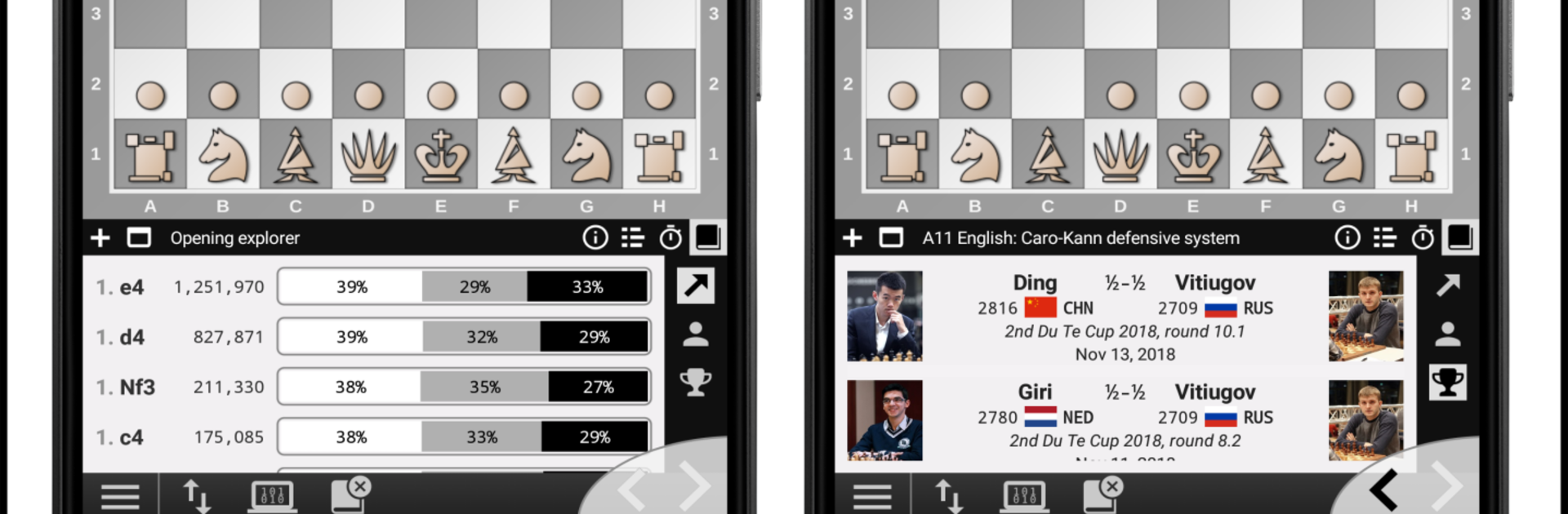
  • Massive database access: Premium tools include an online database with 260M positions, 4.5M games spanning the 1800s–2025, and 330K OTB players. Power the opening explorer, search by player, opening, or rating, and use it as an opening book for engines.
  • PGN powerhouse: Autosave your games, manage files with the PGN Explorer, edit headers and annotations, import/export, use the clipboard, and share PGNs with ease.
  • OTB essentials: Follow live boards from major events, use a slick fullscreen clock, search the database mid‑prep, and play OTP (two players on one device).
  • Real boards and clocks: Connect DGT e‑Boards and clocks (Bluetooth or USB) and play online, engine, or OTB games with your physical setup. DGT drivers are the only optional purchase in the app.
  • Blindfold and voice: Hide the board and move list, speak your moves, and have opponent moves read out loud.
  • Tactics and simuls: Tackle 900 puzzles across three difficulty levels, import your own PGN sets, and run simuls against 2–16 engines—blindfold if you’re feeling bold.
  • Variants and style: Play Chess960, swap among elegant board and piece themes, set up custom positions, and add player details with title, flag, and rating.
  • Clocks and stats: Use a hardware‑style LCD chess clock with sounds and flags, a standalone clock app for non‑connected games, and personal head‑to‑head stats.
  • Built‑in manual: A thorough in‑app guide presented like a book, packed with examples, use cases, and tips.

Make your gaming sessions memorable with precise controls that give you an edge in close combats and visuals that pop up, bringing every character to life.


Game Features

Enhancements

  • Macros
  • Multi Instance
  • Multi Instance Sync
  • Script
  • Enhancements
Macros

Macros

Automate the predictable in Acid Ape Chess GM Edition and transform your gameplay with Macros. Get access to inventive Macros in the BlueStacks Macro Community
Multi Instance

Multi Instance

Play Acid Ape Chess GM Edition on one window. And chat with your friend on the other. Press CTRL + Shift + 8 to open the Multi-Instance Manager. And start creating fresh instances or clone an existing one.
Multi Instance Sync

Multi Instance Sync

Play Acid Ape Chess GM Edition with the power of Multi-Instance Sync. Replicate what you are doing on the main instance on all other instances. Level up faster, play more.
Script

Script

Script your way to gaming glory in Acid Ape Chess GM Edition with BlueStacks Script. Write and run a set of commands to automate repeated tasks. Trigger the command by assigning it to any key.
Read More

How to Download and Play Acid Ape Chess GM Edition on PC or Mac

  • Download and install BlueStacks on your PC or Mac

  • Complete Google sign-in to access the Play Store, or do it later

  • Look for Acid Ape Chess GM Edition in the search bar at the top right corner

  • Click to install Acid Ape Chess GM Edition from the search results

  • Complete Google sign-in (if you skipped step 2) to install Acid Ape Chess GM Edition

  • Click the Acid Ape Chess GM Edition icon on the home screen to start playing

video
Watch Video

Minimum System Requirements

With BlueStacks 5, you can get started on a PC that fulfills the following requirements.

  • Operating System

    Microsoft Windows 7 or above, macOS 11 (Big Sur) or above

  • Processor

    Intel, AMD or Apple Silicon Processor

  • RAM

    at least 4GB

  • HDD

    10GB Free Disk Space

Note:

* You must be an Administrator on your PC. Up to date graphics drivers from Microsoft or the chipset vendor.

Acid Ape Chess GM Edition - FAQs

  • How to play Acid Ape Chess GM Edition on Windows PC & Mac?

    Play Acid Ape Chess GM Edition on your PC or Mac by following these simple steps.

    • Click on 'Play Acid Ape Chess GM Edition on PC’ to download BlueStacks
    • Install it and log-in to Google Play Store
    • Launch and play the game.
  • Why is BlueStacks the fastest and safest platform to play games on PC?

    BlueStacks respects your privacy and is always safe and secure to use. It does not carry any malware, spyware, or any sort of additional software that could harm your PC.

    It is engineered to optimize speed and performance for a seamless gaming experience.

  • What are Acid Ape Chess GM Edition PC requirements?

    Minimum requirement to run Acid Ape Chess GM Edition on your PC

    • OS: Microsoft Windows 7 or above MacOS 11 (Big Sur) or above
    • Processor: Intel, AMD or Apple Silicon Processor
    • RAM: Your PC must have at least 4GB of RAM. (Note that having 4GB or more disk space is not a substitute for RAM)
    • HDD: 10GB Free Disk Space.
    • You must be an Administrator on your PC.