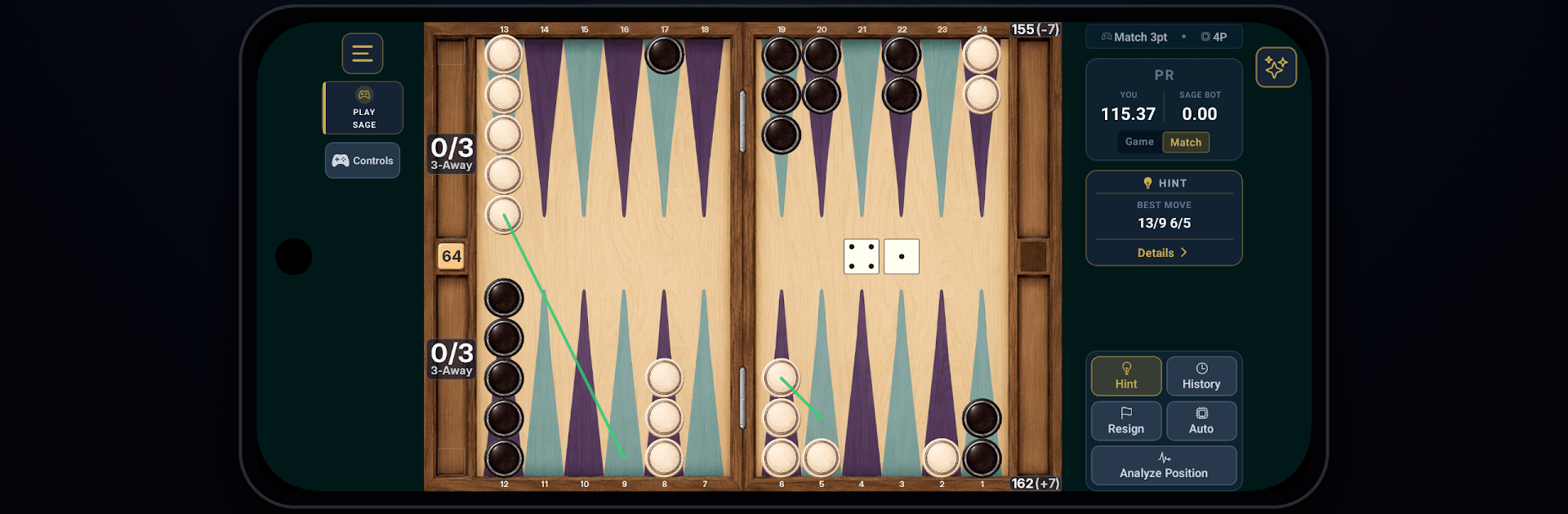
Backgammon Sage Pro
Backgammon Sage Pro

Backgammon Sage Pro

Board

| Backgammon Gaming Technologies

Play on PC with BlueStacks or from our cloud

  • Overview
  • Game Features
  • How to Play

Page Modified On: September 18, 2026

Play Backgammon Sage Pro on PC or Mac

Backgammon Sage Pro brings the Board genre to life, and throws up exciting challenges for gamers. Developed by Backgammon Gaming Technologies, this Android game is best experienced on BlueStacks, the World’s #1 app player for PC and Mac users.

About the Game

Backgammon Sage Pro turns classic backgammon into a smart training ground built around clarity and improvement. This Board experience blends fast, satisfying play with deep analysis tools that actually make sense, so you can learn, test ideas, and see your progress over time. Expect a sharp AI sparring partner, clean explanations, and a toolkit that helps every move feel intentional.

Game Features

  • Instant Position Analysis: Set up any checker layout or cube decision and get evaluations at the strength you choose, complete with clear, plain-language reasoning.
  • World-Class Bot Matches: Face an adjustable AI in casual games or full matches, with live performance feedback and detailed post-game reviews.
  • Play Friends Online: Challenge friends with text and voice chat, then study the full analysis together after the last roll.
  • Chouette, Made Easy: Run group sessions with more than two players, chat in real time, and get automatic breakdowns of every critical choice.
  • Progress You Can See: Track Performance Rating, recurring mistakes, and long-term trends across multiple player profiles.
  • Targeted Drills: Turn your past errors into bite-sized quizzes that focus exactly on the positions you struggle with.
  • Explanations That Click: Learn the ideas behind each move—prime-building, racing priorities, cube timing—without getting buried in math.
  • Pro Study Tools: Explore dice distributions, run cloud rollouts, and use modern market-window insights to sharpen your cube action.
  • Import and Organize: Pull in XG and supported online match files to build a single, searchable history of your play.
  • Powered by Serious Tech: A top-tier engine with cloud evaluation gives tough positions the depth and accuracy they demand.
  • Comfortable on Big Screens: Play and analyze on your PC with BlueStacks when you want more space to think.

Start your journey now. Download the game on BlueStacks, invite your friends, and march on a new adventure.


Game Features

Enhancements

  • Macros
  • Multi Instance
  • Multi Instance Sync
  • Script
  • Enhancements
Macros

Macros

Automate the predictable in Backgammon Sage Pro and transform your gameplay with Macros. Get access to inventive Macros in the BlueStacks Macro Community
Multi Instance

Multi Instance

Play Backgammon Sage Pro on one window. And chat with your friend on the other. Press CTRL + Shift + 8 to open the Multi-Instance Manager. And start creating fresh instances or clone an existing one.
Multi Instance Sync

Multi Instance Sync

Play Backgammon Sage Pro with the power of Multi-Instance Sync. Replicate what you are doing on the main instance on all other instances. Level up faster, play more.
Script

Script

Script your way to gaming glory in Backgammon Sage Pro with BlueStacks Script. Write and run a set of commands to automate repeated tasks. Trigger the command by assigning it to any key.
Read More

How to Download and Play Backgammon Sage Pro on PC or Mac

  • Download and install BlueStacks on your PC or Mac

  • Complete Google sign-in to access the Play Store, or do it later

  • Look for Backgammon Sage Pro in the search bar at the top right corner

  • Click to install Backgammon Sage Pro from the search results

  • Complete Google sign-in (if you skipped step 2) to install Backgammon Sage Pro

  • Click the Backgammon Sage Pro icon on the home screen to start playing

video
Watch Video

Minimum System Requirements

With BlueStacks 5, you can get started on a PC that fulfills the following requirements.

  • Operating System

    Microsoft Windows 7 or above, macOS 11 (Big Sur) or above

  • Processor

    Intel, AMD or Apple Silicon Processor

  • RAM

    at least 4GB

  • HDD

    10GB Free Disk Space

Note:

* You must be an Administrator on your PC. Up to date graphics drivers from Microsoft or the chipset vendor.

Backgammon Sage Pro - FAQs

  • How to play Backgammon Sage Pro on Windows PC & Mac?

    Play Backgammon Sage Pro on your PC or Mac by following these simple steps.

    • Click on 'Play Backgammon Sage Pro on PC’ to download BlueStacks
    • Install it and log-in to Google Play Store
    • Launch and play the game.
  • Why is BlueStacks the fastest and safest platform to play games on PC?

    BlueStacks respects your privacy and is always safe and secure to use. It does not carry any malware, spyware, or any sort of additional software that could harm your PC.

    It is engineered to optimize speed and performance for a seamless gaming experience.

  • What are Backgammon Sage Pro PC requirements?

    Minimum requirement to run Backgammon Sage Pro on your PC

    • OS: Microsoft Windows 7 or above MacOS 11 (Big Sur) or above
    • Processor: Intel, AMD or Apple Silicon Processor
    • RAM: Your PC must have at least 4GB of RAM. (Note that having 4GB or more disk space is not a substitute for RAM)
    • HDD: 10GB Free Disk Space.
    • You must be an Administrator on your PC.