ChessRecall: Chess Openings

ChessRecall: Chess Openings

Board

| VanSoftware

Play on PC with BlueStacks or from our cloud

  • Overview
  • Game Features
  • How to Play

Page Modified On: September 25, 2026

Play ChessRecall: Chess Openings on PC or Mac

Play ChessRecall: Chess Openings by VanSoftware on PC or Mac with BlueStacks. Use a bigger screen, mouse and keyboard controls, and smoother performance while you play.

About the Game

ChessRecall: Chess Openings is a Board trainer for players who want their first moves to actually stick. It turns your opening prep into quick, memory-first drills where you play the lines yourself and fix mistakes fast. Prefer a larger view? It runs smoothly on PC with BlueStacks.

Game Features

  • Import your lines fast: Bring in your Lichess studies or any PGN and start drilling your exact repertoire right away.
  • Smart spaced repetition (FSRS): Reviews are timed for when you’re about to forget, so the right line shows up at the perfect moment.
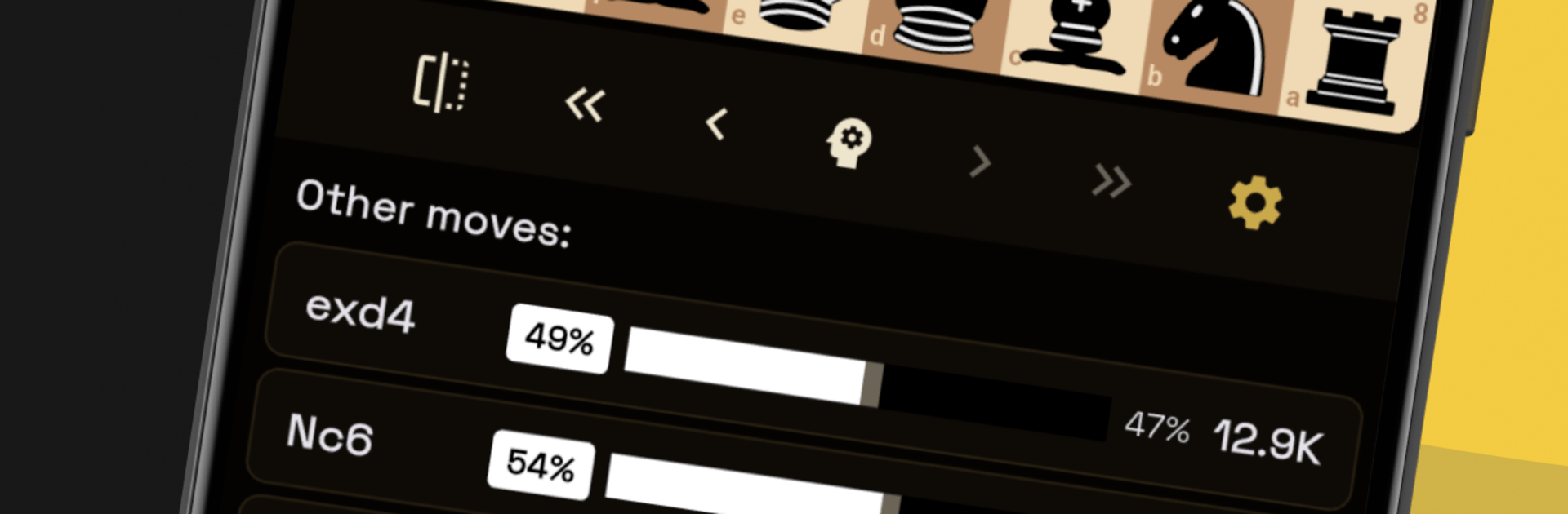
  • Engine insights on tap: Analyze tricky positions with built-in Stockfish and use Explorer Mode to check move stats and polish choices.
  • Clear opening trees: See your entire repertoire as easy-to-navigate branches—main lines, sidelines, all neatly mapped out.
  • Play to remember: Active Recall isn’t just a buzzword here—you input the moves on the board, get feedback, and actually retain them.
  • Stats that actually help: Track mastery, forecast your upcoming review queue, and watch your memory strength grow over time.
  • Offline friendly with backup: Practice anywhere, then keep everything safe with Google Drive sync when you’re back online.
  • Adapted to your level: From your first Italian Game ideas to sharp tournament prep, drills scale to match your goals.

Get ready for a buttery smooth, high-performance gaming action only on BlueStacks.

Game Features

Enhancements

  • Macros
  • Multi Instance
  • Multi Instance Sync
  • Script
  • Enhancements
Macros

Macros

Automate the predictable in ChessRecall: Chess Openings and transform your gameplay with Macros. Get access to inventive Macros in the BlueStacks Macro Community
Multi Instance

Multi Instance

Play ChessRecall: Chess Openings on one window. And chat with your friend on the other. Press CTRL + Shift + 8 to open the Multi-Instance Manager. And start creating fresh instances or clone an existing one.
Multi Instance Sync

Multi Instance Sync

Play ChessRecall: Chess Openings with the power of Multi-Instance Sync. Replicate what you are doing on the main instance on all other instances. Level up faster, play more.
Script

Script

Script your way to gaming glory in ChessRecall: Chess Openings with BlueStacks Script. Write and run a set of commands to automate repeated tasks. Trigger the command by assigning it to any key.
Read More

How to Download and Play ChessRecall: Chess Openings on PC or Mac

  • Download and install BlueStacks on your PC or Mac

  • Complete Google sign-in to access the Play Store, or do it later

  • Look for ChessRecall: Chess Openings in the search bar at the top right corner

  • Click to install ChessRecall: Chess Openings from the search results

  • Complete Google sign-in (if you skipped step 2) to install ChessRecall: Chess Openings

  • Click the ChessRecall: Chess Openings icon on the home screen to start playing

video
Watch Video

Minimum System Requirements

With BlueStacks 5, you can get started on a PC that fulfills the following requirements.

  • Operating System

    Microsoft Windows 7 or above, macOS 11 (Big Sur) or above

  • Processor

    Intel, AMD or Apple Silicon Processor

  • RAM

    at least 4GB

  • HDD

    10GB Free Disk Space

Note:

* You must be an Administrator on your PC. Up to date graphics drivers from Microsoft or the chipset vendor.

ChessRecall: Chess Openings - FAQs

  • How to play ChessRecall: Chess Openings on Windows PC & Mac?

    Play ChessRecall: Chess Openings on your PC or Mac by following these simple steps.

    • Click on 'Play ChessRecall: Chess Openings on PC’ to download BlueStacks
    • Install it and log-in to Google Play Store
    • Launch and play the game.
  • Why is BlueStacks the fastest and safest platform to play games on PC?

    BlueStacks respects your privacy and is always safe and secure to use. It does not carry any malware, spyware, or any sort of additional software that could harm your PC.

    It is engineered to optimize speed and performance for a seamless gaming experience.

  • What are ChessRecall: Chess Openings PC requirements?

    Minimum requirement to run ChessRecall: Chess Openings on your PC

    • OS: Microsoft Windows 7 or above MacOS 11 (Big Sur) or above
    • Processor: Intel, AMD or Apple Silicon Processor
    • RAM: Your PC must have at least 4GB of RAM. (Note that having 4GB or more disk space is not a substitute for RAM)
    • HDD: 10GB Free Disk Space.
    • You must be an Administrator on your PC.