Fruited Xmas
Fruited Xmas

Fruited Xmas

Board

| iGold Technologies Private Limited

Play on PC with BlueStacks or from our cloud

  • Overview
  • Game Features
  • How to Play

Page Modified On: June 02, 2026

Play Fruited Xmas on PC or Mac

Bring your A-game to Fruited Xmas, the Board game sensation from iGold Technologies Private Limited. Give your gameplay the much-needed boost with precise game controls, high FPS graphics, and top-tier features on your PC or Mac with BlueStacks.

About the Game

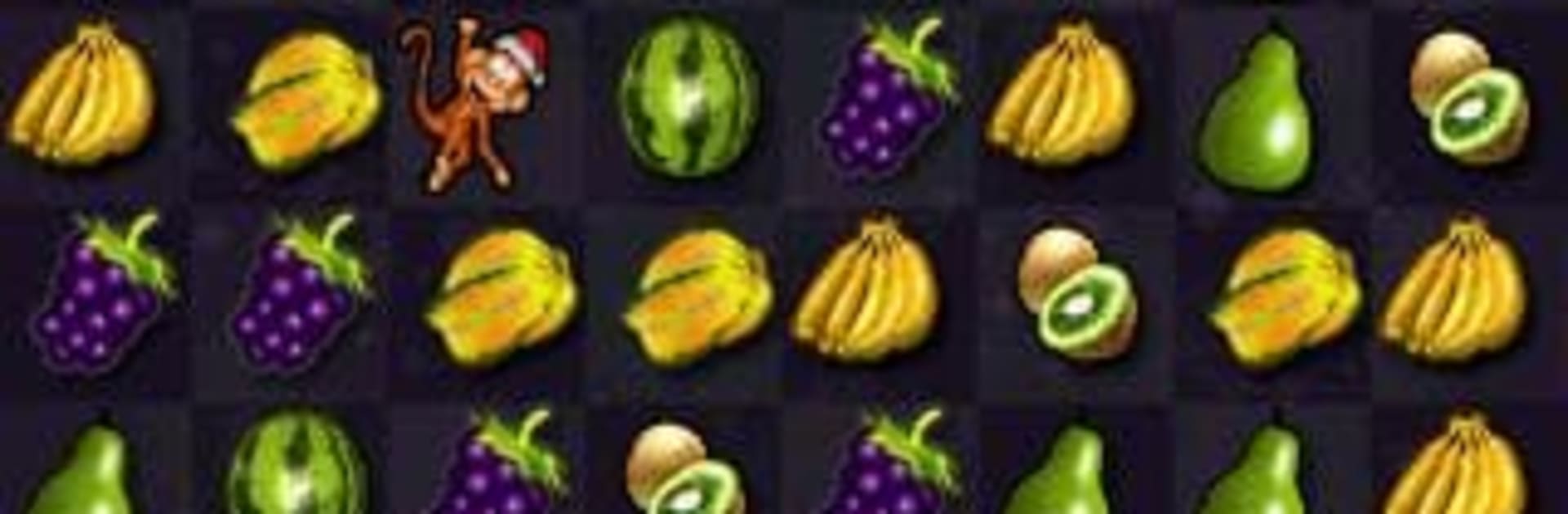
Fruited Xmas is a cheerful holiday-themed match-3 Board puzzler where juicy fruit tiles, Santa, and a couple of mischievous monkeys share the spotlight. It blends cozy vibes with snappy, combo-driven gameplay and a few playful curveballs—yes, worms will try to mess with your board if you let them. Great for quick breaks that easily turn into “just one more” runs.

Game Features

  • Four Ways to Play: Pick your pace. Classic adds a per-move timer for thoughtful swaps, Time Attack races the clock, Score Panic goes full-on frantic, and Continuous lets you keep matching without pressure.
  • Helpers (and Trouble): Trigger a combo next to Santa to sweep an entire row or column. Set off monkeys and they’ll clear the nearby tiles. Ignore worms and they’ll spread—match them out before their countdown hits zero.
  • Combos That Matter: Smart chains don’t just score big; they wake up the board’s characters and unleash satisfying clears right where you need them.
  • Endless Progression: No hard cap on stages. The challenge ramps up as you go, rewarding sharp planning and quick reads of the board.
  • Fresh Look and Feel: Polished 3D fruit pieces and smooth animations keep every swap lively. Rotate through multiple festive backdrops, with distinct looks for certain modes.
  • Plain Mode Option: Want a cleaner board? Toggle Plain Mode to tone down special pieces and keep the focus on pure matching.
  • Compete Worldwide: Climb weekly and monthly leaderboards and submit your score after every game to chase the top spots.
  • Touch-Ready, PC-Friendly: Built for quick, satisfying swipes on mobile—and it also plays nicely on BlueStacks if you prefer matching on a bigger screen.
  • Genre: Board: Classic puzzle comfort with modern match-3 twists and character-driven power-ups.

Start your journey now. Download the game on BlueStacks, invite your friends, and march on a new adventure.


Game Features

Enhancements

  • Macros
  • Multi Instance
  • Multi Instance Sync
  • Script
  • Enhancements
Macros

Macros

Automate the predictable in Fruited Xmas and transform your gameplay with Macros. Get access to inventive Macros in the BlueStacks Macro Community
Multi Instance

Multi Instance

Play Fruited Xmas on one window. And chat with your friend on the other. Press CTRL + Shift + 8 to open the Multi-Instance Manager. And start creating fresh instances or clone an existing one.
Multi Instance Sync

Multi Instance Sync

Play Fruited Xmas with the power of Multi-Instance Sync. Replicate what you are doing on the main instance on all other instances. Level up faster, play more.
Script

Script

Script your way to gaming glory in Fruited Xmas with BlueStacks Script. Write and run a set of commands to automate repeated tasks. Trigger the command by assigning it to any key.
Read More

How to Download and Play Fruited Xmas on PC or Mac

  • Download and install BlueStacks on your PC or Mac

  • Complete Google sign-in to access the Play Store, or do it later

  • Look for Fruited Xmas in the search bar at the top right corner

  • Click to install Fruited Xmas from the search results

  • Complete Google sign-in (if you skipped step 2) to install Fruited Xmas

  • Click the Fruited Xmas icon on the home screen to start playing

video
Watch Video

Minimum System Requirements

With BlueStacks 5, you can get started on a PC that fulfills the following requirements.

  • Operating System

    Microsoft Windows 7 or above, macOS 11 (Big Sur) or above

  • Processor

    Intel, AMD or Apple Silicon Processor

  • RAM

    at least 4GB

  • HDD

    10GB Free Disk Space

Note:

* You must be an Administrator on your PC. Up to date graphics drivers from Microsoft or the chipset vendor.

Fruited Xmas - FAQs

  • How to play Fruited Xmas on Windows PC & Mac?

    Play Fruited Xmas on your PC or Mac by following these simple steps.

    • Click on 'Play Fruited Xmas on PC’ to download BlueStacks
    • Install it and log-in to Google Play Store
    • Launch and play the game.
  • Why is BlueStacks the fastest and safest platform to play games on PC?

    BlueStacks respects your privacy and is always safe and secure to use. It does not carry any malware, spyware, or any sort of additional software that could harm your PC.

    It is engineered to optimize speed and performance for a seamless gaming experience.

  • What are Fruited Xmas PC requirements?

    Minimum requirement to run Fruited Xmas on your PC

    • OS: Microsoft Windows 7 or above MacOS 11 (Big Sur) or above
    • Processor: Intel, AMD or Apple Silicon Processor
    • RAM: Your PC must have at least 4GB of RAM. (Note that having 4GB or more disk space is not a substitute for RAM)
    • HDD: 10GB Free Disk Space.
    • You must be an Administrator on your PC.