Длинные нарды: Шеш-беш

Длинные нарды: Шеш-беш

Board

| Культ

Play on PC with BlueStacks or from our cloud

  • Overview
  • Game Features
  • How to Play

Page Modified On: October 30, 2026

Play Длинные нарды: Шеш-беш on PC or Mac

Play Длинные нарды: Шеш-беш by Культ on PC or Mac with BlueStacks. Use a bigger screen, mouse and keyboard controls, and smoother performance while you play.

About the Game

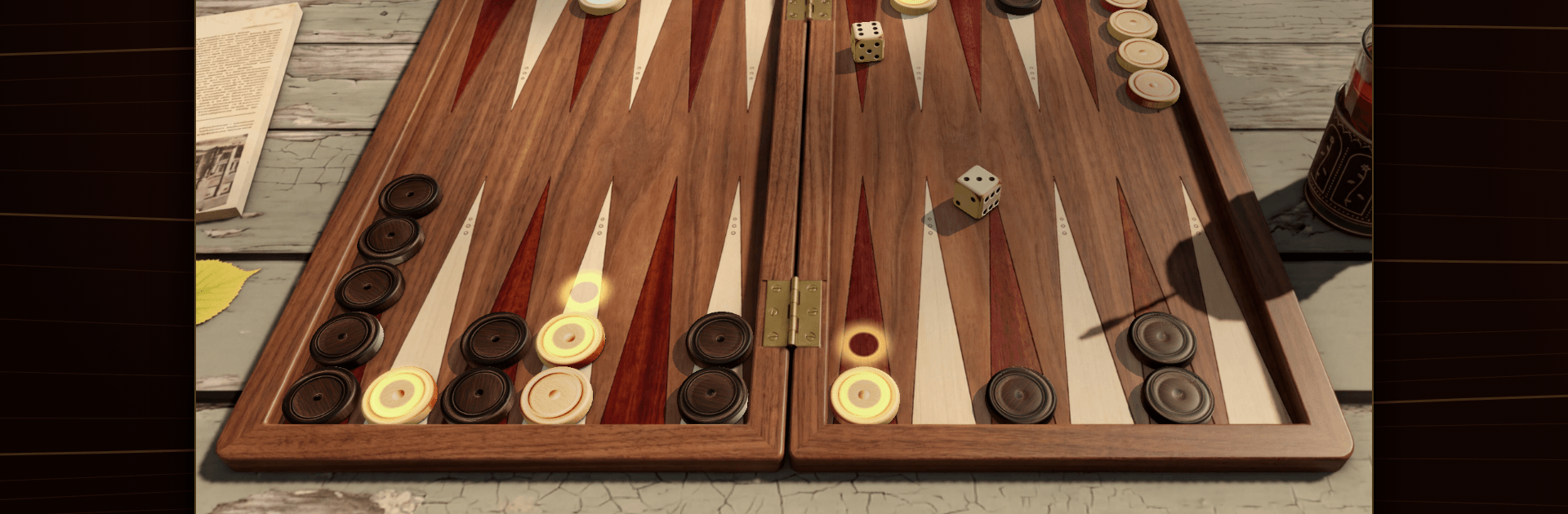
Длинные нарды: Шеш-беш is a thoughtful, no-nonsense take on classic backgammon and nardi. It’s a Board experience built for relaxing solo play, with a smart bot, clean visuals, and zero interruptions. Play quick games or stretch into longer matches, tweak the rules to your taste, and enjoy fair rolls every time. Prefer a bigger screen? It feels great on BlueStacks, too.

Game Features

  • Smart bot, real challenge: Play against an AI trained through self-play, not memorized scripts. Pick Beginner, Intermediate, Experienced, or Master—lower levels keep things friendly, while Master brings serious heat.
  • Fair, transparent dice: Rolls are purely random and never rigged. The bot doesn’t know what’s coming, and physics are just for the satisfying bounce and tumble you see on the board.
  • Your rules, your pace: Use official rules, local traditions, or flip individual toggles to build your own set. Jump into single games or full matches scored from 3 to 15 points.
  • Polished 3D look: A warm walnut board sits in a cozy yard, complete with soft shadows and lively dice that clatter and rebound. Prefer simple? Switch to a flat board. Graphics auto-adjust for smooth performance on older hardware.
  • Comfortable controls: Drag the roll button wherever your thumb wants it, get gentle move hints, auto-complete when there’s only one legal play, and undo before the bot takes its turn. A progress indicator shows remaining pips for both sides, and there’s a clock for timed sessions.
  • Play anywhere, no nags: It runs fully offline and doesn’t serve ads—no banners, no pop-ups, no videos between games.
  • Orientation and audio options: Play in portrait or landscape; ambient yard sounds and music can be turned down or switched off entirely.
  • Stats and ratings that matter: Track wins, losses, and recent results, with separate ratings for long nardi and short backgammon.
  • Privacy-respecting by design: No personal data collection. Your games, settings, and ratings live locally on your device.

Ready to top the leaderboard? We bet you do. Let precise controls and sharp visuals optimized on BlueStacks lead you to victory.


Game Features

Enhancements

  • Macros
  • Multi Instance
  • Multi Instance Sync
  • Script
  • Enhancements
Macros

Macros

Automate the predictable in Длинные нарды: Шеш-беш and transform your gameplay with Macros. Get access to inventive Macros in the BlueStacks Macro Community
Multi Instance

Multi Instance

Play Длинные нарды: Шеш-беш on one window. And chat with your friend on the other. Press CTRL + Shift + 8 to open the Multi-Instance Manager. And start creating fresh instances or clone an existing one.
Multi Instance Sync

Multi Instance Sync

Play Длинные нарды: Шеш-беш with the power of Multi-Instance Sync. Replicate what you are doing on the main instance on all other instances. Level up faster, play more.
Script

Script

Script your way to gaming glory in Длинные нарды: Шеш-беш with BlueStacks Script. Write and run a set of commands to automate repeated tasks. Trigger the command by assigning it to any key.
Read More

How to Download and Play Длинные нарды: Шеш-беш on PC or Mac

  • Download and install BlueStacks on your PC or Mac

  • Complete Google sign-in to access the Play Store, or do it later

  • Look for Длинные нарды: Шеш-беш in the search bar at the top right corner

  • Click to install Длинные нарды: Шеш-беш from the search results

  • Complete Google sign-in (if you skipped step 2) to install Длинные нарды: Шеш-беш

  • Click the Длинные нарды: Шеш-беш icon on the home screen to start playing

video
Watch Video

Minimum System Requirements

With BlueStacks 5, you can get started on a PC that fulfills the following requirements.

  • Operating System

    Microsoft Windows 7 or above, macOS 11 (Big Sur) or above

  • Processor

    Intel, AMD or Apple Silicon Processor

  • RAM

    at least 4GB

  • HDD

    10GB Free Disk Space

Note:

* You must be an Administrator on your PC. Up to date graphics drivers from Microsoft or the chipset vendor.

Длинные нарды: Шеш-беш - FAQs

  • How to play Длинные нарды: Шеш-беш on Windows PC & Mac?

    Play Длинные нарды: Шеш-беш on your PC or Mac by following these simple steps.

    • Click on 'Play Длинные нарды: Шеш-беш on PC’ to download BlueStacks
    • Install it and log-in to Google Play Store
    • Launch and play the game.
  • Why is BlueStacks the fastest and safest platform to play games on PC?

    BlueStacks respects your privacy and is always safe and secure to use. It does not carry any malware, spyware, or any sort of additional software that could harm your PC.

    It is engineered to optimize speed and performance for a seamless gaming experience.

  • What are Длинные нарды: Шеш-беш PC requirements?

    Minimum requirement to run Длинные нарды: Шеш-беш on your PC

    • OS: Microsoft Windows 7 or above MacOS 11 (Big Sur) or above
    • Processor: Intel, AMD or Apple Silicon Processor
    • RAM: Your PC must have at least 4GB of RAM. (Note that having 4GB or more disk space is not a substitute for RAM)
    • HDD: 10GB Free Disk Space.
    • You must be an Administrator on your PC.