Trainer Fish: Chess Trainer

Trainer Fish: Chess Trainer

Board

| Ton Orbe

Play on PC with BlueStacks or from our cloud

  • Overview
  • Game Features
  • How to Play

Page Modified On: September 25, 2026

Play Trainer Fish: Chess Trainer on PC or Mac

Explore a whole new adventure with Trainer Fish: Chess Trainer, a Board game created by Ton Orbe. Experience great gameplay with BlueStacks, the most popular gaming platform to play Android games on your PC or Mac.

About the Game

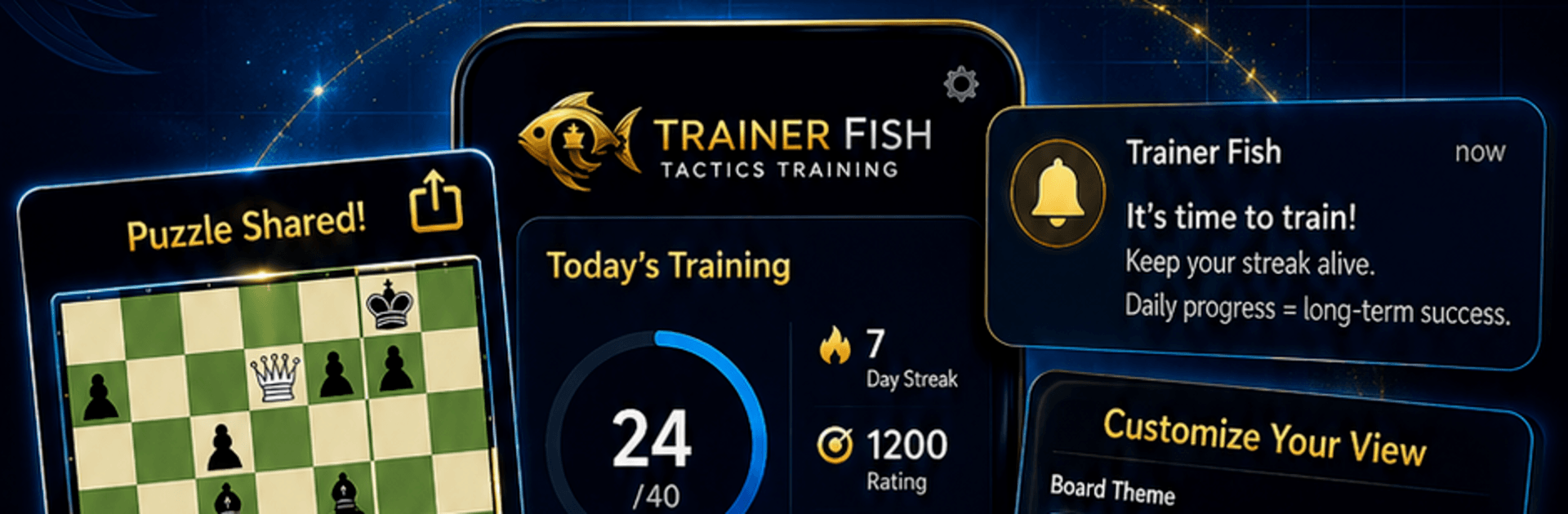
Trainer Fish: Chess Trainer is a Board title built for players who actually want to get better, not just push pieces around. It mixes serious training tools—tactics, endgames, game recording, analysis—with a clean, focused feel and even live broadcasts you can follow while you practice. Prefer a bigger board and comfy controls? It runs smoothly on PC with BlueStacks, too.

Game Features

  • Serious Tactics, No Fluff: Drill through 2M+ rated puzzles spanning beginner to master strength, filter by difficulty or theme, and sharpen calculation while building real pattern recognition.
  • Woodpecker Cycles: Create a custom set, solve it, then loop back through for spaced repetition; resume exactly where you left off so ideas turn into instinct.
  • Endgames That Matter: Practice practical endings, sharp tactical finishes, and classic studies to polish technique when every tempo counts.
  • Play the Personalities: Face Trainer Fish at different strengths, load custom positions, save your games, and review what went right—or wrong—afterward.
  • Game Recorder: Log your own games move by move (with time spent per move) and stash them for later analysis and clean study notes.
  • Chess TV, Live and Busy: Watch top Lichess games and full tournament coverage, see clocks, moves, and engine evals, switch between multiple boards, keep your selections while you train, and get alerts when favorite players go live—streams snap back automatically if interrupted.
  • Analysis That Helps: Run engine checks and read moves in familiar figurine notation to understand ideas, not just blunders.
  • Smooth, Fast Training: Snappy tactics loading, a keep-screen-awake option for long sessions, and interface tweaks that stay out of your way.
  • Make It Yours: Choose boards, piece sets, pane colors, and light/dark themes for comfortable study any time of day.
  • Share the Position: Create clean puzzle posters showing the diagram, theme, rating, and your result—perfect for a friendly challenge.
  • Gentle Nudges: Set daily reminders so training happens even on busy days when you’ve only got a few spare minutes.
  • Fair and Straightforward: No ads and no subscription pressure; there’s an optional one-time Pro unlock if you want more and wish to support continued development.

BlueStacks gives you more room to focus on the game and less time adjusting around mobile limitations.


Game Features

Enhancements

  • Macros
  • Multi Instance
  • Multi Instance Sync
  • Script
  • Enhancements
Macros

Macros

Automate the predictable in Trainer Fish: Chess Trainer and transform your gameplay with Macros. Get access to inventive Macros in the BlueStacks Macro Community
Multi Instance

Multi Instance

Play Trainer Fish: Chess Trainer on one window. And chat with your friend on the other. Press CTRL + Shift + 8 to open the Multi-Instance Manager. And start creating fresh instances or clone an existing one.
Multi Instance Sync

Multi Instance Sync

Play Trainer Fish: Chess Trainer with the power of Multi-Instance Sync. Replicate what you are doing on the main instance on all other instances. Level up faster, play more.
Script

Script

Script your way to gaming glory in Trainer Fish: Chess Trainer with BlueStacks Script. Write and run a set of commands to automate repeated tasks. Trigger the command by assigning it to any key.
Read More

How to Download and Play Trainer Fish: Chess Trainer on PC or Mac

  • Download and install BlueStacks on your PC or Mac

  • Complete Google sign-in to access the Play Store, or do it later

  • Look for Trainer Fish: Chess Trainer in the search bar at the top right corner

  • Click to install Trainer Fish: Chess Trainer from the search results

  • Complete Google sign-in (if you skipped step 2) to install Trainer Fish: Chess Trainer

  • Click the Trainer Fish: Chess Trainer icon on the home screen to start playing

video
Watch Video

Minimum System Requirements

With BlueStacks 5, you can get started on a PC that fulfills the following requirements.

  • Operating System

    Microsoft Windows 7 or above, macOS 11 (Big Sur) or above

  • Processor

    Intel, AMD or Apple Silicon Processor

  • RAM

    at least 4GB

  • HDD

    10GB Free Disk Space

Note:

* You must be an Administrator on your PC. Up to date graphics drivers from Microsoft or the chipset vendor.

Trainer Fish: Chess Trainer - FAQs

  • How to play Trainer Fish: Chess Trainer on Windows PC & Mac?

    Play Trainer Fish: Chess Trainer on your PC or Mac by following these simple steps.

    • Click on 'Play Trainer Fish: Chess Trainer on PC’ to download BlueStacks
    • Install it and log-in to Google Play Store
    • Launch and play the game.
  • Why is BlueStacks the fastest and safest platform to play games on PC?

    BlueStacks respects your privacy and is always safe and secure to use. It does not carry any malware, spyware, or any sort of additional software that could harm your PC.

    It is engineered to optimize speed and performance for a seamless gaming experience.

  • What are Trainer Fish: Chess Trainer PC requirements?

    Minimum requirement to run Trainer Fish: Chess Trainer on your PC

    • OS: Microsoft Windows 7 or above MacOS 11 (Big Sur) or above
    • Processor: Intel, AMD or Apple Silicon Processor
    • RAM: Your PC must have at least 4GB of RAM. (Note that having 4GB or more disk space is not a substitute for RAM)
    • HDD: 10GB Free Disk Space.
    • You must be an Administrator on your PC.