FreeCell Solitaire - Card Game

FreeCell Solitaire - Card Game

Card

| G Soft Team

Play on PC with BlueStacks or from our cloud

  • Overview
  • Game Features
  • How to Play

Page Modified On: October 30, 2026

Play FreeCell Solitaire - Card Game on PC or Mac

FreeCell Solitaire – Card Game by G Soft Team has plenty to keep you busy. BlueStacks lets you play it on PC or Mac with more screen space, better control, and fewer mobile limits.

About the Game

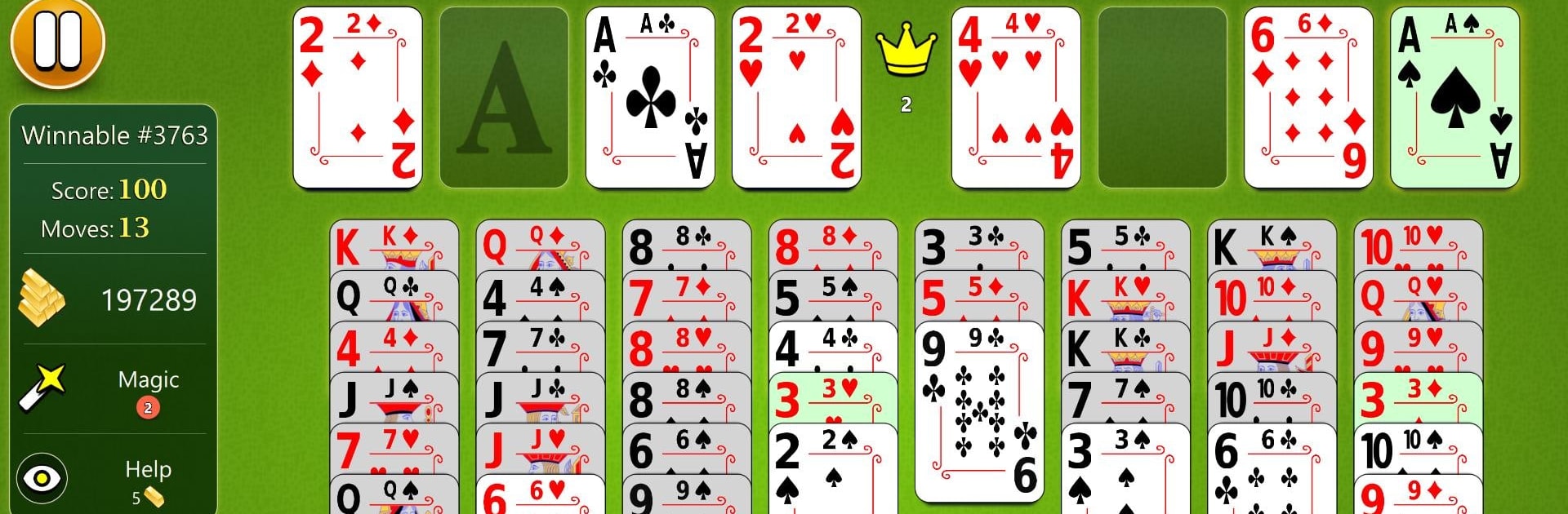
FreeCell Solitaire – Card Game brings the classic brainy pastime into a smooth, modern package. It keeps the feel you love while giving you tons of ways to play, tweak, and track your wins. Whether you’re brand-new or a longtime fan of this Card favorite, you’ll find quick hands for a break and deeper challenges when you’re in the mood to think. Prefer a desk setup? It runs nicely on PC with BlueStacks, too.

Game Features

  • Multiple ways to play: Jump into Random Deals, tackle a huge set of guaranteed-solvable boards, climb an expansive level path, or take on unique Daily Challenges.
  • Friendly help system: Use unlimited hints, visual tips, and undos whenever you need a nudge—or ignore them and go full strategist.
  • Classic FreeCell flow: Stage moves in four free cells, build foundations from Ace to King, and string together clean sequences to clear the board.
  • Smooth controls: Tap for quick auto-moves or drag-and-drop when you want precision and control.
  • Personalize your table: Swap backgrounds, card faces, and backs; fine-tune animations, vibrations, and interface elements to match your vibe.
  • Portrait or landscape: Play comfortably in either orientation without missing a beat.
  • Lefty or righty ready: Flip the layout so everything sits exactly where your hand expects it.
  • Adaptive and precise: Enjoy a clean layout on different screens, plus stylus support for pixel-perfect placement.
  • Stats and achievements: Track streaks and milestones with detailed statistics and 30+ achievements to chase.
  • Cloud sync and competition: Save progress to the cloud and see how you rank on online leaderboards.

Start playing FreeCell Solitaire – Card Game on BlueStacks and get a smoother, more comfortable PC or Mac setup.


Game Features

Enhancements

  • Macros
  • Multi Instance
  • Multi Instance Sync
  • Script
  • Enhancements
Macros

Macros

Automate the predictable in FreeCell Solitaire - Card Game and transform your gameplay with Macros. Get access to inventive Macros in the BlueStacks Macro Community
Multi Instance

Multi Instance

Play FreeCell Solitaire - Card Game on one window. And chat with your friend on the other. Press CTRL + Shift + 8 to open the Multi-Instance Manager. And start creating fresh instances or clone an existing one.
Multi Instance Sync

Multi Instance Sync

Play FreeCell Solitaire - Card Game with the power of Multi-Instance Sync. Replicate what you are doing on the main instance on all other instances. Level up faster, play more.
Script

Script

Script your way to gaming glory in FreeCell Solitaire - Card Game with BlueStacks Script. Write and run a set of commands to automate repeated tasks. Trigger the command by assigning it to any key.
Read More

How to Download and Play FreeCell Solitaire - Card Game on PC or Mac

  • Download and install BlueStacks on your PC or Mac

  • Complete Google sign-in to access the Play Store, or do it later

  • Look for FreeCell Solitaire - Card Game in the search bar at the top right corner

  • Click to install FreeCell Solitaire - Card Game from the search results

  • Complete Google sign-in (if you skipped step 2) to install FreeCell Solitaire - Card Game

  • Click the FreeCell Solitaire - Card Game icon on the home screen to start playing

video
Watch Video

Minimum System Requirements

With BlueStacks 5, you can get started on a PC that fulfills the following requirements.

  • Operating System

    Microsoft Windows 7 or above, macOS 11 (Big Sur) or above

  • Processor

    Intel, AMD or Apple Silicon Processor

  • RAM

    at least 4GB

  • HDD

    10GB Free Disk Space

Note:

* You must be an Administrator on your PC. Up to date graphics drivers from Microsoft or the chipset vendor.

FreeCell Solitaire - Card Game - FAQs

  • How to play FreeCell Solitaire - Card Game on Windows PC & Mac?

    Play FreeCell Solitaire - Card Game on your PC or Mac by following these simple steps.

    • Click on 'Play FreeCell Solitaire - Card Game on PC’ to download BlueStacks
    • Install it and log-in to Google Play Store
    • Launch and play the game.
  • Why is BlueStacks the fastest and safest platform to play games on PC?

    BlueStacks respects your privacy and is always safe and secure to use. It does not carry any malware, spyware, or any sort of additional software that could harm your PC.

    It is engineered to optimize speed and performance for a seamless gaming experience.

  • What are FreeCell Solitaire - Card Game PC requirements?

    Minimum requirement to run FreeCell Solitaire - Card Game on your PC

    • OS: Microsoft Windows 7 or above MacOS 11 (Big Sur) or above
    • Processor: Intel, AMD or Apple Silicon Processor
    • RAM: Your PC must have at least 4GB of RAM. (Note that having 4GB or more disk space is not a substitute for RAM)
    • HDD: 10GB Free Disk Space.
    • You must be an Administrator on your PC.