Sengodai
Sengodai

Sengodai

Card

| Tsunoa Games

Play on PC with BlueStacks or from our cloud

Click here to Pre-Register for Sengodai
  • Overview
  • Features
  • How to Play

Page Modified On: December 02, 2025

Play Sengodai on PC or Mac

Explore a whole new adventure with Sengodai, a Card game created by Tsunoa Games. Experience great gameplay with BlueStacks, the most popular gaming platform to play Android games on your PC or Mac.

About the Game

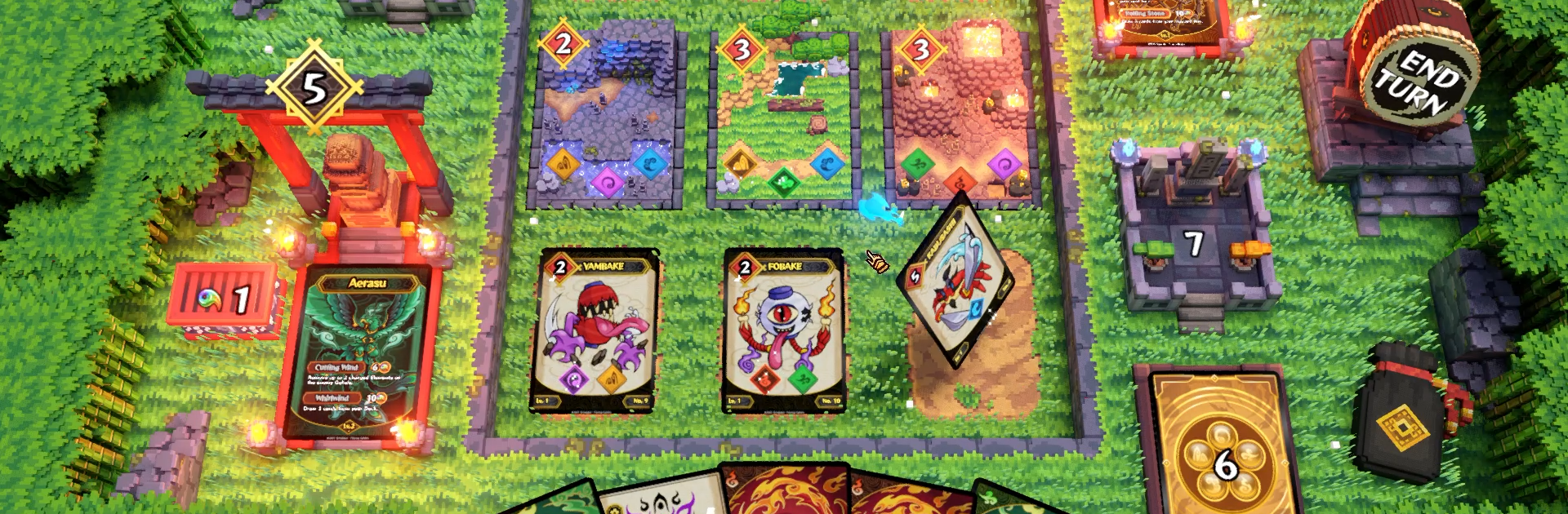
Sengodai is a tactical roguelike Card game from Tsunoa Games where you build a squad of Gokai monsters and take on tricky deities across shifting realms. Each run remixes the map, the encounters, and the cards you can snag, so your strategy keeps evolving as you go. If you like playing on a bigger screen, it also runs smoothly on BlueStacks.

Game Features

  • Branching runs: Choose your route through five distinct worlds packed with duels, surprise events, traveling merchants, and crafty sculptors who reshape your deck.
  • Build your Gokai roster: Collect and evolve 20+ Gokai cards, then stack smart synergies around your team leader to create combos that actually matter.
  • Lead with a god: Command one of five gods (four unlockable). Each deity brings a unique skill set and playstyle that changes how your team fights.
  • Spells that swing battles: Discover 40+ spell cards—buy them from a mysterious vendor or snatch them from enemies—to flip a losing turn into a clean win.
  • Elemental charge: Infuse your Gokai with elemental power to cleanse corrupted zones and grind your opponent’s life down to zero.
  • Campaign mode: Push a full run across five themed worlds, learning the ropes while testing bolder builds with every attempt.
  • Choice-driven progression: Risky trades, upgrades, and oddities keep decisions interesting; the path you pick shapes the deck you end up piloting.

Start your journey now. Download the game on BlueStacks, invite your friends, and march on a new adventure.


Features

  • Macros

    Automate the predictable in Sengodai and transform your gameplay with Macros. Get access to inventive Macros in the BlueStacks Macro Community

  • Multi Instance

    Play Sengodai on one window. And chat with your friend on the other. Press CTRL + Shift + 8 to open the Multi-Instance Manager. And start creating fresh instances or clone an existing one.

  • Multi Instance Sync

    Play Sengodai with the power of Multi-Instance Sync. Replicate what you are doing on the main instance on all other instances. Level up faster, play more.

  • Script

    Script your way to gaming glory in Sengodai with BlueStacks Script. Write and run a set of commands to automate repeated tasks. Trigger the command by assigning it to any key.

How to Download and Play Sengodai on PC or Mac

  • Download and install BlueStacks on your PC or Mac

  • Complete Google sign-in to access the Play Store, or do it later

  • Look for Sengodai in the search bar at the top right corner

  • Click to install Sengodai from the search results

  • Complete Google sign-in (if you skipped step 2) to install Sengodai

  • Click the Sengodai icon on the home screen to start playing

video
Watch Video

Minimum System Requirements

With BlueStacks 5, you can get started on a PC that fulfills the following requirements.

  • Operating System

    Microsoft Windows 7 or above, macOS 11 (Big Sur) or above

  • Processor

    Intel, AMD or Apple Silicon Processor

  • RAM

    at least 4GB

  • HDD

    10GB Free Disk Space

Note:

* You must be an Administrator on your PC. Up to date graphics drivers from Microsoft or the chipset vendor.

Exclusive Gaming Content. And More.

Get the latest updates on the BlueStacks Blog.

See More
Sengodai

Be among the first to play Sengodai on PC

Get notified when the Game launches

Sengodai - FAQs

  • How to play Sengodai on Windows PC & Mac?

    Play Sengodai on your PC or Mac by following these simple steps.

    • Click on 'Play Sengodai on PC’ to download BlueStacks
    • Install it and log-in to Google Play Store
    • Launch and play the game.
  • Why is BlueStacks the fastest and safest platform to play games on PC?

    BlueStacks respects your privacy and is always safe and secure to use. It does not carry any malware, spyware, or any sort of additional software that could harm your PC.

    It is engineered to optimize speed and performance for a seamless gaming experience.

  • What are Sengodai PC requirements?

    Minimum requirement to run Sengodai on your PC

    • OS: Microsoft Windows 7 or above MacOS 11 (Big Sur) or above
    • Processor: Intel, AMD or Apple Silicon Processor
    • RAM: Your PC must have at least 4GB of RAM. (Note that having 4GB or more disk space is not a substitute for RAM)
    • HDD: 10GB Free Disk Space.
    • You must be an Administrator on your PC.