Durak
Durak

Durak

Card

| VG MobileGames

Play on PC with BlueStacks or from our cloud

  • Overview
  • Game Features
  • How to Play

Page Modified On: August 29, 2025

Play Durak on PC or Mac

Explore a whole new adventure with Durak, a Card game created by VG MobileGames. Experience great gameplay with BlueStacks, the most popular gaming platform to play Android games on your PC or Mac.

About the Game

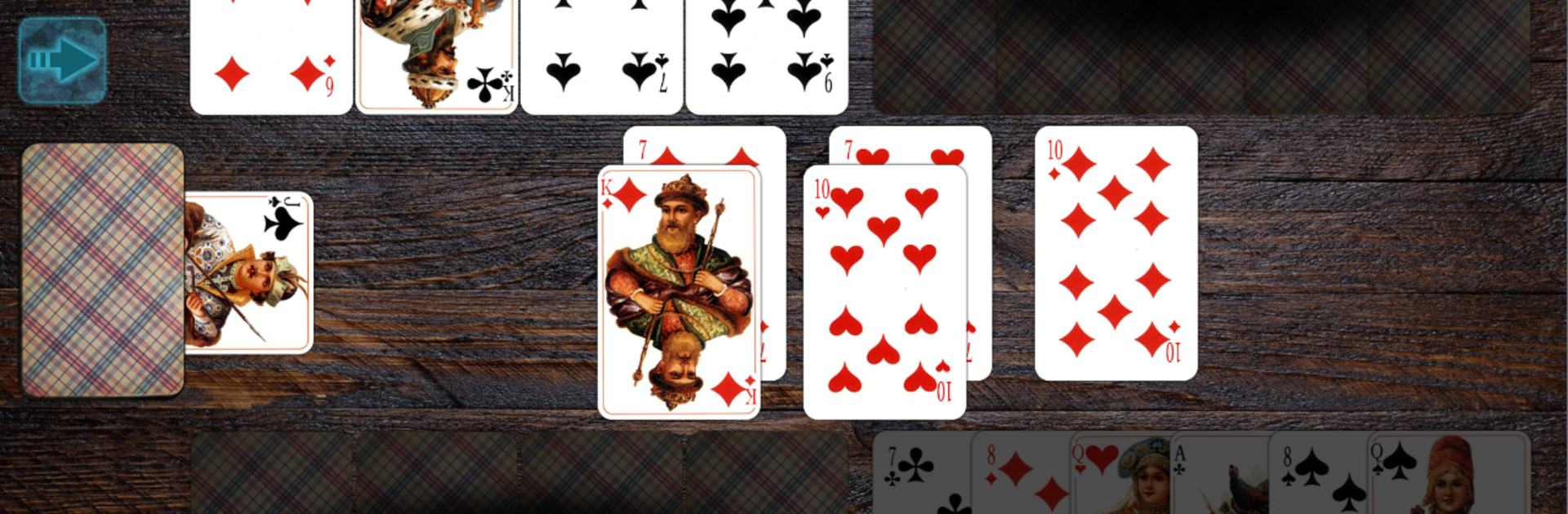
Durak by VG MobileGames brings the classic Card showdown to your screen with a smart, fair opponent that actually feels sharp. It sticks to the rules fans know, offers both throw-in and passing styles, and keeps things moving with clean visuals and quick turns. Prefer a bigger screen? It also plays smoothly on PC with BlueStacks.

Game Features

  • Smart, Fair AI: The computer remembers cards, tracks trumps, and tightens up near the end—without peeking or cheating. Wins feel earned.
  • Two Popular Modes: Play throw-in or passing variations of Durak, switching styles when you want a different pace.
  • Up to Six at the Table: Fill the table with up to six players, perfect for chaotic endgames and clever team-like tactics.
  • Play Anywhere, Offline: No internet needed. Pick up a round on the go, save mid-match, and continue after a phone call.
  • Crisp Visuals, Big Cards: Photorealistic decks and smooth animations look great on HD, FullHD, and higher resolutions. Large card faces are easy to read on phones and tablets.
  • 36- or 52-Card Decks: Choose the classic 36-card setup or go 52 if you want longer, more strategic sessions.
  • Mix-and-Match Look: Four detailed card decks, multiple “jackets/shirts,” and five table backgrounds you can combine however you like.
  • Comfortable Layout: Place your hand at the top or bottom of the table and keep the board tidy your way.
  • Swipe-First Controls: Quick swipes to attack, defend, pass, or take—fast, precise, and easy to learn.
  • Rules Done Right: Thoughtful edge cases handled, from re-deals to correct throws, so the flow stays fair and consistent.
  • English and Russian Support: Play in the language you prefer without digging through menus.

Slay your opponents with your epic moves. Play it your way on BlueStacks and dominate the battlefield.


Game Features

Enhancements

  • Macros
  • Multi Instance
  • Multi Instance Sync
  • Script
  • Enhancements
Macros

Macros

Automate the predictable in Durak and transform your gameplay with Macros. Get access to inventive Macros in the BlueStacks Macro Community
Multi Instance

Multi Instance

Play Durak on one window. And chat with your friend on the other. Press CTRL + Shift + 8 to open the Multi-Instance Manager. And start creating fresh instances or clone an existing one.
Multi Instance Sync

Multi Instance Sync

Play Durak with the power of Multi-Instance Sync. Replicate what you are doing on the main instance on all other instances. Level up faster, play more.
Script

Script

Script your way to gaming glory in Durak with BlueStacks Script. Write and run a set of commands to automate repeated tasks. Trigger the command by assigning it to any key.
Read More

How to Download and Play Durak on PC or Mac

  • Download and install BlueStacks on your PC or Mac

  • Complete Google sign-in to access the Play Store, or do it later

  • Look for Durak in the search bar at the top right corner

  • Click to install Durak from the search results

  • Complete Google sign-in (if you skipped step 2) to install Durak

  • Click the Durak icon on the home screen to start playing

video
Watch Video

Minimum System Requirements

With BlueStacks 5, you can get started on a PC that fulfills the following requirements.

  • Operating System

    Microsoft Windows 7 or above, macOS 11 (Big Sur) or above

  • Processor

    Intel, AMD or Apple Silicon Processor

  • RAM

    at least 4GB

  • HDD

    10GB Free Disk Space

Note:

* You must be an Administrator on your PC. Up to date graphics drivers from Microsoft or the chipset vendor.

Durak - FAQs

  • How to play Durak on Windows PC & Mac?

    Play Durak on your PC or Mac by following these simple steps.

    • Click on 'Play Durak on PC’ to download BlueStacks
    • Install it and log-in to Google Play Store
    • Launch and play the game.
  • Why is BlueStacks the fastest and safest platform to play games on PC?

    BlueStacks respects your privacy and is always safe and secure to use. It does not carry any malware, spyware, or any sort of additional software that could harm your PC.

    It is engineered to optimize speed and performance for a seamless gaming experience.

  • What are Durak PC requirements?

    Minimum requirement to run Durak on your PC

    • OS: Microsoft Windows 7 or above MacOS 11 (Big Sur) or above
    • Processor: Intel, AMD or Apple Silicon Processor
    • RAM: Your PC must have at least 4GB of RAM. (Note that having 4GB or more disk space is not a substitute for RAM)
    • HDD: 10GB Free Disk Space.
    • You must be an Administrator on your PC.