Airport Control
Airport Control

Airport Control

Casual

| NexGen Game World

Play on PC with BlueStacks or from our cloud

  • Overview
  • Game Features
  • How to Play

Page Modified On: January 09, 2026

Play Airport Control on PC or Mac

Join millions to experience Airport Control, an exciting Casual game from NexGen Game World. With BlueStacks App Player, you are always a step ahead of your opponent, ready to outplay them with faster gameplay and better control with the mouse and keyboard on your PC or Mac.

About the Game

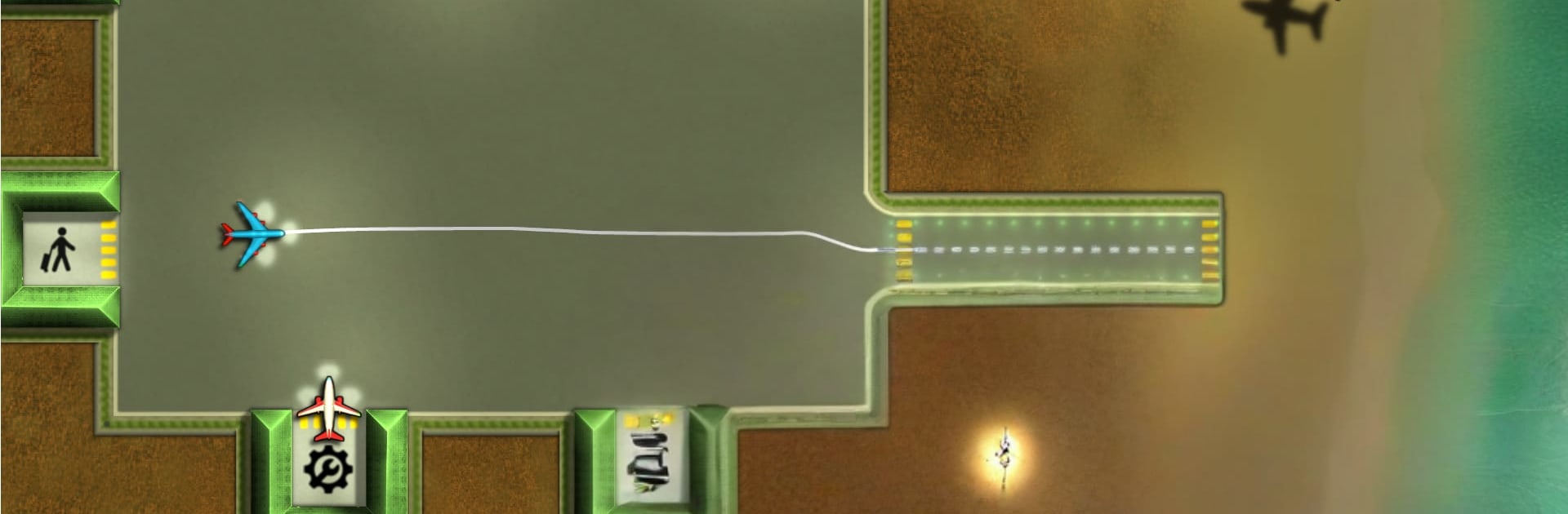
Airport Control is a Casual air-traffic puzzler from NexGen Game World that puts you in the hot seat of the control tower. You’ll sketch flight paths, time landings and takeoffs, and keep the runway schedule running like clockwork. It’s easy to pick up, surprisingly tense when the sky gets crowded, and perfect for a quick session that can turn into “just one more try.”

Game Features

  • Draw-and-Guide Flights: Trace safe routes for incoming and outgoing planes, then tweak on the fly to avoid runway jams and close calls.
  • Real-Time Multitasking: Handle arrivals, departures, and service needs at once—your attention and timing are everything when the airspace gets busy.
  • On-Time Pays: Send flights off promptly to earn cash, then invest in upgrades and open new stations to grow your airport’s capacity.
  • Modes and Progression: Work through lots of handcrafted levels with steadily rising difficulty, plus six endless modes built for high-score chases.
  • Compete and Collect: Climb global leaderboards and unlock achievements as you sharpen your tower skills and push for cleaner, faster runs.
  • Dynamic Skies: Rain, clouds, and a full day-night cycle change visibility and pacing, so you’ll adjust routes and timing as conditions shift.
  • Quick Sessions, Sticky Challenge: Great for short breaks, yet deep enough to reward planning, rerouting, and clever use of space.
  • Smooth on BlueStacks: Prefer a bigger screen and precise cursor control? Playing on BlueStacks makes drawing paths and rapid switches feel extra crisp.

Get ready for a buttery smooth, high-performance gaming action only on BlueStacks.

Game Features

Enhancements

  • Macros
  • Multi Instance
  • Script
  • Repeated Tap
  • Enhancements
Macros

Macros

Automate the predictable in Airport Control and transform your gameplay with Macros. Get access to inventive Macros in the BlueStacks Macro Community
Multi Instance

Multi Instance

Play Airport Control on one window. And chat with your friend on the other. Press CTRL + Shift + 8 to open the Multi-Instance Manager. And start creating fresh instances or clone an existing one.
Script

Script

Script your way to gaming glory in Airport Control with BlueStacks Script. Write and run a set of commands to automate repeated tasks. Trigger the command by assigning it to any key.
Repeated Tap

Repeated Tap

BlueStacks lets you master Airport Control with useful features like the Repeated Tap. Now you do not have to press the same key repeatedly to initiate an action. Just assign it to one key and you are good to go.
Read More

How to Download and Play Airport Control on PC or Mac

  • Download and install BlueStacks on your PC or Mac

  • Complete Google sign-in to access the Play Store, or do it later

  • Look for Airport Control in the search bar at the top right corner

  • Click to install Airport Control from the search results

  • Complete Google sign-in (if you skipped step 2) to install Airport Control

  • Click the Airport Control icon on the home screen to start playing

video
Watch Video

Minimum System Requirements

With BlueStacks 5, you can get started on a PC that fulfills the following requirements.

  • Operating System

    Microsoft Windows 7 or above, macOS 11 (Big Sur) or above

  • Processor

    Intel, AMD or Apple Silicon Processor

  • RAM

    at least 4GB

  • HDD

    10GB Free Disk Space

Note:

* You must be an Administrator on your PC. Up to date graphics drivers from Microsoft or the chipset vendor.

Airport Control - FAQs

  • How to play Airport Control on Windows PC & Mac?

    Play Airport Control on your PC or Mac by following these simple steps.

    • Click on 'Play Airport Control on PC’ to download BlueStacks
    • Install it and log-in to Google Play Store
    • Launch and play the game.
  • Why is BlueStacks the fastest and safest platform to play games on PC?

    BlueStacks respects your privacy and is always safe and secure to use. It does not carry any malware, spyware, or any sort of additional software that could harm your PC.

    It is engineered to optimize speed and performance for a seamless gaming experience.

  • What are Airport Control PC requirements?

    Minimum requirement to run Airport Control on your PC

    • OS: Microsoft Windows 7 or above MacOS 11 (Big Sur) or above
    • Processor: Intel, AMD or Apple Silicon Processor
    • RAM: Your PC must have at least 4GB of RAM. (Note that having 4GB or more disk space is not a substitute for RAM)
    • HDD: 10GB Free Disk Space.
    • You must be an Administrator on your PC.