Dress Up Game:Fashion Design

Dress Up Game:Fashion Design

Casual

| Fishing Shooting and Hunting Games

Play on PC with BlueStacks or from our cloud

  • Overview
  • Game Features
  • How to Play

Page Modified On: November 20, 2025

Play Dress Up Game:Fashion Design on PC or Mac

Dress Up Game:Fashion Design brings the Casual genre to life, and throws up exciting challenges for gamers. Developed by Fishing Shooting and Hunting Games, this Android game is best experienced on BlueStacks, the World’s #1 app player for PC and Mac users.

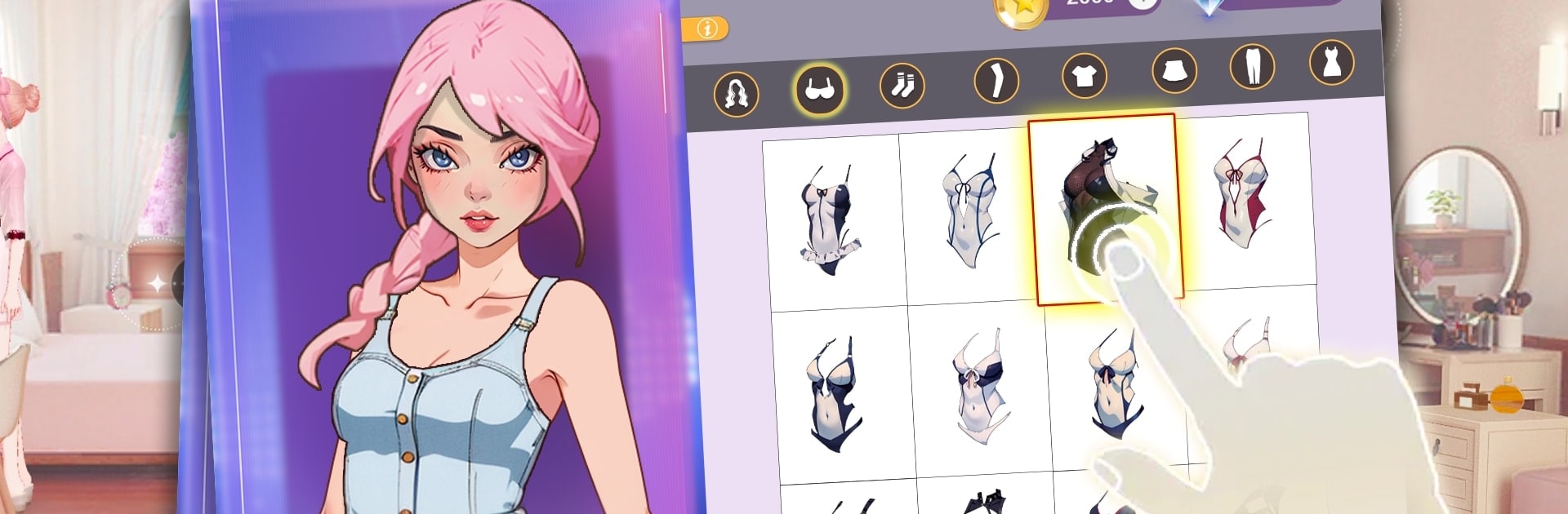
Dress Up Game: Fashion Design is a chill anime-style fashion builder where players style models from hair to heels, then send those looks into themed contests. The fun sits in mixing pieces from a huge closet, with outfits pulled from lots of places and moments in life, like formal dances, sunny beach days, campus events, or looks inspired by different regions. It feels like rummaging through a massive wardrobe, trying colors and cuts that should not match but somehow do, then saving the best combos for later. There is a light story too, starting as a rookie stylist and moving up to bigger runways, more clients, and louder crowds. New items unlock by finishing challenges and doing well in competitions, so there is a bit of collecting and a little grind, nothing too heavy.

Matches are scored by judges and by player votes, which keeps results unpredictable in a good way. The closet keeps growing with comic-style clothes and accessories, so there is always a fresh pair of boots or a wild dress to test. On PC with BlueStacks, clicking through menus and dragging items around is smooth, the bigger screen actually helps with detail like patterns and fabric shine. It suits casual players who just want to dress characters for a few minutes, and also anyone who loves planning full looks, hair to jewelry, then tweaking until it feels just right. It even doubles as a quick reference when thinking about what outfit works together in real life, not official advice, but it helps.

Slay your opponents with your epic moves. Play it your way on BlueStacks and dominate the battlefield.


Game Features

Enhancements

  • Macros
  • Multi Instance
  • Script
  • Repeated Tap
  • Enhancements
Macros

Macros

Automate the predictable in Dress Up Game:Fashion Design and transform your gameplay with Macros. Get access to inventive Macros in the BlueStacks Macro Community
Multi Instance

Multi Instance

Play Dress Up Game:Fashion Design on one window. And chat with your friend on the other. Press CTRL + Shift + 8 to open the Multi-Instance Manager. And start creating fresh instances or clone an existing one.
Script

Script

Script your way to gaming glory in Dress Up Game:Fashion Design with BlueStacks Script. Write and run a set of commands to automate repeated tasks. Trigger the command by assigning it to any key.
Repeated Tap

Repeated Tap

BlueStacks lets you master Dress Up Game:Fashion Design with useful features like the Repeated Tap. Now you do not have to press the same key repeatedly to initiate an action. Just assign it to one key and you are good to go.
Read More

How to Download and Play Dress Up Game:Fashion Design on PC or Mac

  • Download and install BlueStacks on your PC or Mac

  • Complete Google sign-in to access the Play Store, or do it later

  • Look for Dress Up Game:Fashion Design in the search bar at the top right corner

  • Click to install Dress Up Game:Fashion Design from the search results

  • Complete Google sign-in (if you skipped step 2) to install Dress Up Game:Fashion Design

  • Click the Dress Up Game:Fashion Design icon on the home screen to start playing

video
Watch Video

Minimum System Requirements

With BlueStacks 5, you can get started on a PC that fulfills the following requirements.

  • Operating System

    Microsoft Windows 7 or above, macOS 11 (Big Sur) or above

  • Processor

    Intel, AMD or Apple Silicon Processor

  • RAM

    at least 4GB

  • HDD

    10GB Free Disk Space

Note:

* You must be an Administrator on your PC. Up to date graphics drivers from Microsoft or the chipset vendor.

Dress Up Game:Fashion Design - FAQs

  • How to play Dress Up Game:Fashion Design on Windows PC & Mac?

    Play Dress Up Game:Fashion Design on your PC or Mac by following these simple steps.

    • Click on 'Play Dress Up Game:Fashion Design on PC’ to download BlueStacks
    • Install it and log-in to Google Play Store
    • Launch and play the game.
  • Why is BlueStacks the fastest and safest platform to play games on PC?

    BlueStacks respects your privacy and is always safe and secure to use. It does not carry any malware, spyware, or any sort of additional software that could harm your PC.

    It is engineered to optimize speed and performance for a seamless gaming experience.

  • What are Dress Up Game:Fashion Design PC requirements?

    Minimum requirement to run Dress Up Game:Fashion Design on your PC

    • OS: Microsoft Windows 7 or above MacOS 11 (Big Sur) or above
    • Processor: Intel, AMD or Apple Silicon Processor
    • RAM: Your PC must have at least 4GB of RAM. (Note that having 4GB or more disk space is not a substitute for RAM)
    • HDD: 10GB Free Disk Space.
    • You must be an Administrator on your PC.