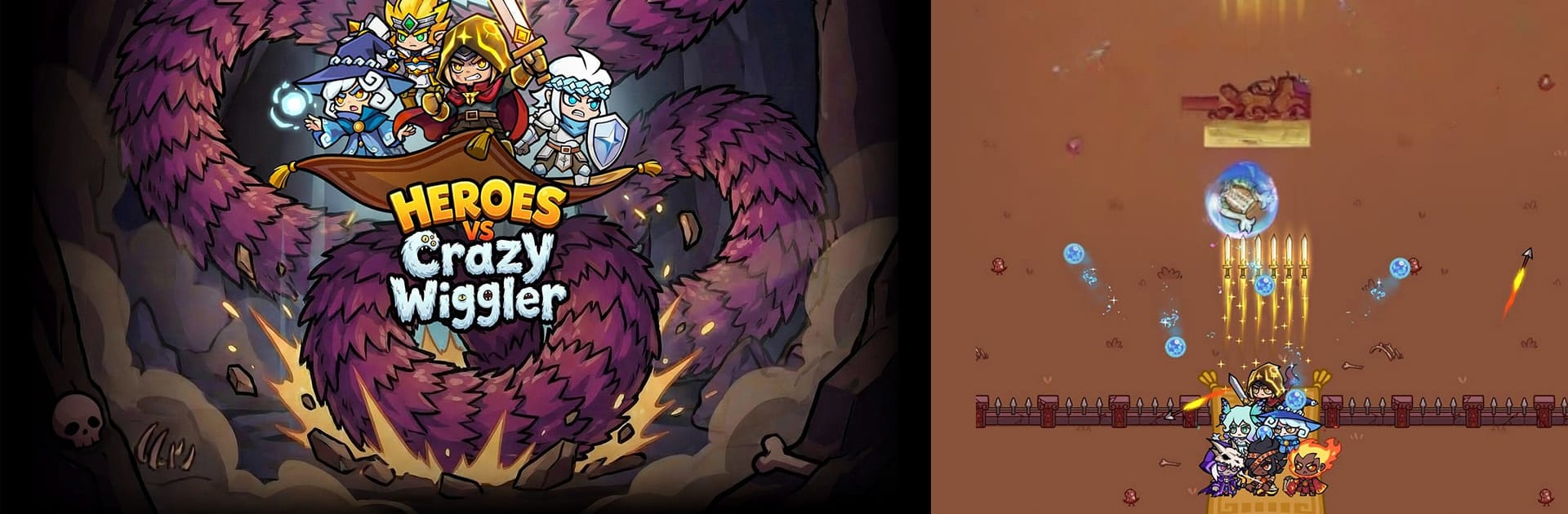
Heroes vs Crazy Wiggler

Heroes vs Crazy Wiggler

Casual

| IMIYOO

Play on PC with BlueStacks or from our cloud

  • Overview
  • Game Features
  • How to Play

Page Modified On: June 09, 2026

Play Heroes vs Crazy Wiggler on PC or Mac

Explore a whole new adventure with Heroes vs Crazy Wiggler, a Casual game created by IMIYOO. Experience great gameplay with BlueStacks, the most popular gaming platform to play Android games on your PC or Mac.

About the Game

Heroes vs Crazy Wiggler is a Casual, boss-focused survivor where your crew takes on one enormous, squirming menace. You guide a pack of heroes, thread through danger, and stitch together ridiculous builds that turn near-misses into jaw-dropping comebacks. It’s snappy and chaotic in the best way—great for a quick burst on your phone or a longer sit-down using BlueStacks.

Game Features

  • Pick-up-and-play controls: Your heroes swing automatically, so you handle the important stuff—moving, dodging, and grabbing upgrades. It’s easy to start, surprisingly tough to master.
  • Made for quick sessions: Runs kick off fast and stay punchy. Perfect for a coffee break, a commute, or any spare five minutes that somehow turns into twenty.
  • Fresh builds every run: Draft new skills each match and stack outrageous power-ups. The right combo can snowball into hilarious damage numbers, and no two attempts feel the same.
  • Squad-based mayhem: Field multiple heroes at once and mix roles—tanky fronts, sharp-shooting backlines, spell slingers, and splash specialists. Experiment until your lineup clicks.
  • One colossal foe: Face a massive, segmented Wiggler that owns the arena. Break parts, read its patterns, and squeeze through chaotic attacks while waves keep ramping up.
  • Zero grind, all action: Skip the fuss and get straight to the fight. Clean menus, fast starts, and upgrades that feel impactful from the first minute.
  • Satisfying synergies: Chain skills, trigger screen-wide effects, and watch segments crumble when everything lines up just right.

Get ready for a buttery smooth, high-performance gaming action only on BlueStacks.

Game Features

Enhancements

  • Macros
  • Multi Instance
  • Script
  • Repeated Tap
  • Enhancements
Macros

Macros

Automate the predictable in Heroes vs Crazy Wiggler and transform your gameplay with Macros. Get access to inventive Macros in the BlueStacks Macro Community
Multi Instance

Multi Instance

Play Heroes vs Crazy Wiggler on one window. And chat with your friend on the other. Press CTRL + Shift + 8 to open the Multi-Instance Manager. And start creating fresh instances or clone an existing one.
Script

Script

Script your way to gaming glory in Heroes vs Crazy Wiggler with BlueStacks Script. Write and run a set of commands to automate repeated tasks. Trigger the command by assigning it to any key.
Repeated Tap

Repeated Tap

BlueStacks lets you master Heroes vs Crazy Wiggler with useful features like the Repeated Tap. Now you do not have to press the same key repeatedly to initiate an action. Just assign it to one key and you are good to go.
Read More

How to Download and Play Heroes vs Crazy Wiggler on PC or Mac

  • Download and install BlueStacks on your PC or Mac

  • Complete Google sign-in to access the Play Store, or do it later

  • Look for Heroes vs Crazy Wiggler in the search bar at the top right corner

  • Click to install Heroes vs Crazy Wiggler from the search results

  • Complete Google sign-in (if you skipped step 2) to install Heroes vs Crazy Wiggler

  • Click the Heroes vs Crazy Wiggler icon on the home screen to start playing

video
Watch Video

Minimum System Requirements

With BlueStacks 5, you can get started on a PC that fulfills the following requirements.

  • Operating System

    Microsoft Windows 7 or above, macOS 11 (Big Sur) or above

  • Processor

    Intel, AMD or Apple Silicon Processor

  • RAM

    at least 4GB

  • HDD

    10GB Free Disk Space

Note:

* You must be an Administrator on your PC. Up to date graphics drivers from Microsoft or the chipset vendor.

Heroes vs Crazy Wiggler - FAQs

  • How to play Heroes vs Crazy Wiggler on Windows PC & Mac?

    Play Heroes vs Crazy Wiggler on your PC or Mac by following these simple steps.

    • Click on 'Play Heroes vs Crazy Wiggler on PC’ to download BlueStacks
    • Install it and log-in to Google Play Store
    • Launch and play the game.
  • Why is BlueStacks the fastest and safest platform to play games on PC?

    BlueStacks respects your privacy and is always safe and secure to use. It does not carry any malware, spyware, or any sort of additional software that could harm your PC.

    It is engineered to optimize speed and performance for a seamless gaming experience.

  • What are Heroes vs Crazy Wiggler PC requirements?

    Minimum requirement to run Heroes vs Crazy Wiggler on your PC

    • OS: Microsoft Windows 7 or above MacOS 11 (Big Sur) or above
    • Processor: Intel, AMD or Apple Silicon Processor
    • RAM: Your PC must have at least 4GB of RAM. (Note that having 4GB or more disk space is not a substitute for RAM)
    • HDD: 10GB Free Disk Space.
    • You must be an Administrator on your PC.