Monsters Dress Up Games

Monsters Dress Up Games

Casual

| Fashion Stylist Games

Play on PC with BlueStacks or from our cloud

  • Overview
  • Game Features
  • How to Play

Page Modified On: October 12, 2026

Play Monsters Dress Up Games on PC or Mac

Monsters Dress Up Games brings the Casual genre to life, and throws up exciting challenges for gamers. Developed by Fashion Stylist Games, this Android game is best experienced on BlueStacks, the World’s #1 app player for PC and Mac users.

About the Game

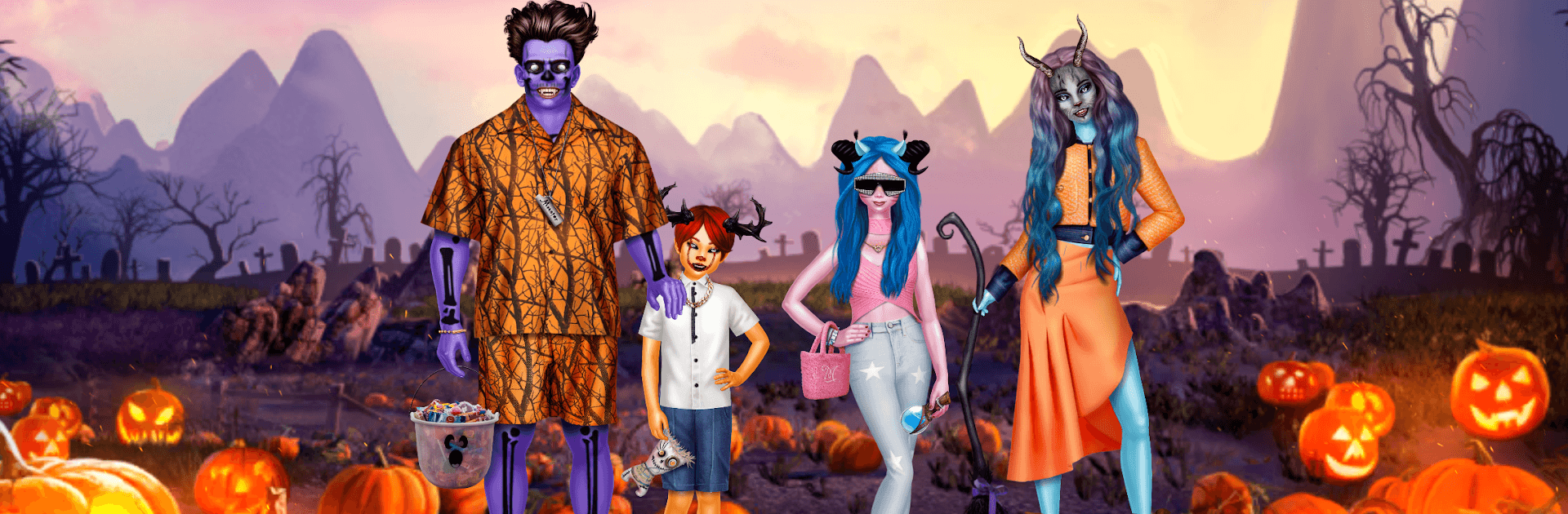
Monsters Dress Up Games is a playful Casual makeover playground where you style a whole monster family from head to toe. Create spooky, cute, or downright outrageous looks for two kids and their parents, then pose them for a Halloween bash or a monster runway moment. Prefer a larger screen? It also runs great on BlueStacks.

Game Features

  • Monster Family Makeovers: Dress a squad of four—girl, boy, mom, and dad—and build matching looks or give each one a totally different personality.
  • Advanced Creator Tools: Fine-tune every creature with highly customizable options, from skin tones and textures to facial shapes and special details.
  • Spooky-to-Cute Styles: Go classic with werewolves, vampires, witches, and aliens, or mash them up for original hybrids that feel uniquely yours.
  • High-Fashion Wardrobes: Explore curated outfits for each character, with pieces that fit their vibe and elevate your monster couture.
  • Gothic Beauty Shop: Play with Halloween makeup and eerie cosmetics to craft glamorous ghouls or wonderfully weird creations.
  • Magical Add‑Ons: Top off your designs with horns, wings, tails, pointy ears, fangs, and witchy props to nail the perfect theme.
  • Animated Live Portraits: Work with realistic, animated dolls and set up poses that bring your creepy-cool cast to life.
  • Scene-Setting Backgrounds: Drop your styled family into bold, atmospheric backdrops that scream party, catwalk, or haunted hangout.
  • Save Your Looks: Capture finished portraits and keep your favorite combos handy for future mix-and-match sessions.
  • Total Creative Freedom: Keep the whole clan on one theme or switch gears for each character—there are no rules, just imagination.

Start playing Monsters Dress Up Games on BlueStacks and get a smoother, more comfortable PC or Mac setup.


Game Features

Enhancements

  • Macros
  • Multi Instance
  • Script
  • Repeated Tap
  • Enhancements
Macros

Macros

Automate the predictable in Monsters Dress Up Games and transform your gameplay with Macros. Get access to inventive Macros in the BlueStacks Macro Community
Multi Instance

Multi Instance

Play Monsters Dress Up Games on one window. And chat with your friend on the other. Press CTRL + Shift + 8 to open the Multi-Instance Manager. And start creating fresh instances or clone an existing one.
Script

Script

Script your way to gaming glory in Monsters Dress Up Games with BlueStacks Script. Write and run a set of commands to automate repeated tasks. Trigger the command by assigning it to any key.
Repeated Tap

Repeated Tap

BlueStacks lets you master Monsters Dress Up Games with useful features like the Repeated Tap. Now you do not have to press the same key repeatedly to initiate an action. Just assign it to one key and you are good to go.
Read More

How to Download and Play Monsters Dress Up Games on PC or Mac

  • Download and install BlueStacks on your PC or Mac

  • Complete Google sign-in to access the Play Store, or do it later

  • Look for Monsters Dress Up Games in the search bar at the top right corner

  • Click to install Monsters Dress Up Games from the search results

  • Complete Google sign-in (if you skipped step 2) to install Monsters Dress Up Games

  • Click the Monsters Dress Up Games icon on the home screen to start playing

video
Watch Video

Minimum System Requirements

With BlueStacks 5, you can get started on a PC that fulfills the following requirements.

  • Operating System

    Microsoft Windows 7 or above, macOS 11 (Big Sur) or above

  • Processor

    Intel, AMD or Apple Silicon Processor

  • RAM

    at least 4GB

  • HDD

    10GB Free Disk Space

Note:

* You must be an Administrator on your PC. Up to date graphics drivers from Microsoft or the chipset vendor.

Monsters Dress Up Games - FAQs

  • How to play Monsters Dress Up Games on Windows PC & Mac?

    Play Monsters Dress Up Games on your PC or Mac by following these simple steps.

    • Click on 'Play Monsters Dress Up Games on PC’ to download BlueStacks
    • Install it and log-in to Google Play Store
    • Launch and play the game.
  • Why is BlueStacks the fastest and safest platform to play games on PC?

    BlueStacks respects your privacy and is always safe and secure to use. It does not carry any malware, spyware, or any sort of additional software that could harm your PC.

    It is engineered to optimize speed and performance for a seamless gaming experience.

  • What are Monsters Dress Up Games PC requirements?

    Minimum requirement to run Monsters Dress Up Games on your PC

    • OS: Microsoft Windows 7 or above MacOS 11 (Big Sur) or above
    • Processor: Intel, AMD or Apple Silicon Processor
    • RAM: Your PC must have at least 4GB of RAM. (Note that having 4GB or more disk space is not a substitute for RAM)
    • HDD: 10GB Free Disk Space.
    • You must be an Administrator on your PC.