Party Pop Bubblyz
Party Pop Bubblyz

Party Pop Bubblyz

Casual

| Smilegate Holdings, Inc

Play on PC with BlueStacks or from our cloud

  • Overview
  • Game Features
  • How to Play

Page Modified On: December 15, 2025

Play Party Pop Bubblyz on PC or Mac

Step into the World of Party Pop Bubblyz, a thrilling Casual game from the house of Smilegate Holdings, Inc. Play this Android game on BlueStacks App Player and experience immersive gaming on PC or Mac.

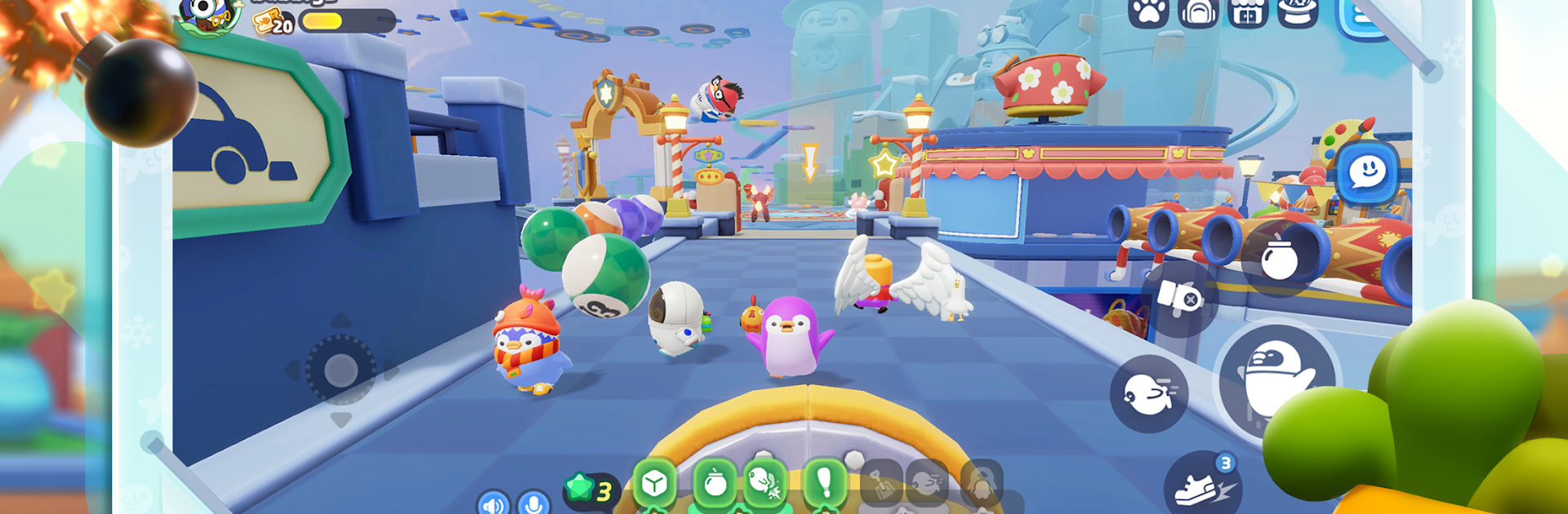
Party Pop Bubblyz feels like a goofy penguin party where chaos is the main course. It throws up to 20 players into short obstacle runs and mini challenges, and everything is a mix of bumping, sliding, and tumble physics. Rounds are about ten minutes, so it fits those quick sessions when someone has a little time to spare. Winning is nice, but the game clearly leans into silly moments. Stars picked up during a match unlock items that flip everything on its head, like a baseball bat that sends a rival flying or a jet engine that blasts across a gap. It is messy in a good way, the kind where a perfect jump turns into a pileup and everyone laughs about it.

There is a decent chunk of variety too. More than 30 stages keep swapping in different traps and moving platforms, and the look keeps things bright without being loud. Customization is a big hook. Over 200 costume pieces and dozens of pets means players can go full matching set, or mix parts for a weird little penguin that feels like theirs. Pets tag along in the plaza, pose for photos, and build up affection as they hang out. On PC with BlueStacks, movement and camera control feel cleaner with a keyboard, which helps when timing jumps actually matters. It works fine solo, but it really shines when friends load into the same lobby and start knocking each other around for no real reason besides laughs.

Make your gaming sessions memorable with precise controls that give you an edge in close combats and visuals that pop up, bringing every character to life.


Game Features

Enhancements

  • Macros
  • Multi Instance
  • Script
  • Repeated Tap
  • Enhancements
Macros

Macros

Automate the predictable in Party Pop Bubblyz and transform your gameplay with Macros. Get access to inventive Macros in the BlueStacks Macro Community
Multi Instance

Multi Instance

Play Party Pop Bubblyz on one window. And chat with your friend on the other. Press CTRL + Shift + 8 to open the Multi-Instance Manager. And start creating fresh instances or clone an existing one.
Script

Script

Script your way to gaming glory in Party Pop Bubblyz with BlueStacks Script. Write and run a set of commands to automate repeated tasks. Trigger the command by assigning it to any key.
Repeated Tap

Repeated Tap

BlueStacks lets you master Party Pop Bubblyz with useful features like the Repeated Tap. Now you do not have to press the same key repeatedly to initiate an action. Just assign it to one key and you are good to go.
Read More

How to Download and Play Party Pop Bubblyz on PC or Mac

  • Download and install BlueStacks on your PC or Mac

  • Complete Google sign-in to access the Play Store, or do it later

  • Look for Party Pop Bubblyz in the search bar at the top right corner

  • Click to install Party Pop Bubblyz from the search results

  • Complete Google sign-in (if you skipped step 2) to install Party Pop Bubblyz

  • Click the Party Pop Bubblyz icon on the home screen to start playing

video
Watch Video

Minimum System Requirements

With BlueStacks 5, you can get started on a PC that fulfills the following requirements.

  • Operating System

    Microsoft Windows 7 or above, macOS 11 (Big Sur) or above

  • Processor

    Intel, AMD or Apple Silicon Processor

  • RAM

    at least 4GB

  • HDD

    10GB Free Disk Space

Note:

* You must be an Administrator on your PC. Up to date graphics drivers from Microsoft or the chipset vendor.

Party Pop Bubblyz - FAQs

  • How to play Party Pop Bubblyz on Windows PC & Mac?

    Play Party Pop Bubblyz on your PC or Mac by following these simple steps.

    • Click on 'Play Party Pop Bubblyz on PC’ to download BlueStacks
    • Install it and log-in to Google Play Store
    • Launch and play the game.
  • Why is BlueStacks the fastest and safest platform to play games on PC?

    BlueStacks respects your privacy and is always safe and secure to use. It does not carry any malware, spyware, or any sort of additional software that could harm your PC.

    It is engineered to optimize speed and performance for a seamless gaming experience.

  • What are Party Pop Bubblyz PC requirements?

    Minimum requirement to run Party Pop Bubblyz on your PC

    • OS: Microsoft Windows 7 or above MacOS 11 (Big Sur) or above
    • Processor: Intel, AMD or Apple Silicon Processor
    • RAM: Your PC must have at least 4GB of RAM. (Note that having 4GB or more disk space is not a substitute for RAM)
    • HDD: 10GB Free Disk Space.
    • You must be an Administrator on your PC.