Sushi Nook: Order Puzzle

Sushi Nook: Order Puzzle

Casual

| Pi Game

Play on PC with BlueStacks or from our cloud

  • Overview
  • Game Features
  • How to Play

Page Modified On: October 30, 2026

Play Sushi Nook: Order Puzzle on PC or Mac

Play Sushi Nook: Order Puzzle by Pi Game on PC or Mac with BlueStacks. Use a bigger screen, mouse and keyboard controls, and smoother performance while you play.

About the Game

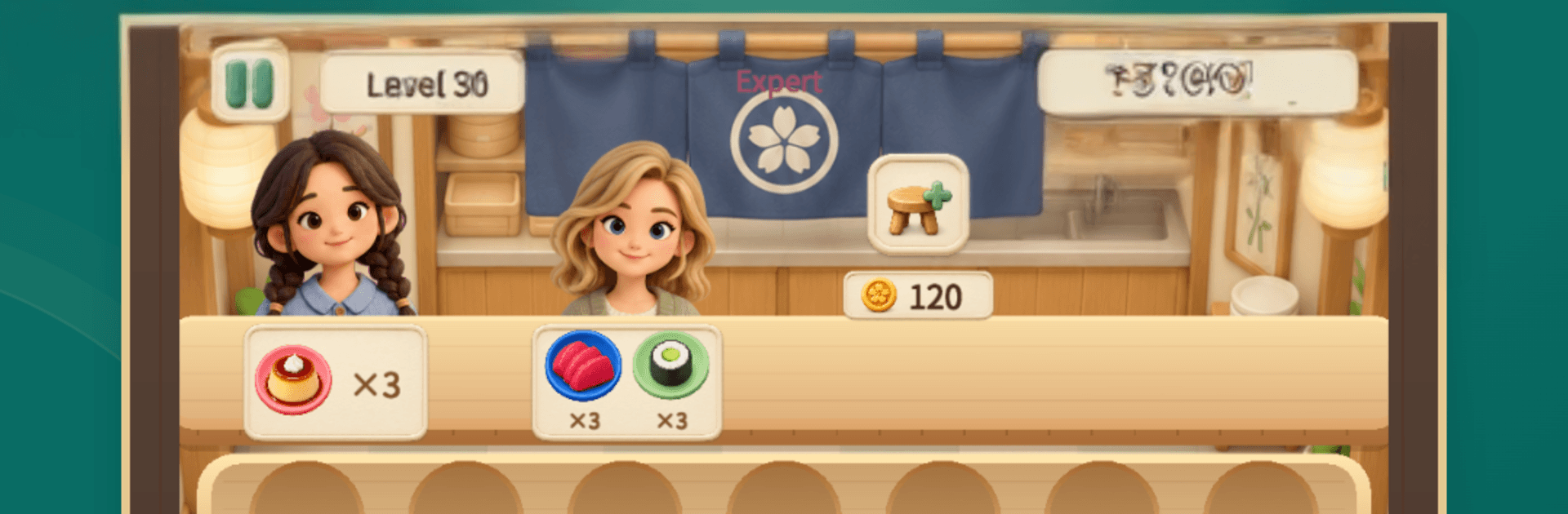
Sushi Nook: Order Puzzle is a Casual brain-teaser where you run a snug little sushi counter with a surprisingly tricky twist. You’ll grab plates from tables and moving belts to complete orders, but space is tight and stacks hide what you need, so every move counts. Want a bigger view while you play? It runs smoothly on PC with BlueStacks, too.

Game Features

  • Stacking strategy: Pick plates in the right order while juggling a small tray, uncovering buried dishes and making room before things pile up.
  • Conveyor-belt timing: Belts keep sliding by, so you’ll watch the flow, wait for openings, and snag the perfect piece at just the right moment.
  • 150 handcrafted puzzles: Work through winding layouts and deeper stacks that steadily raise the challenge without losing that chill, satisfying feel.
  • 28 dishes to unlock: Fill your recipe book with everything from crisp rolls to sweet treats, and enjoy the little surprises each new dish brings.
  • Handy boosters: Stuck with a full tray? Undo a misstep, shuffle the board, or stash a plate to buy yourself a breather and set up the next move.
  • Cozy clay vibe: Soft, handmade visuals, cheerful diners, and a warm atmosphere that makes each clear feel extra pleasing.
  • Easy to learn, smart to solve: Simple taps get you going fast, but clever sequencing and space management keep your brain pleasantly busy.

BlueStacks gives you more room to focus on the game and less time adjusting around mobile limitations.


Game Features

Enhancements

  • Macros
  • Multi Instance
  • Script
  • Repeated Tap
  • Enhancements
Macros

Macros

Automate the predictable in Sushi Nook: Order Puzzle and transform your gameplay with Macros. Get access to inventive Macros in the BlueStacks Macro Community
Multi Instance

Multi Instance

Play Sushi Nook: Order Puzzle on one window. And chat with your friend on the other. Press CTRL + Shift + 8 to open the Multi-Instance Manager. And start creating fresh instances or clone an existing one.
Script

Script

Script your way to gaming glory in Sushi Nook: Order Puzzle with BlueStacks Script. Write and run a set of commands to automate repeated tasks. Trigger the command by assigning it to any key.
Repeated Tap

Repeated Tap

BlueStacks lets you master Sushi Nook: Order Puzzle with useful features like the Repeated Tap. Now you do not have to press the same key repeatedly to initiate an action. Just assign it to one key and you are good to go.
Read More

How to Download and Play Sushi Nook: Order Puzzle on PC or Mac

  • Download and install BlueStacks on your PC or Mac

  • Complete Google sign-in to access the Play Store, or do it later

  • Look for Sushi Nook: Order Puzzle in the search bar at the top right corner

  • Click to install Sushi Nook: Order Puzzle from the search results

  • Complete Google sign-in (if you skipped step 2) to install Sushi Nook: Order Puzzle

  • Click the Sushi Nook: Order Puzzle icon on the home screen to start playing

video
Watch Video

Minimum System Requirements

With BlueStacks 5, you can get started on a PC that fulfills the following requirements.

  • Operating System

    Microsoft Windows 7 or above, macOS 11 (Big Sur) or above

  • Processor

    Intel, AMD or Apple Silicon Processor

  • RAM

    at least 4GB

  • HDD

    10GB Free Disk Space

Note:

* You must be an Administrator on your PC. Up to date graphics drivers from Microsoft or the chipset vendor.

Sushi Nook: Order Puzzle - FAQs

  • How to play Sushi Nook: Order Puzzle on Windows PC & Mac?

    Play Sushi Nook: Order Puzzle on your PC or Mac by following these simple steps.

    • Click on 'Play Sushi Nook: Order Puzzle on PC’ to download BlueStacks
    • Install it and log-in to Google Play Store
    • Launch and play the game.
  • Why is BlueStacks the fastest and safest platform to play games on PC?

    BlueStacks respects your privacy and is always safe and secure to use. It does not carry any malware, spyware, or any sort of additional software that could harm your PC.

    It is engineered to optimize speed and performance for a seamless gaming experience.

  • What are Sushi Nook: Order Puzzle PC requirements?

    Minimum requirement to run Sushi Nook: Order Puzzle on your PC

    • OS: Microsoft Windows 7 or above MacOS 11 (Big Sur) or above
    • Processor: Intel, AMD or Apple Silicon Processor
    • RAM: Your PC must have at least 4GB of RAM. (Note that having 4GB or more disk space is not a substitute for RAM)
    • HDD: 10GB Free Disk Space.
    • You must be an Administrator on your PC.