
Zoo Sound Land
Zoo Sound Land

Zoo Sound Land

Casual

| Poddorfient

Play on PC with BlueStacks or from our cloud

  • Overview
  • Game Features
  • How to Play

Page Modified On: May 11, 2026

Play Zoo Sound Land on PC or Mac

Zoo Sound Land brings the Casual genre to life, and throws up exciting challenges for gamers. Developed by Poddorfient, this Android game is best experienced on BlueStacks, the World’s #1 app player for PC and Mac users.

About the Game

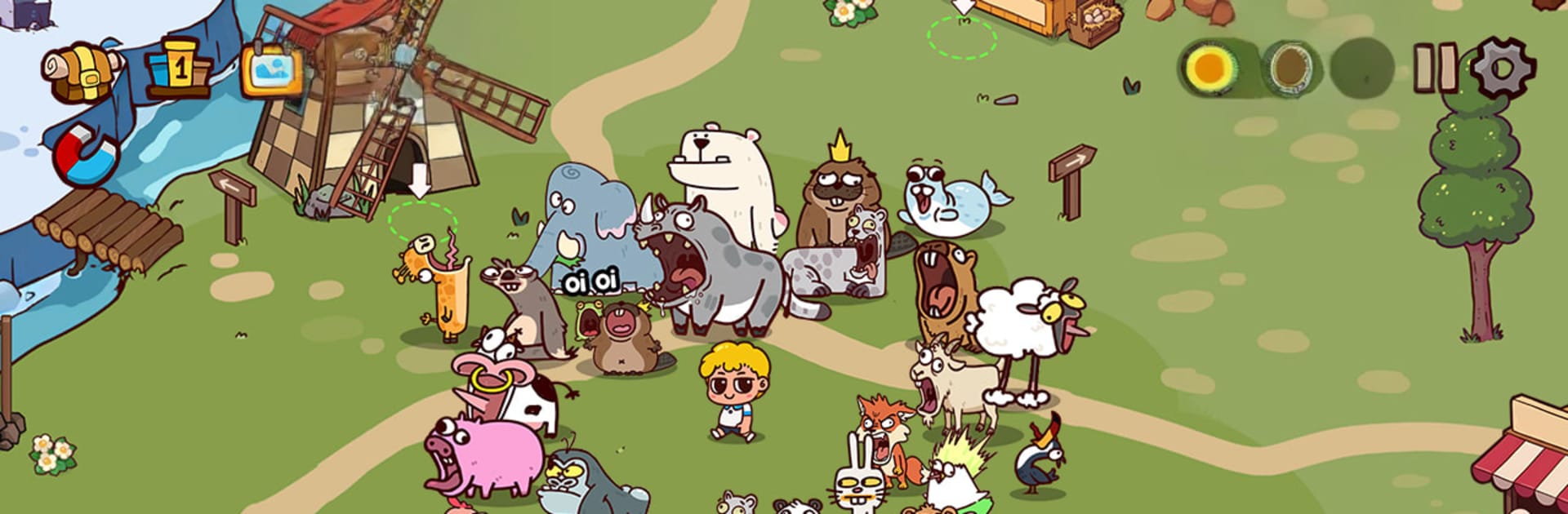
Zoo Sound Land is a quirky Casual game from Poddorfient where your voice is the magic trick. Record silly roars, chirps, or whispers to give each critter its own personality as you grow a cozy, low-stress zoo that keeps bustling even when you’re not around. It’s easy to learn, satisfying to check in on, and feels great on a phone—or on BlueStacks if you like playing on PC.

Game Features

  • Your voice, their call: Use your mic to record custom sounds for every animal, turning each new resident into something uniquely yours.
  • Collect cute critters: Unlock a growing lineup of adorable animals and watch your little park fill up with character and charm.
  • Idle coins, steady progress: Your zoo earns while you’re away, so popping back in to collect rewards and make upgrades always feels rewarding, not rushed.
  • Simple, relaxing flow: No complicated menus or busywork—tap, record, assign, and enjoy the cheerful chaos your sounds create.
  • Upgrade what you love: Spend your earnings to boost animals and expand your collection at your own pace.
  • Soundboard vibes: Build a playful chorus as different habitats echo with the voices you’ve recorded—go goofy, realistic, or somewhere in between.
  • Quick sessions or long hangs: Whether you’ve got a spare minute or a comfy evening, there’s always something satisfying to tweak or collect.
  • Easy steps to start: Record a sound, link it to an animal, unlock new friends, and keep the coins rolling while your zoo grows in the background.

Start your journey now. Download the game on BlueStacks, invite your friends, and march on a new adventure.


Game Features

Enhancements

  • Macros
  • Multi Instance
  • Script
  • Repeated Tap
  • Enhancements
Macros

Macros

Automate the predictable in Zoo Sound Land and transform your gameplay with Macros. Get access to inventive Macros in the BlueStacks Macro Community
Multi Instance

Multi Instance

Play Zoo Sound Land on one window. And chat with your friend on the other. Press CTRL + Shift + 8 to open the Multi-Instance Manager. And start creating fresh instances or clone an existing one.
Script

Script

Script your way to gaming glory in Zoo Sound Land with BlueStacks Script. Write and run a set of commands to automate repeated tasks. Trigger the command by assigning it to any key.
Repeated Tap

Repeated Tap

BlueStacks lets you master Zoo Sound Land with useful features like the Repeated Tap. Now you do not have to press the same key repeatedly to initiate an action. Just assign it to one key and you are good to go.
Read More

How to Download and Play Zoo Sound Land on PC or Mac

  • Download and install BlueStacks on your PC or Mac

  • Complete Google sign-in to access the Play Store, or do it later

  • Look for Zoo Sound Land in the search bar at the top right corner

  • Click to install Zoo Sound Land from the search results

  • Complete Google sign-in (if you skipped step 2) to install Zoo Sound Land

  • Click the Zoo Sound Land icon on the home screen to start playing

video
Watch Video

Minimum System Requirements

With BlueStacks 5, you can get started on a PC that fulfills the following requirements.

  • Operating System

    Microsoft Windows 7 or above, macOS 11 (Big Sur) or above

  • Processor

    Intel, AMD or Apple Silicon Processor

  • RAM

    at least 4GB

  • HDD

    10GB Free Disk Space

Note:

* You must be an Administrator on your PC. Up to date graphics drivers from Microsoft or the chipset vendor.

Zoo Sound Land - FAQs

  • How to play Zoo Sound Land on Windows PC & Mac?

    Play Zoo Sound Land on your PC or Mac by following these simple steps.

    • Click on 'Play Zoo Sound Land on PC’ to download BlueStacks
    • Install it and log-in to Google Play Store
    • Launch and play the game.
  • Why is BlueStacks the fastest and safest platform to play games on PC?

    BlueStacks respects your privacy and is always safe and secure to use. It does not carry any malware, spyware, or any sort of additional software that could harm your PC.

    It is engineered to optimize speed and performance for a seamless gaming experience.

  • What are Zoo Sound Land PC requirements?

    Minimum requirement to run Zoo Sound Land on your PC

    • OS: Microsoft Windows 7 or above MacOS 11 (Big Sur) or above
    • Processor: Intel, AMD or Apple Silicon Processor
    • RAM: Your PC must have at least 4GB of RAM. (Note that having 4GB or more disk space is not a substitute for RAM)
    • HDD: 10GB Free Disk Space.
    • You must be an Administrator on your PC.







