
OS Algorithm Simulator

OS Algorithm Simulator

Education

| Rafael López García

Play on PC with BlueStacks or from our cloud

  • Overview
  • How to Download

Page Modified On: December 22, 2025

Run OS Algorithm Simulator on PC or Mac

Multitask effortlessly on your PC or Mac as you try out OS Algorithm Simulator, a Education app by Rafael López García on BlueStacks.

About the App

OS Algorithm Simulator turns operating-system theory into something you can see, poke, and truly understand. It’s built for students, instructors, and curious minds who want to experiment with the core algorithms an OS uses every day. Want a larger view while you study? It also works nicely on desktop with BlueStacks.

App Features

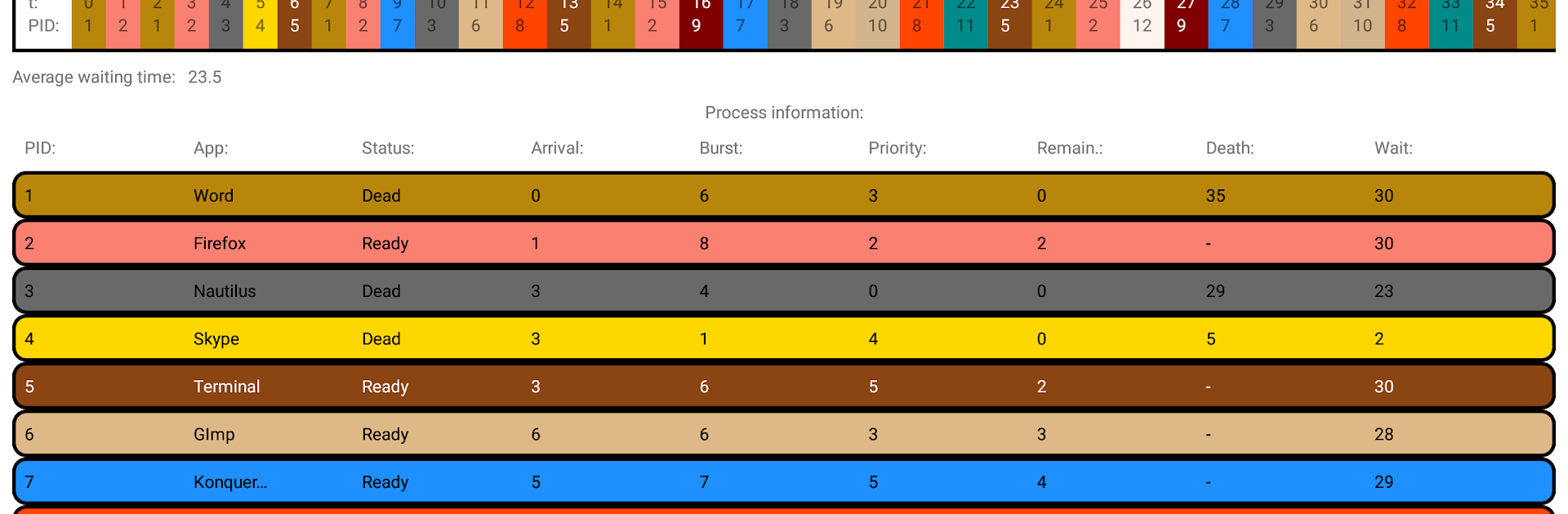
  • CPU scheduling made visual: Watch how processes take turns with First Come First Served, Shortest Job First, Shortest Remaining Time First, Priority (preemptive and non-preemptive), and Round Robin. Step through decisions and see why each choice matters.

  • Deadlock avoidance in action: Try the banker’s algorithm on your own scenarios to spot safe vs. unsafe states before things get stuck.

  • Contiguous memory allocation: Compare First fit, Best fit, and Worst fit to understand fragmentation and why some strategies leave holes behind.

  • Page replacement, side by side: Run Optimal, FIFO, FIFO with second chance, Least Recently Used, Not Frequently Used, and Aging. Track which pages stay in RAM and which get swapped, and observe page faults as they happen.

  • Custom datasets: Don’t just use canned examples—enter your own processes, arrivals, bursts, priorities, memory sizes, or reference strings to see how each algorithm behaves with your data.

  • Test mode for quick checks: Short, focused exercises help you confirm what you’ve learned right after a simulation.

  • Learning-first design: Algorithms are simplified where it helps clarity, so the core ideas click faster without drowning in edge cases.

  • Built for the big picture: Explore how an OS juggles CPU, memory, I/O, and files through targeted simulations that connect concepts instead of treating them in isolation.

  • Clear, concise explanations: Helpful notes explain why some “good-sounding” approaches aren’t what real systems rely on, and what trade-offs are at play—perfect for the Education focus from Rafael López García.

BlueStacks gives you the much-needed freedom to experience your favorite apps on a bigger screen. Get it now.


How to Download and Run OS Algorithm Simulator on PC or Mac

  • Download and install BlueStacks on your PC or Mac

  • Complete Google sign-in to access the Play Store, or do it later

  • Look for OS Algorithm Simulator in the search bar at the top right corner

  • Click to install OS Algorithm Simulator from the search results

  • Complete Google sign-in (if you skipped step 2) to install OS Algorithm Simulator

  • Click the OS Algorithm Simulator icon on the home screen to start playing

video
Watch Video

Minimum System Requirements

With BlueStacks 5, you can get started on a PC that fulfills the following requirements.

  • Operating System

    Microsoft Windows 7 or above, macOS 11 (Big Sur) or above

  • Processor

    Intel, AMD or Apple Silicon Processor

  • RAM

    at least 4GB

  • HDD

    10GB Free Disk Space

Note:

* You must be an Administrator on your PC. Up to date graphics drivers from Microsoft or the chipset vendor.

OS Algorithm Simulator - FAQs

  • How to Run OS Algorithm Simulator on Windows PC & Mac?

    Run OS Algorithm Simulator on your PC or Mac by following these simple steps.

    • Click on ‘Download OS Algorithm Simulator on PC’ to download BlueStacks
    • Install it and log-in to Google Play Store
    • Launch and run the app.
  • Why is BlueStacks the fastest and safest platform to play games on PC?

    BlueStacks respects your privacy and is always safe and secure to use. It does not carry any malware, spyware, or any sort of additional software that could harm your PC.

    It is engineered to optimize speed and performance for a seamless gaming experience.

  • What are OS Algorithm Simulator PC requirements?

    Minimum requirement to run OS Algorithm Simulator on your PC

    • OS: Microsoft Windows 7 and above:
    • Processor: Intel or AMD Processor:
    • RAM: Your PC must have at least 2GB of RAM. (Note that having 2GB or more disk space is not a substitute for RAM):
    • HDD: 5GB Free Disk Space.
    • You must be an Administrator on your PC.



