
PROGRAMMING ZEMI【A programming educational app】

PROGRAMMING ZEMI【A programming educational app】

Education

| DeNA Education

Play on PC with BlueStacks or from our cloud

  • Overview
  • How to Download

Page Modified On: September 19, 2025

Run PROGRAMMING ZEMI【A programming educational app】 on PC or Mac

Multitask effortlessly on your PC or Mac as you try out PROGRAMMING ZEMI【A programming educational app】, a Education app by DeNA Education on BlueStacks.

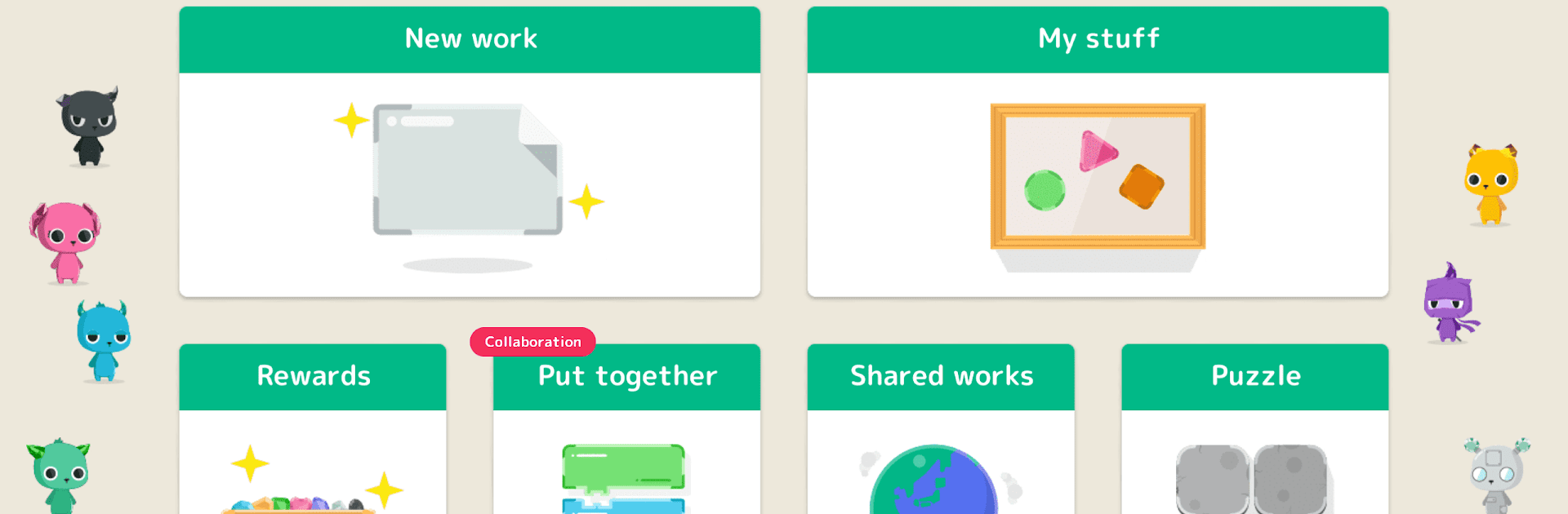
PROGRAMMING ZEMI is a kid-first coding app that feels like a box of colorful blocks that just happen to teach logic. Everything runs on visual blocks, so a first grader can drag pieces together and see things move without touching real code. The app leans on short how-to videos that go from simple actions to more advanced tricks, and it never feels dry. The neat party trick is the doodle feature. Kids draw something on paper, snap a photo, and then make it wiggle, bounce, or react with blocks. Sharing is built in, so they can show off a project, peek at what others made, and even add on to a friend’s idea. It looks like it was shaped by real classrooms, because the menus are big, the text is clear, and it guides without getting in the way.

On PC with BlueStacks, the drag-and-drop feels smooth with a mouse, and the bigger screen makes the lessons easier to follow. Tabs are simple to understand. New Work for starting a fresh creation, My Works as a gallery, Rewards for video lessons that unlock new blocks, Put Together for experimenting with how pieces interact, Puzzle for bite-size challenges that teach order and logic, and Shared Works to browse examples. It is playful, but it still sneaks in real concepts like sequencing, events, and iteration. House rules are covered too. Multiple child accounts on one device, a daily time limit if needed, and per-project sharing controls. It suits very young beginners and still grows with them when they want to build something more complicated, without dumping them into text syntax before they are ready.

Switch to BlueStacks and make the most of your apps on your PC or Mac.

How to Download and Run PROGRAMMING ZEMI【A programming educational app】 on PC or Mac

  • Download and install BlueStacks on your PC or Mac

  • Complete Google sign-in to access the Play Store, or do it later

  • Look for PROGRAMMING ZEMI【A programming educational app】 in the search bar at the top right corner

  • Click to install PROGRAMMING ZEMI【A programming educational app】 from the search results

  • Complete Google sign-in (if you skipped step 2) to install PROGRAMMING ZEMI【A programming educational app】

  • Click the PROGRAMMING ZEMI【A programming educational app】 icon on the home screen to start playing

video
Watch Video

Minimum System Requirements

With BlueStacks 5, you can get started on a PC that fulfills the following requirements.

  • Operating System

    Microsoft Windows 7 or above, macOS 11 (Big Sur) or above

  • Processor

    Intel, AMD or Apple Silicon Processor

  • RAM

    at least 4GB

  • HDD

    10GB Free Disk Space

Note:

* You must be an Administrator on your PC. Up to date graphics drivers from Microsoft or the chipset vendor.

PROGRAMMING ZEMI【A programming educational app】 - FAQs

  • How to Run PROGRAMMING ZEMI【A programming educational app】 on Windows PC & Mac?

    Run PROGRAMMING ZEMI【A programming educational app】 on your PC or Mac by following these simple steps.

    • Click on ‘Download PROGRAMMING ZEMI【A programming educational app】 on PC’ to download BlueStacks
    • Install it and log-in to Google Play Store
    • Launch and run the app.
  • Why is BlueStacks the fastest and safest platform to play games on PC?

    BlueStacks respects your privacy and is always safe and secure to use. It does not carry any malware, spyware, or any sort of additional software that could harm your PC.

    It is engineered to optimize speed and performance for a seamless gaming experience.

  • What are PROGRAMMING ZEMI【A programming educational app】 PC requirements?

    Minimum requirement to run PROGRAMMING ZEMI【A programming educational app】 on your PC

    • OS: Microsoft Windows 7 and above:
    • Processor: Intel or AMD Processor:
    • RAM: Your PC must have at least 2GB of RAM. (Note that having 2GB or more disk space is not a substitute for RAM):
    • HDD: 5GB Free Disk Space.
    • You must be an Administrator on your PC.




